VTube Studio triggers
A trigger starts a macro when something happens. With VTube Studio connected, nine things can start one: you press a hotkey, your camera loses your face, you click your model, a model loads, an animation reaches an event your rigger put in it, and more. Pick them in the trigger editor under VTube Studio.
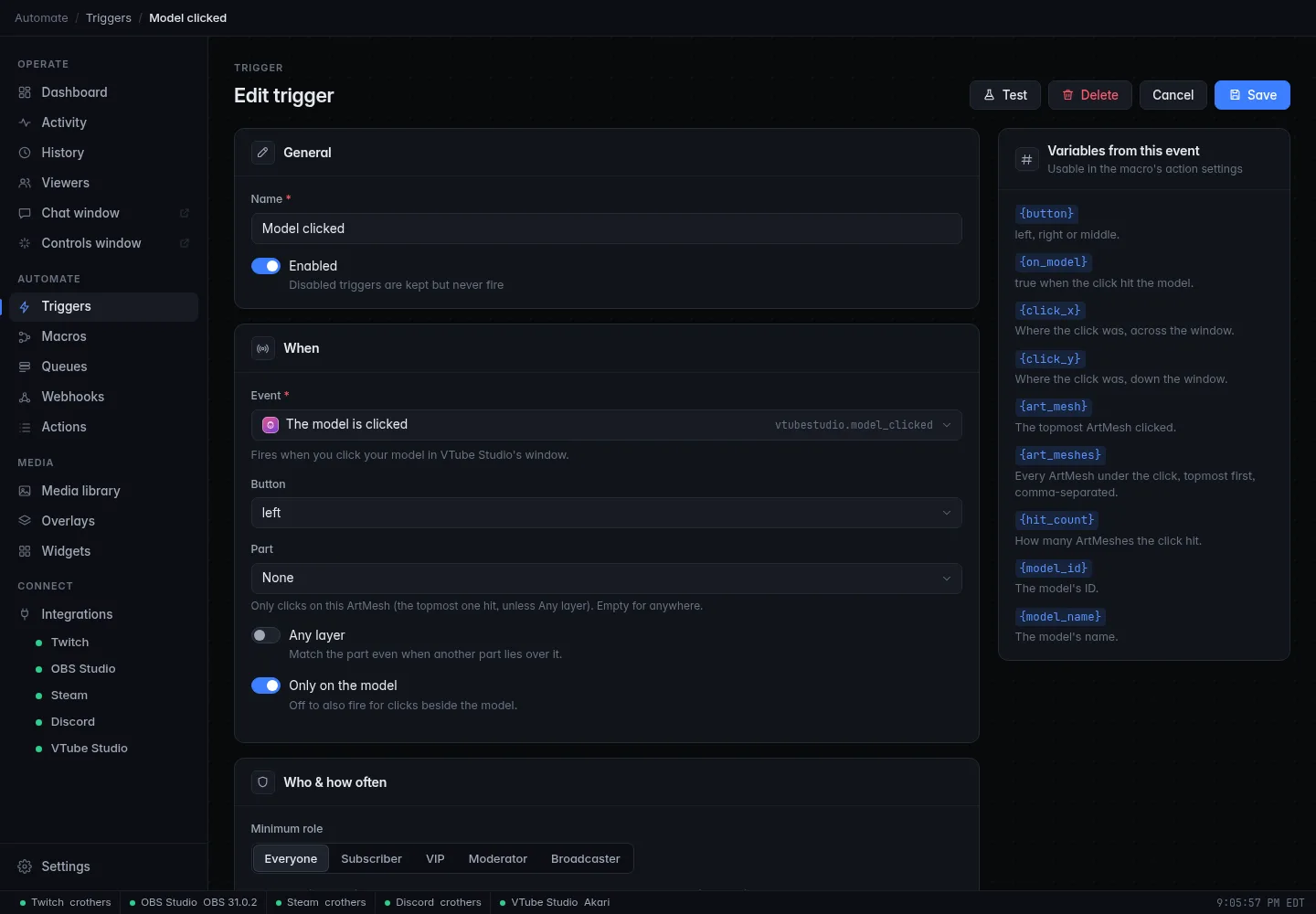
All the variables below are available as {name} in the macro's steps. The
trigger editor's Variables from this event panel lists them too. The
Test button on a trigger runs the macro with sample values that follow
your filters, so you can try a macro without touching VTube Studio.
At a glance
| Trigger | Fires when | Event ID |
|---|---|---|
| A VTube Studio hotkey runs | A hotkey runs in VTube Studio. | vtubestudio.hotkey_triggered |
| Tracking is lost or found | VTube Studio loses or finds your face or a hand. | vtubestudio.tracking |
| A model loads or unloads | VTube Studio loads or unloads a model. | vtubestudio.model_loaded |
| An expression turns on or off | An expression changes. Needs VTube Studio's beta. | vtubestudio.expression |
| The model is clicked | You click your model in VTube Studio's window. | vtubestudio.model_clicked |
| An animation event happens | An animation starts, ends or reaches a custom event. | vtubestudio.animation |
| Something happens to an item | An item is added, removed, clicked, dropped, locked or unlocked. | vtubestudio.item |
| The background changes | VTube Studio changes its background. | vtubestudio.background |
| Effects turn on/off or a preset loads | VTube Studio's visual effects change. | vtubestudio.post_processing |
Each filter is optional: leave a text filter empty to match everything. Text filters ignore capital letters. A trigger that is not connected simply doesn't fire, so it is safe to build macros while VTube Studio is closed.
CroStream only listens to what you use
Some events are chatty, so CroStream asks VTube Studio for them only when a trigger needs them: model clicks, animation events (and their idle-animation and Live2D-item variants), clicks beside the model and expression events of Live2D items. Add the trigger and CroStream subscribes by itself within a moment.
A VTube Studio hotkey runs
ID vtubestudio.hotkey_triggered
Fires when a hotkey runs in VTube Studio: one you press, or one a plugin
(CroStream included) triggers. Use it to hook your stream onto what you do
in VTube Studio: a Surprised hotkey also plays a sound, a Tablet hotkey
switches an OBS scene.
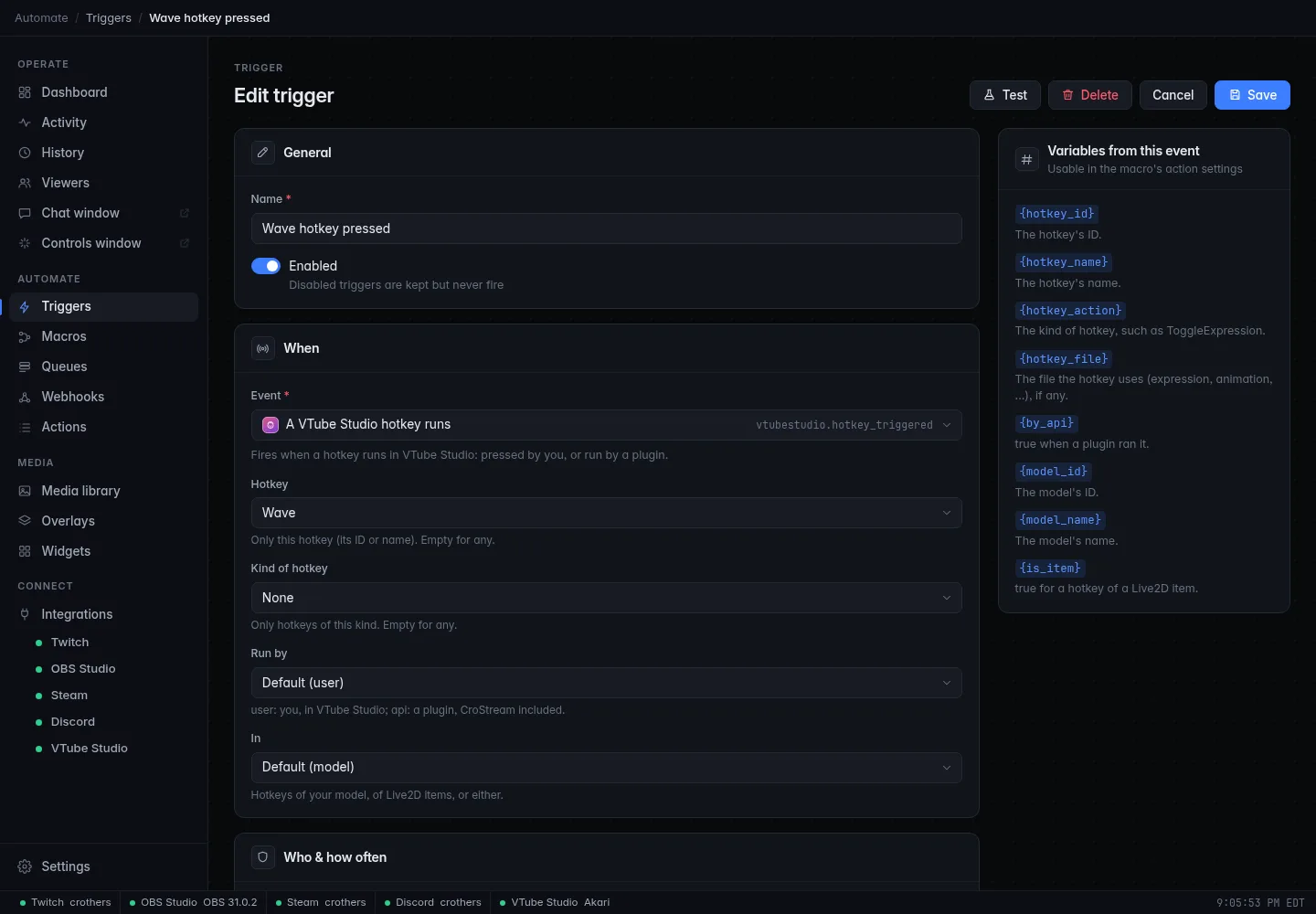
| Option | Type | Details |
|---|---|---|
| Hotkey | Pick | Only this hotkey (its ID or name). Empty for any. |
| Kind of hotkey | Choice | Only hotkeys of this kind. Empty for any. One of TriggerAnimation, ToggleExpression, ChangeBackground, ChangeVTSModel, TakeScreenshot, LoadEffectPreset, MoveModel and the other VTube Studio hotkey kinds. |
| Run by | Choice | Default user user: you, in VTube Studio. api: a plugin, CroStream included. any: both. |
| In | Choice | Default model Hotkeys of your model, of Live2D items, or any. |
| Variable | Meaning | Example |
|---|---|---|
{hotkey_id} |
The hotkey's ID. | 3f2a9c0d |
{hotkey_name} |
The hotkey's name. | Wave |
{hotkey_action} |
The kind of hotkey. | ToggleExpression |
{hotkey_file} |
The file the hotkey uses (expression, animation, …), if any. | smile.exp3.json |
{by_api} |
true when a plugin ran it. |
false |
{model_id} |
The model's ID. | a1b2c3 |
{model_name} |
The model's name. | Akari |
{is_item} |
true for a hotkey of a Live2D item. |
false |
Gotchas.
- Hotkeys that plugins run also fire this. With Run by
apioranya macro can start itself: a trigger on Run by any that runs the Trigger a hotkey action is a loop. The default,user, ignores everything CroStream and other plugins do, which is why it is the default. - VTube Studio does not say whether you pressed a key, clicked a button or
a timer ran:
usermeans "not a plugin". - A hotkey's name is whatever you named it in VTube Studio. Two hotkeys can share a name; use the ID to be exact. The picker lists the loaded model's hotkeys, so load the model first.
hotkey_fileis empty for hotkeys that don't use a file (a screenshot, for example).
Tracking is lost or found
ID vtubestudio.tracking
Fires when VTube Studio loses or finds your face or a hand. Use it for a "be right back" scene when you walk away, or a wave when your hand comes into view.
| Option | Type | Details |
|---|---|---|
| Part | Choice | Default face One of face, left_hand, right_hand, any. |
| When | Choice | Default lost One of lost, found, either. |
| Variable | Meaning | Example |
|---|---|---|
{part} |
face, left_hand or right_hand. |
face |
{found} |
true when it was found, false when lost. |
false |
{face_found} |
Whether your face is tracked now. | false |
{left_hand_found} |
Whether your left hand is tracked now. | true |
{right_hand_found} |
Whether your right hand is tracked now. | true |
Gotchas.
- Each part fires on its own. If you walk away and lose face and both hands
in the same moment, you get up to three runs, one per part (so
Part
anyruns the macro for each). Use Partfacefor a single "away" signal. - It fires on a change. Starting CroStream while your face is already tracked does not fire found. Only the face is read at connect: a hand that is already visible can fire found once right after connecting.
{face_found},{left_hand_found}and{right_hand_found}are the state after the change, so inside afacerun,{face_found}always equals{found}.- Hand triggers only fire if your VTube Studio setup tracks hands.
- Tracking flickers. A person whose camera loses their face for a split second fires lost then found. Put a delay or a condition in your macro, or the trigger's Cooldown, if that matters.
A model loads or unloads
ID vtubestudio.model_loaded
Fires when VTube Studio loads or unloads a model: you switch outfits, or the Load a model action runs.
| Option | Type | Details |
|---|---|---|
| Model | Pick | Only this model (ID or name). Empty for any. |
| When | Choice | Default loaded One of loaded, unloaded, either. |
| Variable | Meaning | Example |
|---|---|---|
{model_id} |
The model's ID. | a1b2c3 |
{model_name} |
The model's name. | Akari |
{loaded} |
true when it loaded, false when it unloaded. |
true |
Gotchas. Switching from one model to another can give an unload and
a load. Use When loaded (the default) to react once. CroStream's anchors
belong to a model, so a new model has none until you set them. If CroStream
was waiting to undo a change tied to the old model, it drops that undo when
the new model loads.
An expression turns on or off
ID vtubestudio.expression
Fires when an expression turns on or off in VTube Studio, whether you toggled it by hotkey or a plugin did.
Needs VTube Studio's beta
VTube Studio's expression events exist only in its public beta branch. Once CroStream is connected to a version without them, it shows Needs VTube Studio's beta: expression events aren't available in this version on the trigger, and the trigger never fires. Everything else, including the expression action, works on the regular version.
| Option | Type | Details |
|---|---|---|
| Expression | Pick | Only this expression (file or name). Empty for any. |
| When | Choice | Default on One of on, off, either. |
| Include Live2D items | On/off | Also expressions of Live2D items. |
| Variable | Meaning | Example |
|---|---|---|
{expression_file} |
The expression's file. | smile.exp3.json |
{expression_name} |
The expression's name. | Smile |
{active} |
true when it turned on. |
true |
{model_id} |
The model's ID. | a1b2c3 |
{model_name} |
The model's name. | Akari |
{is_item} |
true for an expression of a Live2D item. |
false |
{item_id} |
The Live2D item's instance ID, if it is one. | empty |
Gotchas.
- When CroStream connects, VTube Studio reports which expressions are already on. Those are not treated as new events, so they do not fire.
- The expression action changes an expression too and fires this trigger. A macro that turns an expression on and a trigger on the same expression turning on is a loop.
- Expressions of Live2D items are ignored unless Include Live2D items is on.
The model is clicked
ID vtubestudio.model_clicked
Fires when you click your model in VTube Studio's window. Combined with the exact part you hit, it turns your model into a button: boop the nose for a sound, click the hat for a prop.
| Option | Type | Details |
|---|---|---|
| Button | Choice | Default left One of left, right, middle, any. |
| Part | Pick | Only clicks on this ArtMesh (the topmost one hit, unless Any layer). Empty for anywhere. |
| Any layer | On/off | Match the part even when another part lies over it. |
| Only on the model | On/off | Default on Turn off to also fire for clicks beside the model. |
| Variable | Meaning | Example |
|---|---|---|
{button} |
left, right or middle (other for any further mouse button). |
left |
{on_model} |
true when the click hit the model. |
true |
{click_x} |
Where the click was, across the window. | 0.31 |
{click_y} |
Where the click was, down the window. | -0.12 |
{art_mesh} |
The topmost ArtMesh clicked. | D_NOSE_00 |
{art_meshes} |
Every ArtMesh under the click, topmost first, comma-separated. | D_NOSE_00,D_FACE_01 |
{hit_count} |
How many ArtMeshes the click hit. | 2 |
{model_id} |
The model's ID. | a1b2c3 |
{model_name} |
The model's name. | Akari |
Gotchas.
- Button names are
left,rightandmiddle. Only these three can be chosen. A fourth mouse button only fires with Buttonany, and is reported asother. - Pick the Part from the model's list. To learn which part is which, use Click on model on an anchor on the VTube Studio page and click the spot in VTube Studio's window.
- The ArtMesh IDs belong to the model. A trigger set to
D_NOSE_00does nothing after you switch to a model without that part. - Clicks beside the model only reach CroStream when a trigger has
Only on the model off; clicks that miss the model have an empty
{art_mesh}. - "Topmost" means the layer drawn in front. With Any layer, a click on a hat also matches the head under it.
- Only clicks in VTube Studio's own window count, not clicks on your stream or an overlay.
An animation event happens
ID vtubestudio.animation
Fires when an animation starts or ends, or reaches an event the rigger put
into it. The last kind is the powerful one: a rigger adds an event named
confetti at a certain second of a dance, and your macro fires exactly
then.
| Option | Type | Details |
|---|---|---|
| Event | Choice | Default custom One of start, end, custom, any. |
| Animation | Pick | Only this animation. Empty for any. |
| Event text | Text | Only custom events with exactly this text. Empty for any. |
| Include idle animations | On/off | Also idle animations. |
| Include Live2D items | On/off | Also animations of Live2D items. |
| Variable | Meaning | Example |
|---|---|---|
{animation_event} |
start, end or custom. |
custom |
{animation_data} |
The text the rigger put on a custom event, or Anim_Start/Anim_End. |
confetti |
{animation_name} |
The animation's name. | wave |
{animation_time} |
When in the animation the event is, in seconds. | 0.5 |
{animation_length} |
The animation's length in seconds. | 2 |
{is_idle} |
true for an idle animation. |
false |
{model_id} |
The model's ID. | a1b2c3 |
{model_name} |
The model's name. | Akari |
{is_item} |
true for an animation of a Live2D item. |
false |
Gotchas.
- Custom events are set by whoever made the animation (the rigger or animator), in Live2D Cubism's animation editor, and must be exported with "Export Event" on. CroStream cannot add them. If you don't see any, the animation has none.
- Event text has to match exactly, capitals included, and the name of the event is the text the rigger typed.
- Idle animations loop, so their start and end events fire over and over.
They are off unless Include idle animations is on; with it on, a
starttrigger fires on every loop. - Animation events are only requested from VTube Studio while a trigger uses them. The Animation picker lists the animations your model's hotkeys use, plus any CroStream has seen play.
Something happens to an item
ID vtubestudio.item
Fires when an item is added, removed, clicked, dropped, locked or unlocked in VTube Studio. Items are the extras in the scene: pictures, GIFs, Live2D items and the props CroStream puts on.
| Option | Type | Details |
|---|---|---|
| When | Choice | Default clicked One of added, removed, clicked, dropped_pinned, dropped_unpinned, dropped (either of those two), locked, unlocked, any. |
| Item file | Pick | Only items whose file name contains this. Empty for any. |
| Whose | Choice | Default any ours: items CroStream put there. others: the rest. |
| Variable | Meaning | Example |
|---|---|---|
{item_event} |
added, removed, clicked, dropped_pinned, dropped_unpinned, locked or unlocked. |
clicked |
{item_id} |
The item's instance ID. | a5d2… |
{item_file} |
The item's file name. | confetti.png |
{item_x} |
Where the item is, across the window. | 0.4 |
{item_y} |
Where the item is, down the window. | -0.2 |
{ours} |
true when CroStream put the item there. |
true |
Gotchas.
- Items CroStream drops fire added too, with
{ours}normallytrue. Set Whose toothersto react only to items you or other plugins add, and to avoid a loop. - Item file is a "contains" match:
heartmatchesheart.pngandbig-heart.gif. Custom images CroStream uploads get file names that start withcs-. - dropped means the item was let go after being dragged, pinned or not.
- Chain with the item actions: the trigger's
{item_id}is what Remove items and Move an item take.
The background changes
ID vtubestudio.background
Fires when VTube Studio changes its background.
| Option | Type | Details |
|---|---|---|
| Background | Pick | Only this background. Empty for any. |
| Variable | Meaning | Example |
|---|---|---|
{background} |
The new background's name. | Room |
Gotcha. VTube Studio has no list of backgrounds for plugins to read. The picker offers the backgrounds your model's change background hotkeys use, plus any CroStream has seen change since it connected. If yours is missing, type its name.
Effects turn on/off or a preset loads
ID vtubestudio.post_processing
Fires when VTube Studio's visual effects (post-processing) turn on or off, or a preset loads.
| Option | Type | Details |
|---|---|---|
| When | Choice | Default either One of on, off, either. |
| Preset | Pick | Only this preset. Empty for any. |
| Variable | Meaning | Example |
|---|---|---|
{post_processing_on} |
true when the effects are on. |
true |
{preset} |
The active preset, if any. | Dreamy |
Gotcha. The Set VTube Studio's effects action, and a timed revert of effects, fire this too.
Variables at a glance
Variables shared by several triggers carry the same meaning:
| Variable | Provided by |
|---|---|
{model_id}, {model_name} |
hotkey, model loaded, expression, model clicked, animation |
{is_item} |
hotkey, expression, animation |
{item_id}, {item_file} |
item (and, from actions, Drop an item, Put on a prop) |
The full list is in the Variables reference.
Related
- Actions: what your macros can do in VTube Studio
- Recipes
- Troubleshooting
- Events reference