A chat command for an expression
The goal
Chat types !blush and your model blushes for 30 seconds, then goes back
to normal on its own. If someone types it again while you're still
blushing, nothing flickers: the blush simply ends 30 seconds after it
started.
Time: about 5 minutes. Level: beginner.
What you need
- CroStream connected to VTube Studio and logged in to Twitch.
- A model with a blush expression (any expression works: angry, heart eyes, crying). You don't need a VTube Studio hotkey for it.
Step 1: Build the macro
- Click Macros, then New macro. Set Name to
Blush. - Filter the palette for
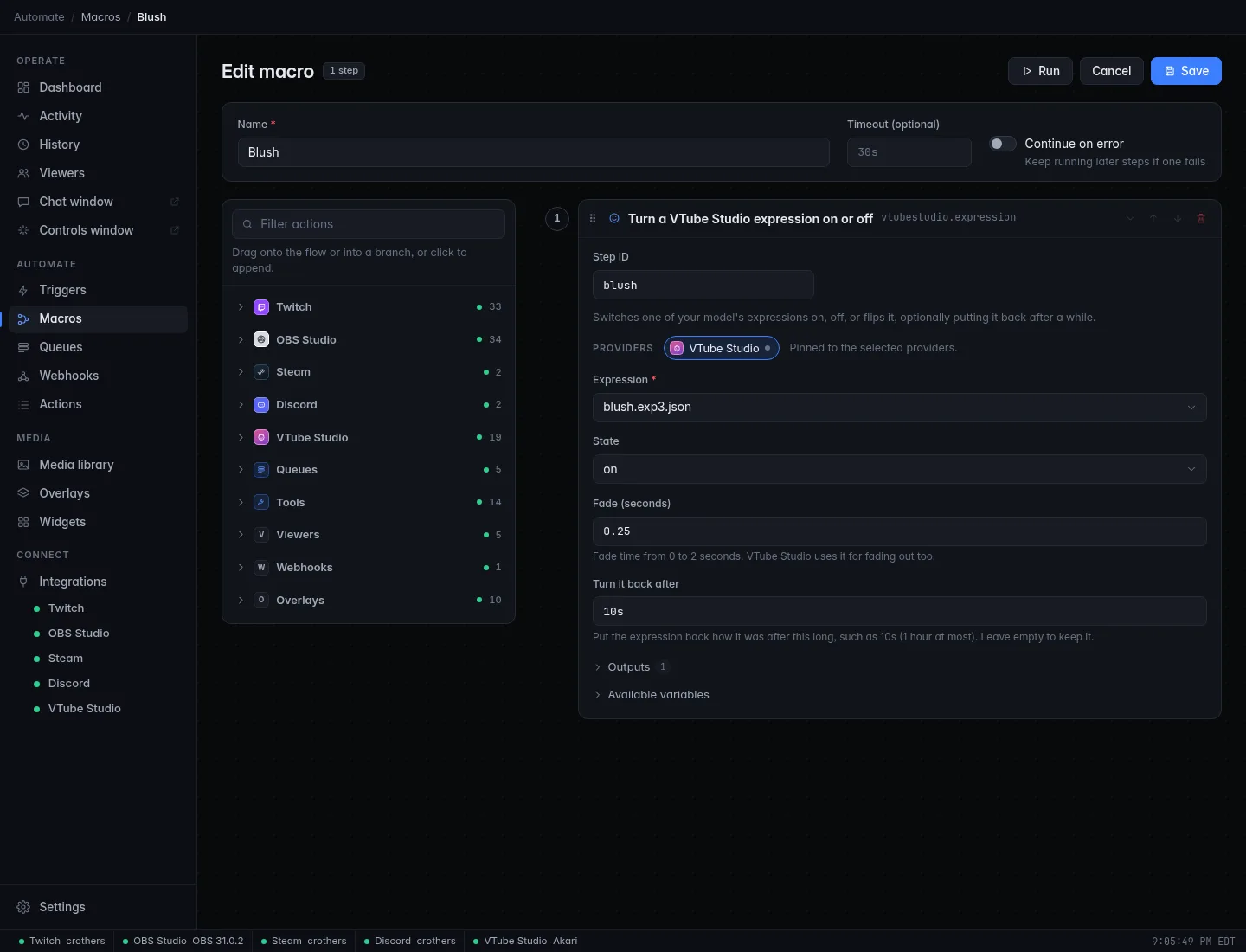
expressionand click Turn a VTube Studio expression on or off (under VTube Studio). -
Fill in the step:
Setting Value Why Expression your blush expression The list shows the loaded model's expressions. State onFade (seconds) 0.25A soft fade in and out. Turn it back after 30sCroStream puts it back how it was. Up to 1 hour. -
Click Save.
Step 2: Add the trigger
- Click Triggers, then New trigger. Set Name to
!blush. - Under When, pick Chat command and type
!blushinto Command. - Under Who & how often, set Cooldown to
30s, the length of the blush, so chat can't spam it, and User cooldown to2m. - Under Then run, pick Blush, then click Save.
Check it works
- Click Test on the trigger. Your model blushes.
- Watch the VTube Studio page's Model card: under Putting back it counts down the time until the blush turns off.
- After 30 seconds the blush fades away.
Variables used
This recipe needs none. The expression step reports
{expression_active}: true when the expression is on afterward, which
you can use in a later If step.
Make it yours
- Toggle instead. Set State to
toggleand leave Turn it back after empty:!blushturns it on, the next!blushturns it off. - Say something. Add a Send chat message step:
{user} made me
  blush >///<
. - Only for subs. Set the trigger's Minimum role to Subscriber.
- A hotkey instead. If the expression is part of a bigger VTube Studio hotkey (with an animation, say), use Trigger a VTube Studio hotkey and pick that hotkey.
Troubleshooting
| What you see | What to do |
|---|---|
| No such expression on the loaded model. | You loaded another model. Expressions belong to a model: pick the expression again with the right model loaded. |
| The expression stays on | The connection to VTube Studio dropped before the 30 seconds were up. CroStream turns it back off when it reconnects, as long as that's within about 10 minutes. Otherwise, turn it off in VTube Studio, or click Reset everything CroStream changed in the Model card. |
| Nothing happens | Check the Connection card says Connected to VTube Studio, and Activity for the error. |
Every setting of the step: Turn a VTube Studio expression on or off. More fixes in Troubleshooting.