VTube Studio
The VTube Studio integration lets your stream and your model react to each other. A viewer redeems a reward and your model puts on a clown nose; you click your model's hat and a sound plays; your camera loses your face and CroStream switches to a be right back scene. There is no account and no password: CroStream talks to VTube Studio's own plugin API on the computer where VTube Studio runs.
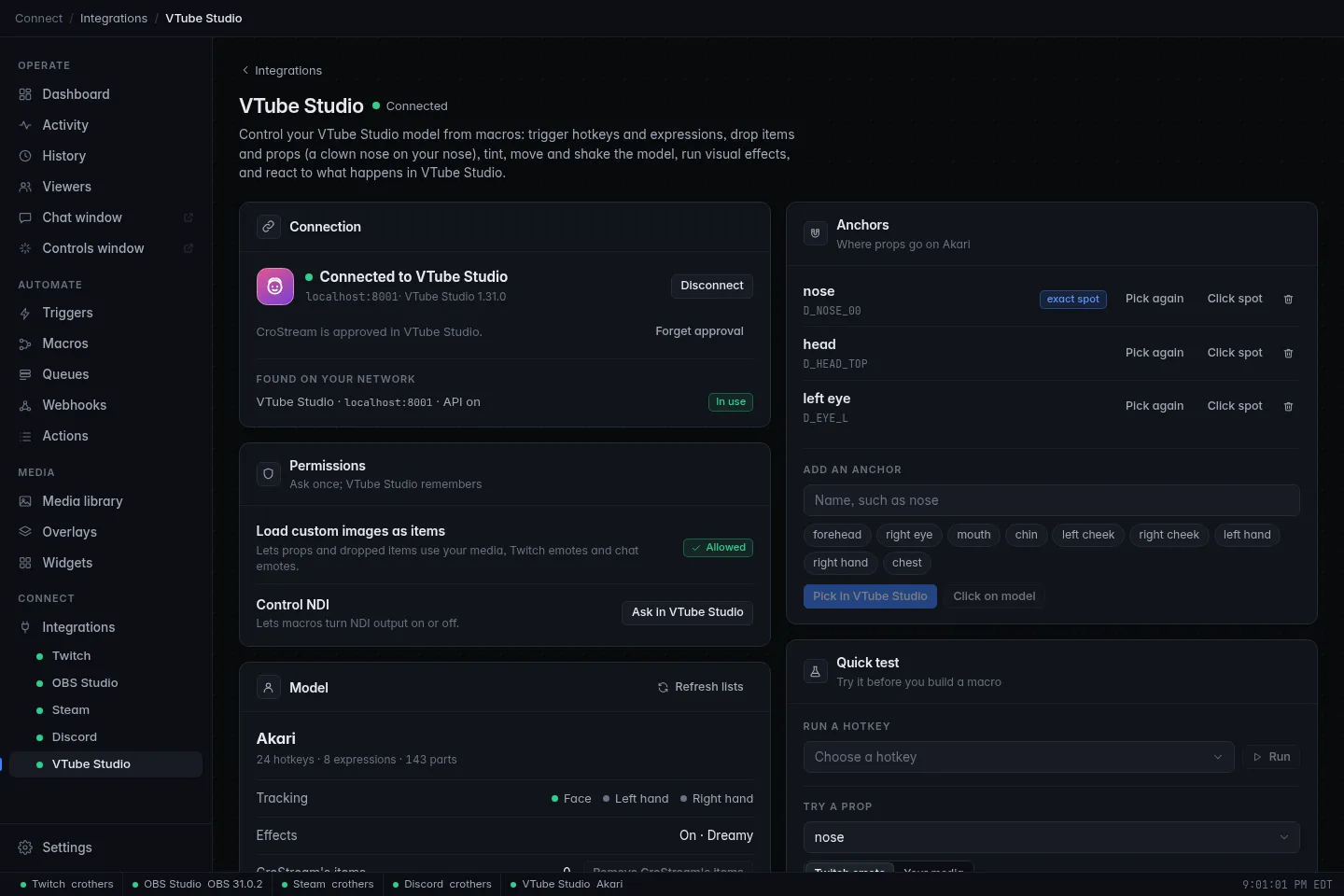
This page is the short version
VTube Studio has its own section with a setup walkthrough, a props and anchors guide, every action and trigger, and step-by-step recipes. Start at VTubers.
How it works
- VTube Studio's API must be on. In VTube Studio open Settings and turn on Start API (VTube Studio's own docs call it Allow Plugin API access). VTube Studio listens on port 8001 unless you changed it.
- You approve CroStream once. The first time you click Connect, VTube Studio shows a popup asking to allow CroStream. Click Allow. After that CroStream connects by itself whenever both are running. If you ever click Deny, or remove CroStream in VTube Studio, click Connect again.
- It works on the same computer or another one. For VTube Studio on a different PC, set Host to its address and allow the port through that PC's firewall.
- VTube Studio is a companion app: when it's closed, "not connected" is normal and the Dashboard doesn't nag. CroStream connects within moments of VTube Studio starting.
See Setup for the walkthrough with screenshots.
Settings
| Setting | What it does |
|---|---|
| Host | The computer VTube Studio runs on. localhost when it's this one. |
| Port | VTube Studio's API port. 8001 unless you changed it. |
| Connect automatically | Connect when CroStream starts, once you've approved it. On by default. |
| Find VTube Studio on the network | Listen for VTube Studio's announcements to show its address and port, with a Use button. Handy when the port is wrong. |
The page also has Connect, Disconnect and Forget approval buttons, a permissions section, the anchors for your current model, a quick test, and Reset everything CroStream changed, which puts back anything a timer was still going to undo and removes CroStream's items.
What it can do
Actions (see the full list):
- Hotkeys and expressions: run any hotkey your model has, turn an expression on, off or back after a while.
- Props: put a picture, a viewer's emote or an item on a named part of your model for a while. See Props & anchors.
- Items: drop, move, animate, pin, sort and remove pictures, GIFs and Live2D items.
- Model: move, turn and resize it, switch models, tint it, add a gust of physics.
- Effects: switch a visual effect on, load a preset, randomize.
- Parameters: hold a tracking parameter (mouth open, a custom one) at a value, create and delete custom parameters.
- NDI: turn the NDI output on or off and set its size (currently needs VTube Studio's beta).
Triggers (see the full list): a hotkey runs, tracking is lost or found, a model loads, an expression changes (needs VTube Studio's beta), the model is clicked, an animation event happens, something happens to an item, the background changes, effects change.
Conditions: VTube Studio is connected, the loaded model, whether it sees your face or hands, whether an expression or the effects are on. See Conditions.
Permissions
Two things need VTube Studio's separate OK, once: loading custom images (media library pictures and emotes as items or props) and controlling NDI (NDI is currently beta-only in VTube Studio). Click Ask in VTube Studio next to the permission on the page, then Allow in VTube Studio. Hotkeys, expressions, built-in items, tints, effects and parameters need no extra permission.
Limits
- VTube Studio sets its own limits (a model load every two seconds, an NDI change every three, one hotkey run every few frames) and CroStream respects them, waiting and retrying where it can.
- Only one plugin can control physics or a given tracking parameter at a time.
- A tint can only darken. White means no tint.
- Expression triggers need VTube Studio's public beta.
All the numbers are in Actions.
Troubleshooting
- The page says "VTube Studio isn't running" or "API is off".
- Start VTube Studio, then in Settings turn on Start API (VTube Studio's own docs call it Allow Plugin API access). If the message offers a different port, set Port to it.
- It asks for approval every time.
- Answer the Allow popup in VTube Studio promptly. If VTube Studio keeps forgetting, click Forget approval and approve again.
- An action says no model is loaded, or a hotkey isn't found.
- Load the model in VTube Studio first. Hotkeys, expressions and anchors belong to the loaded model.
Every message and its fix is in VTube Studio troubleshooting.
Related
- VTubers: the full guide
- Integrations: status meanings and companion apps
- Events, Actions, Variables