Activity
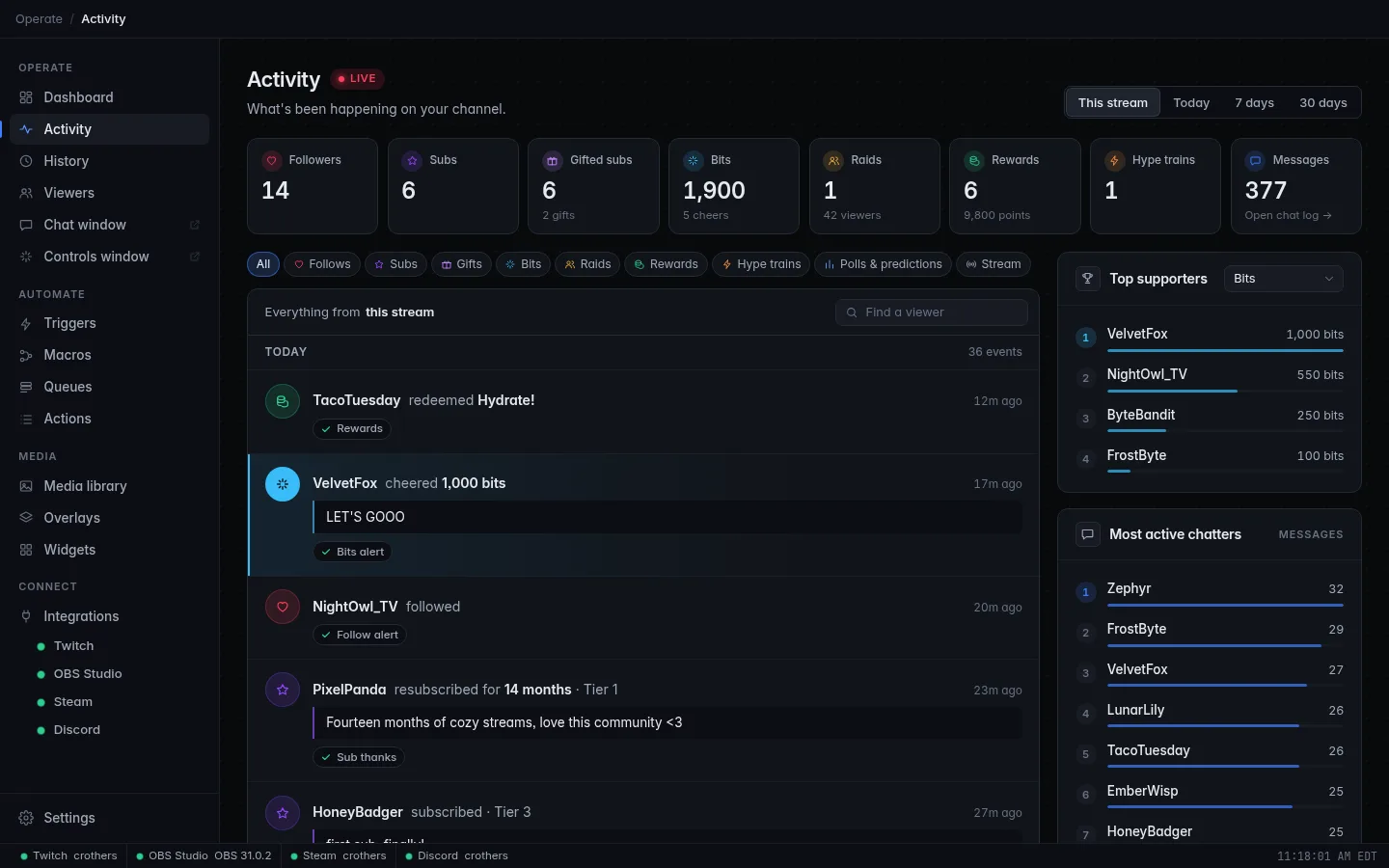
The Activity page is your channel's feed: every follow, sub, gift, cheer, raid, channel point reward, hype train, poll and prediction, as it happens, in plain sentences. Under each one you see what CroStream did about it: which triggers ran, and whether they worked.
Use it during a stream to catch up after a busy moment ("who was that gifter?"), and after a stream to thank your supporters.
Chat messages aren't shown here; there would be far too many. They live in the chat log instead.
Choose a period
The buttons at the top right choose how far back the page looks:
| Period | Covers |
|---|---|
| This stream | Since your current stream started. Only shown while you are live. |
| Last stream | Your most recent stream today. Shown instead of This stream when you're offline but went live earlier today. |
| Today | Since midnight. |
| 7 days | The last 7 days. |
| 30 days | The last 30 days. |
While you are live the page opens on This stream; otherwise on 7 days. A LIVE badge next to the title reminds you that you're live.
The totals, the feed and the leaderboards all follow the period you pick.
The totals
A row of tiles with the period's totals:
| Tile | Big number | Small print |
|---|---|---|
| Followers | New follows | |
| Subs | Subs and resubs | |
| Gifted subs | Subs gifted | how many gifts |
| Bits | Bits cheered | how many cheers |
| Raids | Raids received | how many viewers they brought |
| Rewards | Channel point rewards redeemed | the points spent |
| Hype trains | Hype train events | only shown when there were some |
| Polls & predictions | Polls and predictions that ended | only shown when there were some |
| Messages | Chat messages | Open chat log → |
Click a tile to filter the feed to that kind. Click it again to show everything. Messages opens the chat log instead.
Filter the feed
By kind
The chips above the feed do the same as the tiles, and cover every kind:
All, Follows, Subs, Gifts, Bits, Raids, Rewards, Hype trains, Polls & predictions and Stream (going live, going offline, title or category changes and ad breaks).
Pick one to see only that kind. Pick it again, or All, to clear it.
By viewer
Type into Find a viewer to see only events from someone. It matches their display name, their login name and the event's own text, so typing part of a reward's name works too.
The line above the feed always says what you're looking at, for example Only gifts from mossy_owl · the last 7 days. Click Clear to drop both filters.
Filters are in the address
The kind, viewer and period are part of the page address, so the Dashboard's tiles and links elsewhere in CroStream open Activity already filtered. The browser back button steps back through your filters.
Reading the feed
Events are grouped by day (Today, Yesterday, then dates), with the number of events that day. Today's events say how long ago they happened (just now, 12m ago, 2h 5m ago); older ones show the time. Hover a time for the exact date and time.
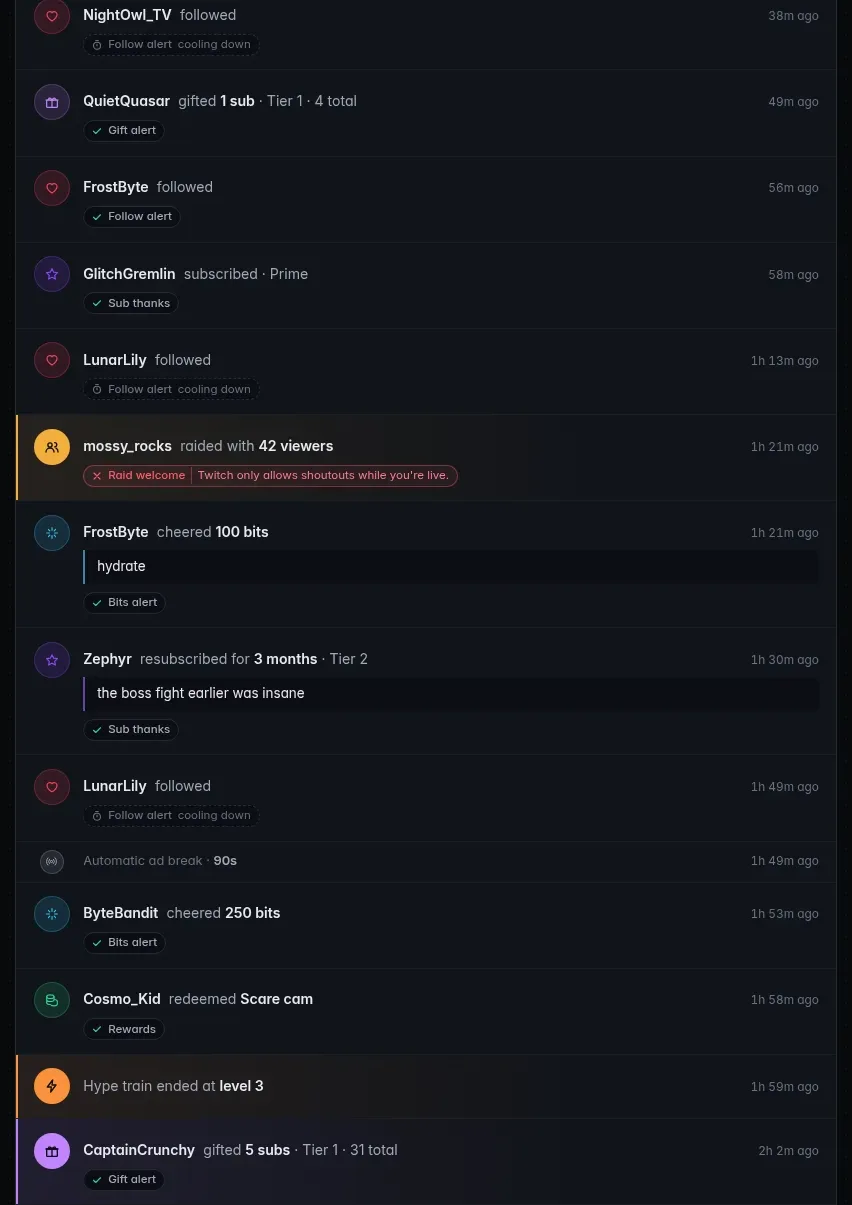
Each card is one sentence. Click a viewer's name to open their page in Viewers.
| Kind | Reads like |
|---|---|
| Follow | mossy_owl followed |
| Sub | mossy_owl subscribed · Tier 1 |
| Resub | mossy_owl resubscribed for 14 months · Tier 1 |
| Prime | mossy_owl subscribed · Prime |
| Gifted sub (received) | mossy_owl received a gifted sub from PixelPaladin · Tier 1 |
| Gift | PixelPaladin gifted 10 subs · Tier 1 · 120 total |
| Cheer | mossy_owl cheered 500 bits |
| Power-up | mossy_owl used the power-up for 100 bits (Twitch's name for it) |
| Raid | RetroRaider raided with 42 viewers |
| Reward | mossy_owl redeemed Hydrate! |
| Hype train | Hype train started · level 1, then reached and ended at a level |
| Poll | Poll closed · Option A · 87 votes (or Poll ended early) |
| Prediction | Prediction resolved · Blue (or Prediction canceled) |
| Stream | You went live · You went offline · Stream info updated · Just Chatting · Ad break · 90s (or Automatic ad break) |
The 120 total on a gift is how many subs that viewer has gifted on your channel in all, when Twitch shares it.
Quotes. When a viewer wrote something with their support, it appears
in a quote under the card: a resub message, a cheer message (with the
cheermote codes like Cheer100 taken out), or the text typed into a reward.
For title changes and polls, the quote is the new title or the question.
Big moments stand out. Raids, hype trains, gifts of 5 or more subs and cheers of 1,000 bits or more get a stronger highlight, so you can spot them when scrolling back.
Stream markers (live, offline, title changes, ad breaks) are slimmer, quieter rows. They help you see where a stream began and ended.
Test marks an event you sent yourself with a test button.
What CroStream did: response chips
Under an event, one chip per trigger that answered it shows how that went:
| Chip | Looks like | Meaning |
|---|---|---|
| Done | green, with a tick | The trigger's macro ran and finished. Hover for how long it took. |
| Failed | red, with a cross and the error | The macro hit a problem. The chip shows the error message. |
| Cooling down | amber, with a timer, cooling down | The trigger was skipped because its cooldown hadn't run out. Hover for the time left. |
| Denied | amber, with a shield, skipped | The trigger was skipped because this viewer isn't allowed to fire it (for example it's for mods only). Hover for the reason. |
| Running | a spinner, running | The macro is still running. The chip updates when it finishes. |
Each chip carries the trigger's name.
Click a chip to open that run in History, with every step it took, what each action did, and the full error if it failed. That's the fastest way from "the alert didn't show" to the reason why.
An event with no chips didn't match any trigger.
Follow bursts
Three or more follows in a row fold into one card, so a follow train doesn't push everything else off the page:

mossy_owl, PixelPaladin, RetroRaider and 4 others followed
If someone unfollowed and followed again, they're named once, and the card adds · 9 follows.
While folded, the card sums up its triggers: one chip per trigger and outcome, with a count (Follow alert ×7). Failures always get their own chip so you never miss one. Click a summed chip to open that trigger's runs in History.
Click Show all 7 to list each follow with its own chips and time. Hide folds it again.
Live updates
New events slide in at the top as they happen, with a short highlight. Chips fill in as triggers run.
If you've scrolled down to read older events, new ones don't push the page around. Instead a 3 new pill appears at the top of the feed. Click it to jump up and show them, or just scroll back to the top.
At the end of the feed, Load older fetches more. When there's nothing older the page says That's everything from the last 7 days. (or whichever period you picked).
Top supporters
The panel on the right ranks the period's top supporters, up to eight, for one kind of event. Pick the kind from its menu: it starts on the most telling one available (bits, then gifts, raids, rewards, subs, follows).
- Bits show the bits cheered, gifts the subs gifted, raids the viewers brought, rewards the channel points spent; subs and follows show how many times (3×).
- Click a name to filter the feed to that viewer. Click it again to show everyone.
Most active chatters
Below it, the eight people who wrote the most chat messages in the period, with their message counts.
When History is off
Activity reads from History. If history is turned off, a note at the top says History is off, showing this session only, with a link to turn it on in Settings. The page then shows only what happened since CroStream started, totals are worked out from that, and Most active chatters stays empty because chat isn't counted.
Troubleshooting
An event is missing
Check the period and the filters first: the line above the feed says what's being shown. Events only arrive while Twitch is connected; check the attention strip on the Dashboard.
An event has no chips, but I have a trigger for it
The trigger didn't match. Common reasons: the trigger is turned off, or its settings (minimum bits, a specific reward) exclude this event. Open Triggers and check it. If it was skipped for a cooldown or role, you'd see a cooling down or skipped chip instead.
A chip says failed
Click it. History opens on that run and shows which action failed and the full message. See History.
Related
- Dashboard: the latest events at a glance
- History: every run and action in detail, and the chat log
- Viewers: a page per viewer with their whole history
- Triggers: decide what happens on each event
- Events reference: every event and its details