Queues
A queue holds moments and lets them out at a steady pace. Say viewers can redeem Play a sound: when ten redeem at once, you don't want ten sounds on top of each other. Put the redemptions in a queue that releases one item a minute, and each sound gets its turn.
A queue sits between two macros:
- A trigger (the redemption) runs a macro with an Add to queue step. The item waits in line, remembering what it needs (who redeemed, which sound).
- When its turn comes, the queue releases it. A trigger with the event Queue release runs a second macro (play the sound), with the item's values as variables.
Queues are built in; they need no connection.
Set up a queue
This sets up the sound example from start to finish.
1. Create the queue
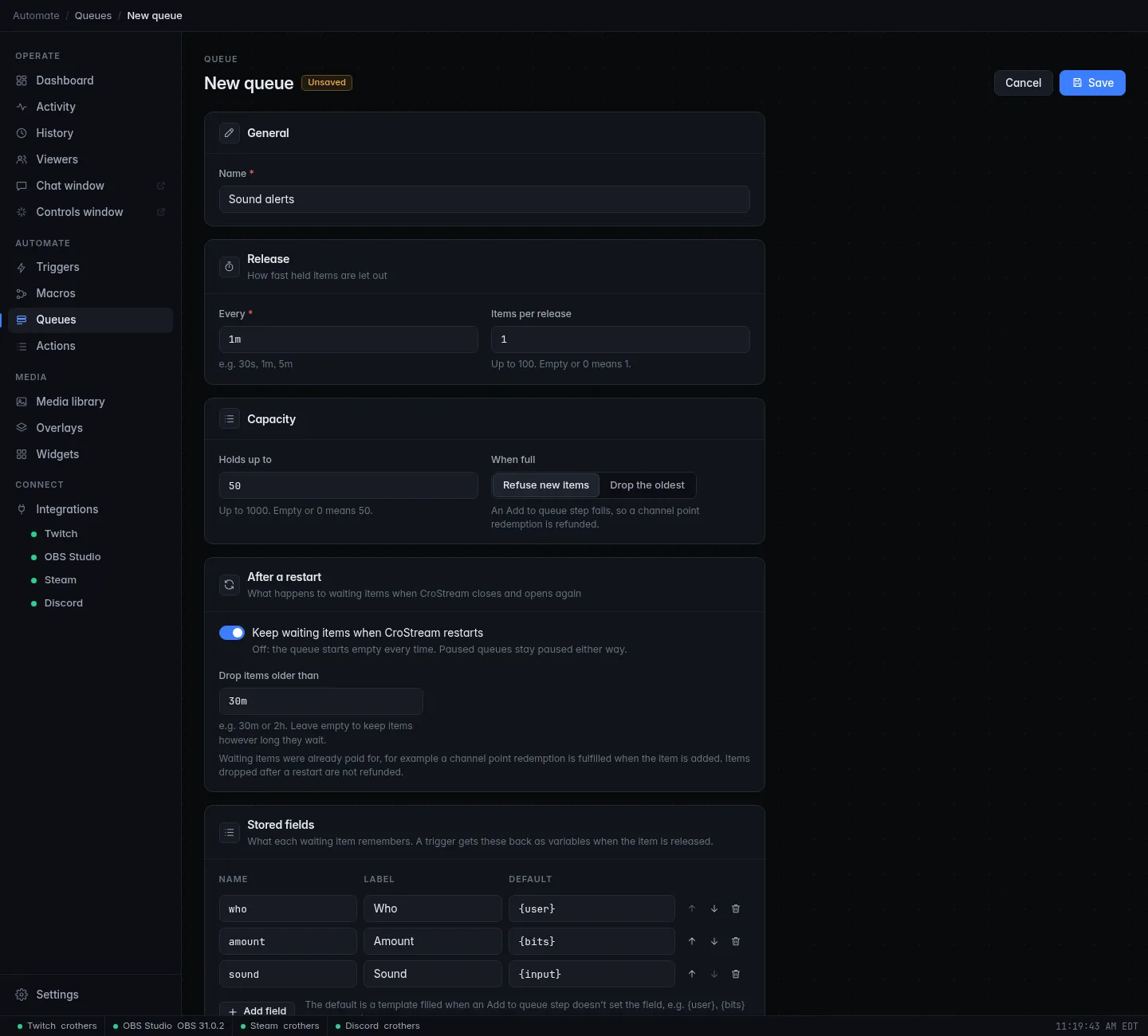
- Open Queues in the sidebar (under Automate) and click New queue.
- Name it, for example Sounds.
- Under Release, set Every to
1mand leave Items per release at 1. - Under Capacity, set Holds up to to
50and When full to Refuse new items. - Under Stored fields, click Sound alert example. It adds three
fields:
who(default{user}),amount(default{bits}) andsound(default{input}). - Click Save.
The line at the bottom sums up your choices, such as Releases 1 item every 1 minute · holds up to 50 · refuses new items when full.
2. Add items to it
- Create a macro, say Queue a sound, with one step: Add to queue (in the palette under Queues).
- Pick the Queue: Sounds. A box appears for each stored field. Leave
them empty to use each field's default, or fill one in to override it
for this macro (
{args}instead of{input}, say). - Create a trigger with the event Channel point redemption for your Play a sound reward that runs Queue a sound.
3. React to releases
- Create a macro, say Play queued sound, that plays the sound. The
stored fields are variables now:
{sound},{who}. For example a Play a sound step with Sound fileC:\Sounds\{sound}.mp3, and a Send chat message step withNow playing {sound} for {who}. - Create a trigger with the event Queue release, pick Queue Sounds, and have it run Play queued sound.
Leave the release trigger open to everyone
A released item keeps the viewer who added it, so the release trigger's Minimum role and cooldowns apply to that viewer. Leave Minimum role at Everyone and the cooldowns empty: the queue already sets the pace, and an item turned away there is gone.
Queue settings
| Setting | What it does |
|---|---|
| Name | Required. Renaming is safe: macros and triggers keep working. |
| Every | How often the queue may release: from 1s to 24h, such as 30s or 5m. |
| Items per release | How many items go out each time, up to 100. Empty or 0 means 1. |
| Holds up to | The most items that can wait, up to 1000. Empty or 0 means 50. |
| When full | Refuse new items (the default): the Add to queue step fails, so a channel point redemption is refunded. Drop the oldest: the oldest waiting item is thrown away to make room. |
| Keep waiting items when CroStream restarts | On (the default for new queues): waiting items survive closing CroStream. Off: the queue starts empty each time. |
| Drop items older than | With the above on, items that waited longer than this are dropped at start-up, such as 30m (the default) or 2h, from 1 minute up to 168 hours (7 days). Empty keeps them however long they waited. |
| Stored fields | What each item remembers. See below. |
Stored fields
Each field has a Name (the variable it becomes: sound gives
{sound}), a Label for the Queues page, and a Default: a template
filled in when the item is added, such as {user} or {input}. Typing a
label fills in the name for you.
- A queue has at most 20 fields. Names use lowercase letters, digits and
_, and start with a letter. - A field can't be named after a standard variable (
user,queue,waitedand the others listed below). - Without any fields, an item only remembers who added it and when.
- If you change the fields later, waiting items are kept. They release with the current fields, empty where they never stored a value.
What a release gives the macro
The Queue release event gives one variable per stored field, plus:
| Variable | Meaning |
|---|---|
{user}, {user_login}, {user_id} |
Who added the item (empty when no one did, for example a timer). |
{queue} |
The queue's name. |
{queue_remaining} |
Items still waiting after this one. |
{queue_item_id} |
An ID for this item. |
{queued_at} |
The time of day it was added, like 14:05:09. |
{waited}, {waited_seconds} |
How long it waited, like 1m 20s, and in whole seconds. |
The trigger editor and the macro editor list these for you.
How releasing works
- A queue lets out at most Items per release items every Every.
- An item that arrives at an idle queue goes out at once. The next one waits a full interval after that.
- Items go out oldest first.
- A paused queue keeps collecting items but releases none until resumed.
- If you lower Holds up to below what's already waiting, nothing is dropped: the extra items stay until released, and new ones are refused (or push out the oldest) until there's room.
Waiting items are already paid for
A redemption is completed when the macro that added it to the queue finishes, not when the item is released. Items dropped later (by Clear, by Drop the oldest, or after a restart) are not refunded.
The Queues page
The Queues page shows every queue live: how many items wait out of the maximum, a bar that fills up, when the next release is due (or Paused, Empty), and the first five waiting items with their values, who added them and how long ago.
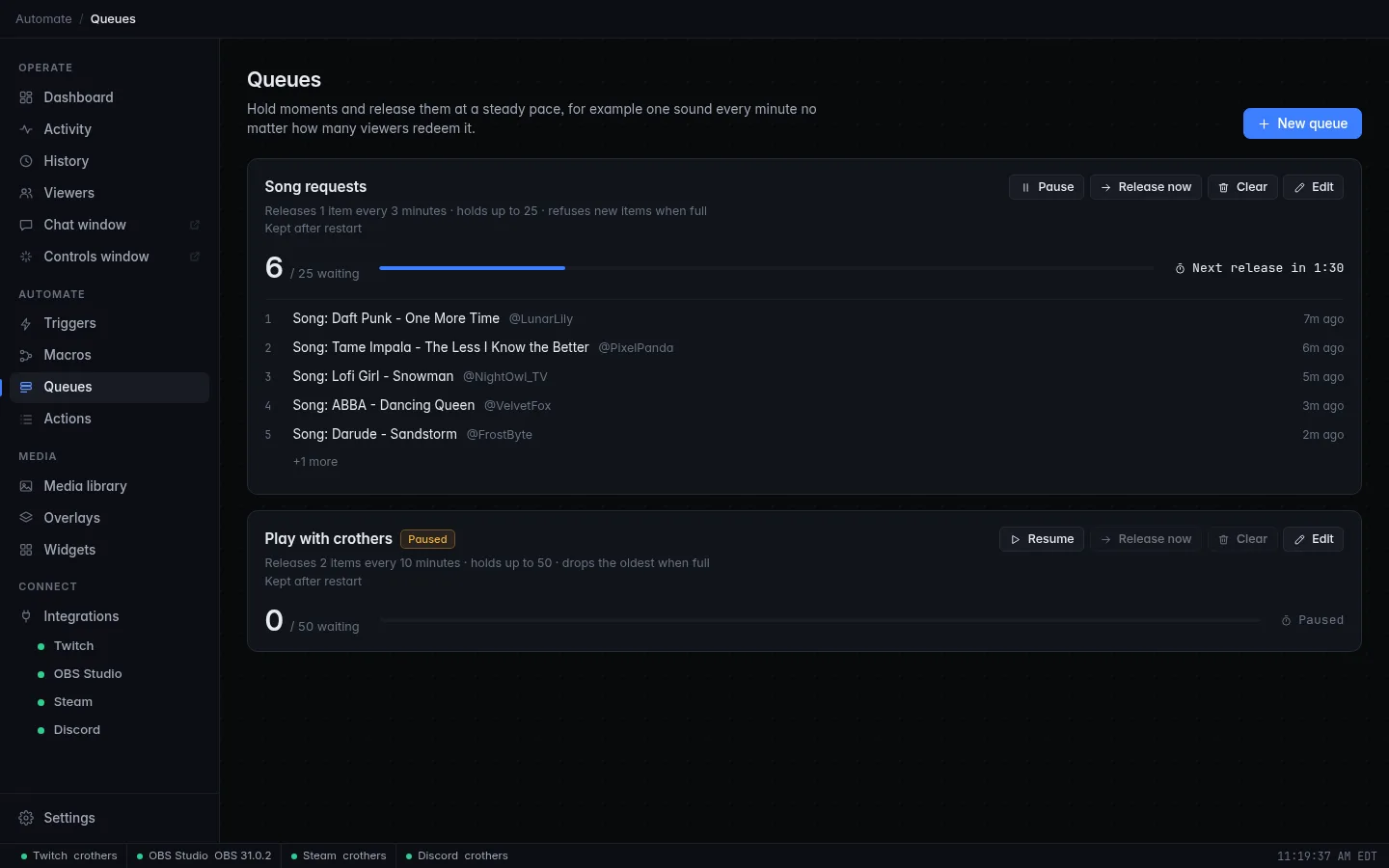
| Button | What it does |
|---|---|
| Pause / Resume | Stop or restart releasing. Paused queues stay paused across a restart. |
| Release now | Let the next items out right away. It counts as a release, so the interval starts over. |
| Clear | Throw away every waiting item, after you confirm with Clear n. |
| Edit | Open the queue's settings. Delete it from there. |
A queue that a macro or trigger uses can't be deleted; CroStream names them so you can change them first.
Queues in macros
Besides Add to queue, macros can Pause queue, Resume queue, Clear queue and Release next now, for example a hotkey that pauses sound alerts while you talk to chat. They report back:
| Action | Outputs |
|---|---|
| Add to queue | {queue_position} (its place in line, from 1), {queue_waiting} (items waiting, this one included), {queue_item_id} |
| Clear queue | {queue_dropped}: how many items were thrown away |
| Release next now | {queue_released}: how many items were released |
So a chat reply like @{user} you're number {queue_position} in line
works right after Add to queue.
An If step can check a queue too: Items waiting and Queue is paused are live values.
After a restart
- Paused queues stay paused.
- Waiting items come back only if the queue keeps them, and only those younger than Drop items older than. The activity feed says how many were dropped.
- A queue with waiting items may release right after start-up.
Troubleshooting
Items go in but nothing comes out
Check that a trigger with the event Queue release exists for this queue, is enabled, and runs the right macro. Then check the queue isn't Paused on the Queues page.
The release macro says {sound} instead of the sound
The field is empty or named differently. Check the field's Name in the queue editor, and its Default (or the value the Add to queue step sets).
Redemptions are refunded
The queue is full and set to Refuse new items. Raise Holds up to, release faster, or switch When full to Drop the oldest.
Some released items do nothing
The release trigger has a Minimum role or a cooldown that turns the item's viewer away. Leave them at Everyone and empty.
Related
- Queue up sound alerts: this setup as a tutorial.
- Triggers and Macros.
- Events reference and Actions reference.