Viewers and points
CroStream keeps a record for every viewer: their whole history on your channel in one place. How long they've watched, what they've said, every follow, sub, gift, cheer, reward and raid, and a points balance you control. This is the viewer database.
Use the Viewers page to look someone up ("how long has this person been
around?"), to reward a giveaway winner, to bring over points from another
bot, or to find your most loyal lurkers. Use the points
actions to build a loyalty system with chat commands like
!points and !give.
Unlike History, which is a log pruned by age, viewer records and points are kept until you delete them.
What is recorded
For each viewer:
- Name and login. Viewers are tracked by their Twitch account, so a name change keeps the same record; earlier names are listed as Also known as.
- Role: the highest seen (subscriber, VIP, moderator, broadcaster).
- First seen and last seen, and how many streams they watched or chatted in.
- Watch time (see below).
- Chat: the message count, and the messages themselves for as long as you choose.
- Support: bits and cheers, subs (months and tier), subs gifted, gifts received, rewards redeemed and channel points spent, raids and the viewers they brought.
- Follow: whether they follow, and since when.
- Points and a ledger of every change.
- Notes: your own private notes.
Anonymous gifts have no viewer to record and are skipped.
Watch time
While you're live, CroStream checks once a minute who is in your channel and credits that minute to each of them. "In your channel" means everyone on Twitch's list of people in chat (lurkers included) plus anyone who wrote in the last 5 minutes. Watch time is only counted while you're live.
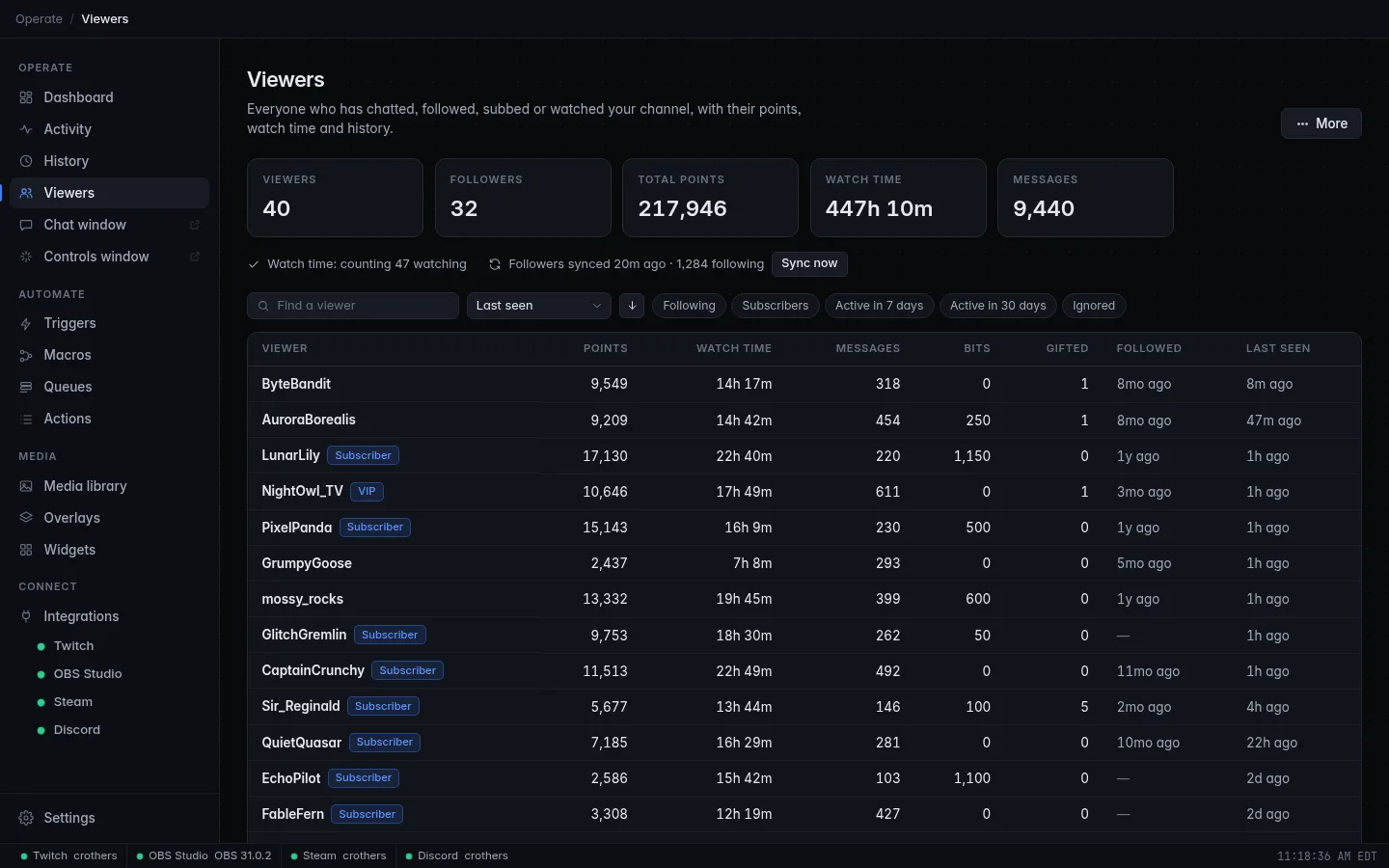
The line under the totals on the Viewers page shows how it's going: Watch time: counting 37 watching when all is well, or why it isn't counting (for example while you're offline or Twitch isn't connected).
Needs a permission
Reading Twitch's list of people in chat needs a permission that older logins don't have. If yours doesn't, the line says so, with an Open Twitch settings button: log in to Twitch again to grant it. Until then only people who chat are credited. See Logging in.
The same count is the Chatters now number on the Dashboard.
Followers
CroStream syncs your follower list from Twitch when it connects and then once a day, so the Following column and follow dates are right even for people who followed while CroStream was closed, and unfollows are noticed.
The second status line says when it last synced and how many follow you: Followers synced 3h ago · 1,204 following. Click Sync now to sync on demand; a message reports how many follow you, how many are new and how many unfollowed.
Your existing history
The first time the viewer database is created, CroStream imports your History (events and chat) into it once, in the background. So viewers who chatted or supported you before you had the database still get their records.
The Viewers page
Totals and status
Across the top: how many Viewers you have records for, Followers, Total points (named after your points name), the Watch time of everyone together, and Messages.
Below them are the watch time and follower status lines.
Find, sort and filter
- Find a viewer: matches the login or display name, including names they used before.
- Sort by: Last seen (the default), First seen, Name, Points, Watch time, Messages, Bits, Gifted subs or Followed. The arrow button next to it flips between descending and ascending.
- Filter chips: Following, Subscribers, Active in 7 days, Active in 30 days and Ignored. Combine them freely: Following + Active in 7 days gives your regulars.
The list shows 50 viewers a page, with Previous and Next and a count like 1–50 of 1,204. When you open a viewer and come back, the list is as you left it.
The list
| Column | Shows |
|---|---|
| Viewer | Their name, their login when it differs, a role tag (Subscriber, VIP, Moderator, Broadcaster) and Ignored when ignored. |
| Points | Their balance. |
| Watch time | Like 12h 5m. |
| Messages, Bits, Gifted | Totals. |
| Followed | How long ago they followed, Unfollowed if they did and left, or —. |
| Last seen | How long ago. Hover for the date. |
Click a row (or press Enter on it) to open the viewer.
A viewer's page
Facts and ranks
At the top:
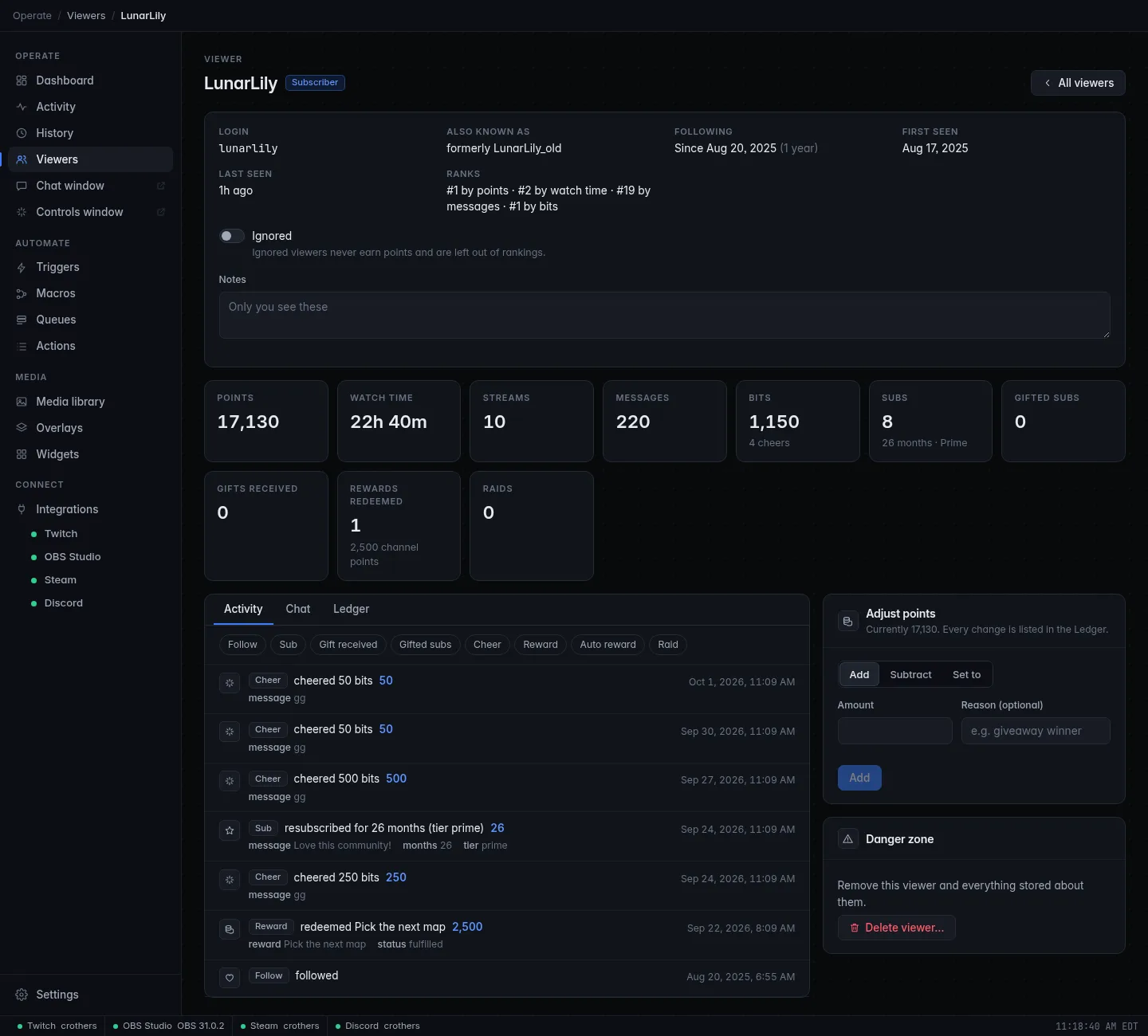
- Login, and Also known as with their earlier names;
- Following: Since the date and for how long, or Not following (with the date they once followed, if known);
- First seen and Last seen;
- Ranks: where they stand among all your viewers, for example #3 by points · #12 by watch time · #1 by bits.
Below that, the Ignored switch and your Notes (Only you see these). Notes save when you click away from the box.
Totals
Tiles for Points, Watch time, Streams, Messages, Bits (with the number of cheers), Subs (with months and tier), Gifted subs, Gifts received, Rewards redeemed (with the channel points spent) and Raids (with the viewers brought).
Activity, Chat and Ledger
Three tabs under the totals:
- Activity: everything they did, newest first: follows, subs, gifts, cheers, rewards and raids, with details like the tier, the message or the reward's input. Use the chips (Follow, Sub, Gift received, Gifted subs, Cheer, Reward, Auto reward, Raid) to show only some kinds.
- Chat: their messages, newest first. Search their messages finds words. Messages older than your chat setting are gone; the count stays.
-
Ledger: every change to their points: when, the Change (+50, −100), the Balance after, the Reason, and the Source:
Source Who changed it adminYou, by hand on this page, or Reset all points. macro:NameThe macro called Name. transferA Give points to another viewer step. importAn import.
Each tab loads more with Load more.
Adjust points
The Adjust points box changes a balance by hand, for a giveaway winner or to fix a mistake:
- Choose Add, Subtract or Set to.
- Type the Amount (a whole number; Set to accepts 0).
- Optionally type a Reason (giveaway winner). It goes in the ledger.
- Click the button. The box confirms the new balance.
You can't subtract more than they have: the box shows an error instead.
Ignored viewers
Turn on Ignored for bots and accounts that shouldn't take part. Ignored viewers never get points from Give points to everyone watching, and they're left out of ranks and points leaderboards. Their record is still kept, and a Change points step aimed at them still works.
Common bots are ignored automatically: Nightbot, StreamElements, Streamlabs, Moobot, Fossabot, WizeBot, Sery_Bot, SoundAlerts, CommanderRoot and a few more, plus CroStream's own account. To ignore many accounts at once, use the settings.
Delete a viewer
Delete viewer… (in the Danger zone) removes their record: points, watch time, chat and notes. Turn on Also remove them from History to delete their events and chat messages from History too. It can't be undone; if they come back, they start from scratch.
Points
Points are whole numbers. CroStream has no built-in earning rules: you decide how points are earned and spent with triggers and macros, using the Viewers actions.
| Action | What it does | Reports back |
|---|---|---|
| Change points | Adds to, subtracts from or sets one viewer's balance. | {points}, {change}, {viewer} |
| Give points to everyone watching | Gives the same amount to everyone here now (Watching, lurkers included) or only those who chatted in the last few minutes (Chatting), optionally only from a minimum role. A negative amount takes points away. | {count}, {amount} |
| Give points to another viewer | Moves points from one viewer to another. Fails when the giver has too few. | {from_points}, {to_points}, {to} |
| Look up a viewer | Reads a viewer's record into placeholders. An unknown viewer isn't an error: {known} is false. |
{known}, {name}, {login}, {points}, {rank}, {watch_time}, {watch_minutes}, {streams}, {messages}, {bits}, {gifted}, {sub_months}, {following}, {follow_age}, {followed_at}, {first_seen}, {currency} |
| Top viewers | Builds a leaderboard line for a !top command: what to rank by, which period, 1 to 25 viewers, and the format of each row. |
{list}, {first}, {count} |
Each points action has a Reason, recorded in the ledger with the macro's
name. The viewer defaults to the person who fired the trigger, and accepts a
Twitch name or @name.
A balance never goes below zero unless Let the balance go below zero is ticked. A spend the balance can't cover fails the step with a message naming the shortfall.
The viewer database also gives you two trigger events, First-time chatter and Returning chatter, for welcome messages, and Viewer's points, Viewer's watch time (minutes) and similar values to use in If conditions. See Events and Conditions.
Testing is safe
Testing a macro doesn't change any balance.
Recipes
What a step reports back is used like any other placeholder, with the
step's name first, for example {lookup.points} for a step named lookup.
See Variables.
Add a trigger with the event On a timer, every 10m, with Only
while live ticked. Its macro has one step, Give points to everyone
watching, amount 5.
A Chat command trigger runs a macro with a Look up a viewer
step named lookup, then a Send chat message step with:
CroStream @{user}, you have {lookup.points} {lookup.currency} and have watched {lookup.watch_time}.
{user} becomes the viewer's name, and the other placeholders come from
the lookup step.
A Chat command trigger runs a macro with Give points to another
viewer. The receiver and amount default to {arg1} and {arg2} (the
first and second words after the command). Follow it with a chat
message using {to} and {from_points}. If the gift fails the macro
stops, so nothing is announced.
For a !shoutout that costs 100:
- Add an If step whose condition is Viewer's points (viewer
{user_login}) <100, with steps that send "not enough" and then Stop. When a channel point reward runs the macro, set the stop to Fail and refund so the redemption is refunded. - After it, add a Change points step with Subtract
100, then the shoutout.
Without the check, Subtract fails by itself when the balance is too low, which also stops the macro before the shoutout.
Import and export
To move over from another bot, open More → Import…, then choose the file (Choose a file…) or paste it into the box. CroStream reads:
- a StreamElements points export (JSON);
- a Streamlabs export (CSV);
- any spreadsheet saved as CSV with a header row: a name column
(
username,login,nameoruser), a points column (points,amountorbalance), and optionally aminutescolumn for watch time; - a file exported from CroStream.
Then pick how to import:
- Add: the imported points and watch time are added to what each viewer has now.
- Replace: each viewer in the file gets exactly the imported points and watch time. Viewers not in the file are left alone. CroStream asks you to confirm (Replace values), because it overwrites balances.
Click Import. The result says how many viewers were updated and added.
Names that couldn't be matched to a Twitch account are skipped; Show the
list shows them. Files can be up to 32 MB. Imported changes appear in the
ledger with the source import.
More → Export as CSV or Export as JSON saves every viewer to a file
(viewers.csv or viewers.json).
Viewer settings
More → Settings opens Viewer settings:
| Setting | What it does |
|---|---|
| Keep a viewer database | On by default. Turn it off to stop recording viewers. The points actions then refuse to run, and existing records are left as they are. |
| Name of your points | What your points are called: coins, gems, seeds. Up to 24 characters; points when empty. It's used throughout the app and as {lookup.currency}. |
| Keep chat messages for | Forever, 30 days, 90 days, 180 days or 1 year. Older messages are removed once a day; message counts are kept either way. |
| Ignored viewers | Logins to ignore, up to 500. Type a login and press Enter or a comma; paste several separated by spaces or commas. Click × on a name to stop ignoring it. |
Click Save.
When the database is off, the Viewers page says The viewer database is off; click Turn on viewers to start it again.
Reset all points
More → Reset all points… sets every viewer's balance back to 0. Their
watch time, chat and history stay. Type RESET to confirm. It can't be
undone, though each reset is written to the ledgers.
Storage and backups
Viewer records are kept in one file in CroStream's data folder (see
Where files are kept). Once a day CroStream saves a
backup copy in the backups folder next to it and keeps the newest 7. Old
chat is cleaned up on the same schedule.
Points can't be rebuilt
History can be lost without harm, but points can't be worked out again.
Now and then, copy the newest file from the backups folder somewhere
safe, or use More → Export as JSON.
Troubleshooting
Watch time isn't counting
Read the status line under the totals. offline: watch time only counts while you're live. Twitch is not connected: connect it on the Twitch page. A permission message: log in to Twitch again.
Someone who follows shows as not following
Click Sync now. Follows that happened while CroStream was closed are picked up by the sync.
A points command says the viewer database is turned off
The step failed with The viewer database is turned off. Turn it on with the Turn on viewers button on the Viewers page. Do just that: open Viewers and click Turn on viewers (or turn on Keep a viewer database in More → Settings).
Some names were skipped when importing
Those names don't match a Twitch account any more (renamed or deleted accounts). Click Show the list to see them.