Webhooks
A webhook is a web address that one program calls to tell another that something happened. Ko-fi calls one when someone sends you a donation. A Stream Deck button can call one to run a macro. Home Assistant gives you one that turns on your lights. CroStream can be on either end:
flowchart LR
    K[Ko-fi, Stream Deck, Home Assistant, scripts] -- "incoming webhook" --> C[CroStream]
C -- "Send a webhook" --> H[Home Assistant, a bot, your own server]- Incoming webhooks are addresses on your PC that other apps can call. Each one turns what the sender posts into variables and fires a trigger, so a donation can thank the donor in chat, or a button press can switch scenes.
- Outgoing webhooks are the Send a webhook step in a macro. It posts text, JSON or a form to another system, and can turn the answer back into variables for the steps after it, so a raid can flash your room lights.
You don't need to know how HTTP works to use them. The editors show a ready-to-paste test command, a live preview of what your settings do, and a log of every call. Where something is technical, this page says so.
Not the same as Discord's webhooks
The Post to Discord action also uses a "webhook address" (one that Discord gives you). That is a single-purpose action. This page is about CroStream's own webhooks, which work with anything that can send or receive web requests.
The Webhooks page
Open Webhooks in the sidebar, under Automate. It has two tabs: Incoming ("Other apps call CroStream") and Outgoing ("CroStream calls other apps").
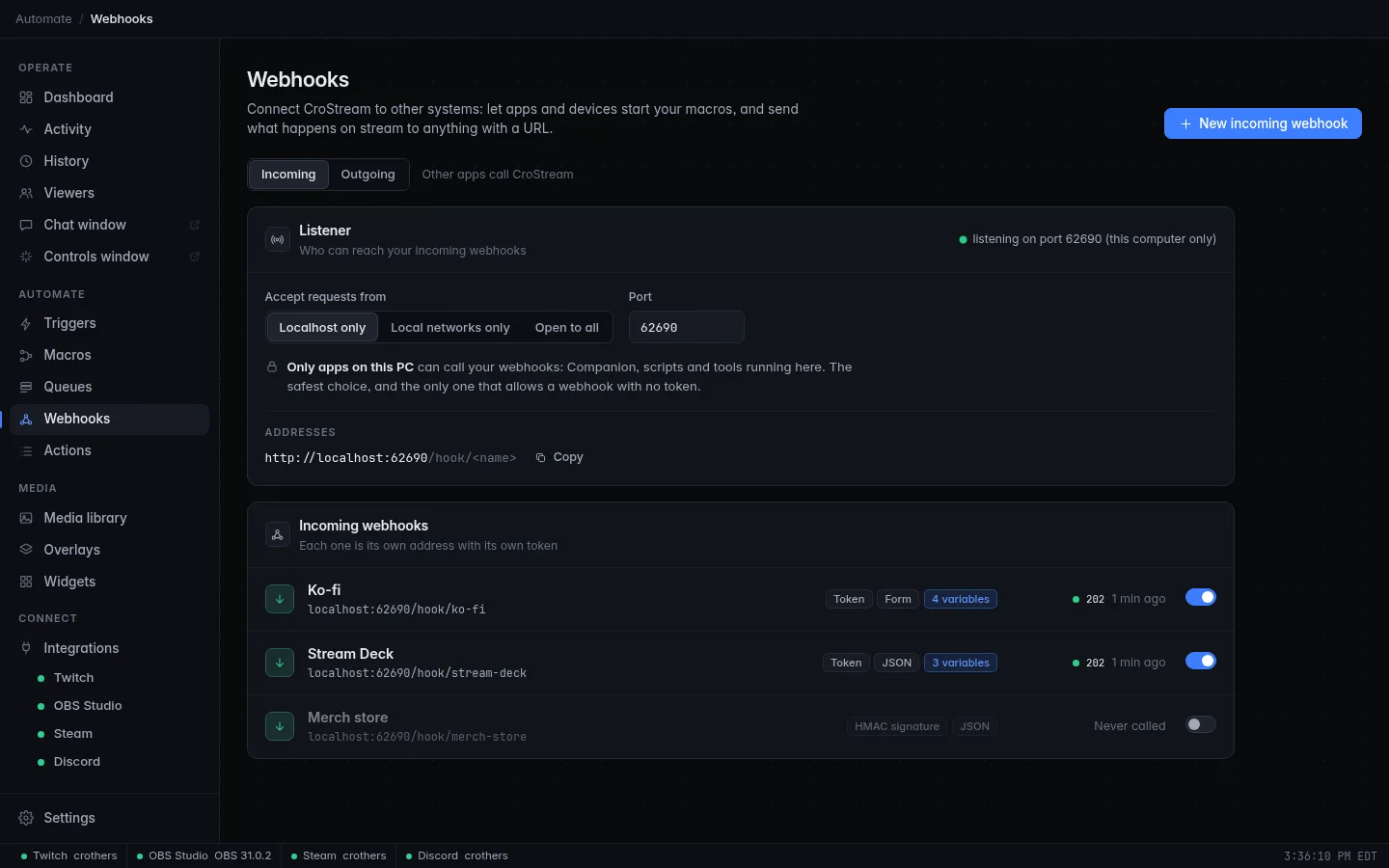
The Incoming tab starts with the Listener panel (who can reach your webhooks, and the port), then lists your incoming webhooks. Each row shows:
- the name and its address;
- tags for how senders prove who they are (Token, HMAC signature, Token + HMAC or No check), how the body is read (Auto, JSON, Form or Text) and how many variables it maps;
- the status code and age of its last call, or Never called;
- a switch to turn it on or off. An off webhook answers 404, as if it didn't exist.
The Outgoing tab lists your destinations. The buttons New incoming webhook and New destination are at the top right.
Incoming webhooks
1. Choose who can reach the listener
CroStream answers incoming webhooks with a small web server of its own, the listener. It is separate from the one used for logging in to Twitch, and it only runs while at least one incoming webhook is turned on. Its panel on the Incoming tab sets two things:
| Setting | What it does |
|---|---|
| Accept requests from | Who may call your webhooks. Three choices, below. |
| Port | The TCP port the listener uses: 1024 to 65535, 62690 if you leave it empty. Change it if another program already uses it. |
The panel's status line says what is happening, such as listening on port 62690 (this computer only), or the error if the port can't be opened ("cannot listen on port … is another program using it? choose another port"). CroStream tries again every 30 seconds. After you change either setting, click Apply; Revert drops the change.
The three choices:
| Choice | Who can call | Use it for |
|---|---|---|
| Localhost only (the default) | Programs on this PC only. The listener isn't even reachable from the network. | Scripts, Bitfocus Companion or another tool running on the same PC. The safest choice, and the only one that allows a webhook with no token. |
| Local networks only | This PC, plus devices on your home or studio network: private addresses (10.x, 172.16–172.31, 192.168.x), the shared range 100.64.0.0/10 that Tailscale and similar tools use, link-local addresses and IPv6 unique-local addresses. Everything else is refused with 403, even if a port is forwarded to the PC. |
A Stream Deck on another PC, your phone, Home Assistant, a Raspberry Pi. |
| Open to all | Anyone who can reach the port. | Internet services that call you, such as Ko-fi, Stripe or Shopify. A red warning panel explains the risks. |
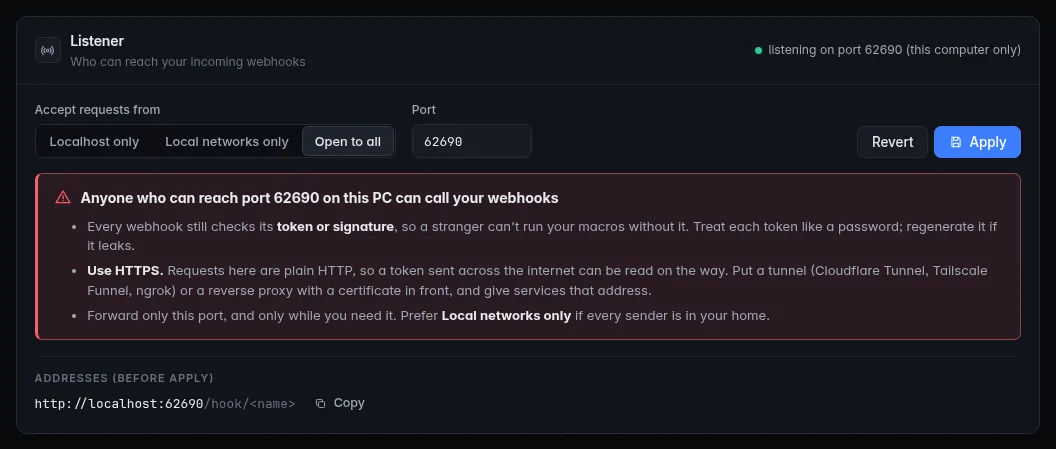
Below the choices, Addresses lists the base addresses you can use: always
http://localhost:<port>, plus this PC's network addresses when the listener
is exposed. Copy copies one.
Who is calling is judged by the connection, not by headers
CroStream decides whether a caller is "local" from the address of the
connection itself. It never trusts X-Forwarded-For or similar headers,
because a sender can write anything in them. The catch: a reverse
proxy or tunnel running on this same PC connects from this PC, so every
request through it looks local, whatever the exposure setting says. Behind
one, the token or signature is your only protection. See
Putting a webhook on the internet.
Choosing a wider setting is refused while any webhook has No check (see Security): give it a token first.
2. Create a webhook
- On the Incoming tab, click New incoming webhook.
- Give it a Name (for example Ko-fi donations). It is what you pick in a trigger and what shows in the activity feed. Names must be unique.
- The Address fills in from the name: the part after
/hook/. Use 1 to 64 lowercase letters, digits and dashes, starting with a letter or digit, such asko-fi. The full address is shown below it, with a Copy button. If the listener is exposed, the other addresses are listed under it. - Choose the Body format and the Methods (below).
- Choose how senders prove who they are, under Security.
- Click Create. The secrets are made when you save.
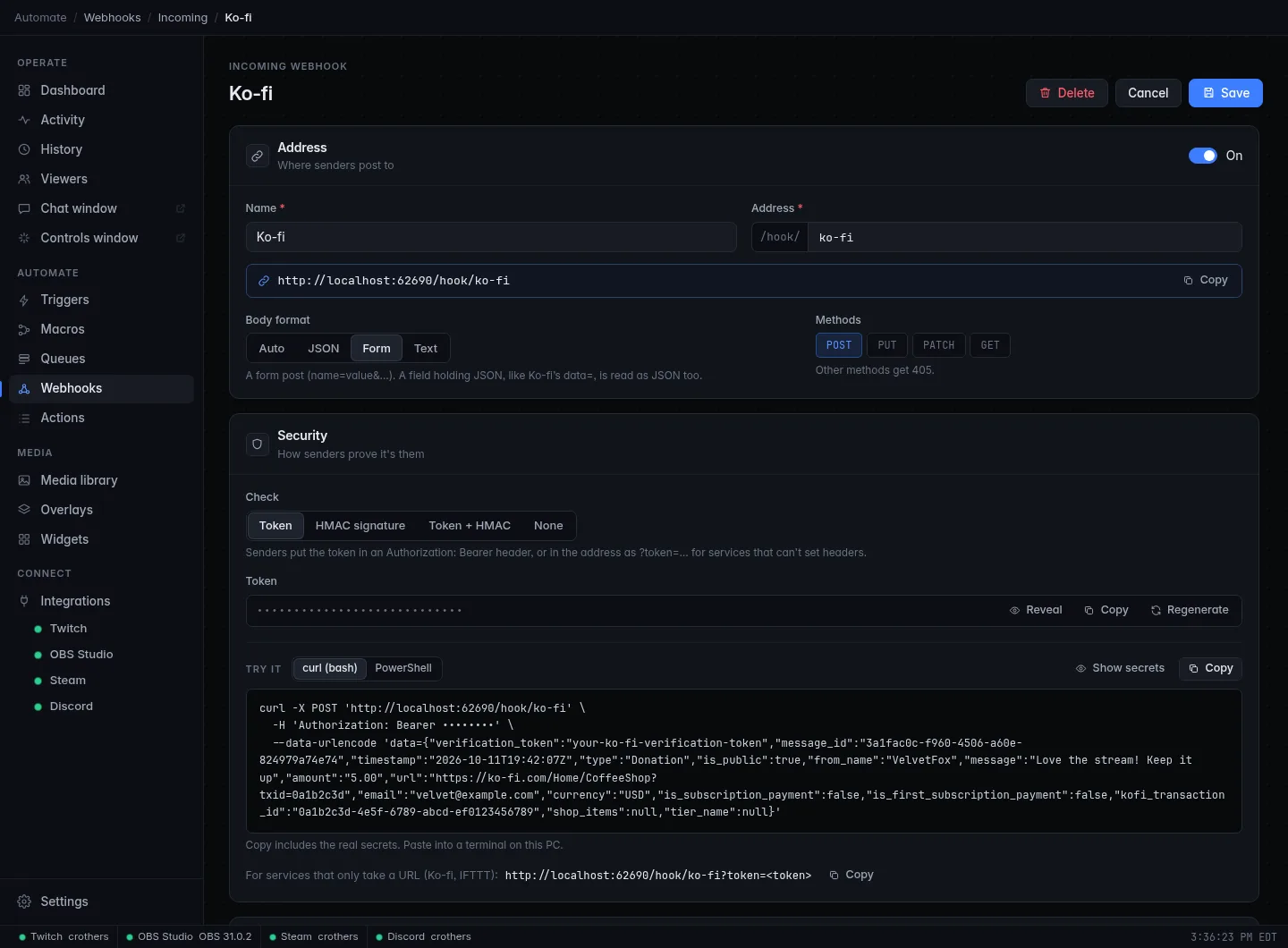
The On switch at the top of the Address panel turns the webhook on and off.
Body format tells CroStream how to read what the sender posts:
| Choice | The body is… |
|---|---|
| Auto | Read by its Content-Type: JSON for application/json (and +json types), a form for application/x-www-form-urlencoded or multipart/form-data, text for text/…. For anything else it tries JSON and falls back to text. A GET with no body is read as a form made from the address's query (?scene=intro). |
| JSON | JSON. A body that isn't valid JSON is refused with 400. |
| Form | A web form (name=value&…). Text fields of multipart forms count; uploaded files are skipped. A field that holds JSON, such as Ko-fi's data=, is read as JSON too. |
| Text | Plain text, available as {body}. Nothing is mapped. |
Methods are the HTTP methods the webhook accepts: POST (the default),
PUT, PATCH and GET. At least one stays selected. Any other method
gets 405. A GET has no body, so use the address's query for data:
{query.scene} for ?scene=intro.
3. Choose how senders prove who they are
Anyone who knows an address can try calling it, so each webhook checks its callers. Under Security, Check has these choices:
| Choice | What the sender must send | Use it when |
|---|---|---|
| Token (the default) | The webhook's token as Authorization: Bearer <token>, or in the address as ?token=<token>. |
The sender lets you set a header (Companion, scripts, Home Assistant), or can only call a URL (Ko-fi, IFTTT) and you use ?token=. |
| HMAC signature | A signature of the exact body, made with a shared Signing key using HMAC-SHA256, in a header (default X-Signature-256). Accepted forms: sha256=<hex>, plain hex, or base64. |
The service signs its webhooks (GitHub, Stripe, Shopify and many more). A signature can't be replayed with a different body, and the key never travels. |
| Token + HMAC | Both. | You want both checks. |
| None | Nothing. Only offered while the listener is Localhost only. | A throwaway script on this PC. |
The token and signing key are long random secrets, made when you save. Under Security each one is hidden behind dots, with three buttons:
- Reveal shows it, and Copy copies it to the clipboard.
- Regenerate makes a new one. The old one stops working at once, so update the sender straight afterwards. The button asks you to confirm.
- With a signing key there is also Use the service's key, for when the
service generates the key and you must paste it in. For HMAC, set the
Signature header to the name the service uses (for example
X-Hub-Signature-256for GitHub). The default isX-Signature-256.
Secrets are not kept in the settings file, only in CroStream's secrets store, and they are never exported or written to the log. Treat them like passwords.
Which one should I pick?
Use HMAC signature whenever the service supports it. Otherwise use
Token, in a header if the sender can set one; the ?token= form puts
the secret in the address, where servers in between may log it. Don't use
None unless nothing else on your network could reach the port.
4. Try it
The Try it box under Security writes the exact command for this
webhook: curl for bash, or PowerShell. It already holds the right
method, headers, a signature for HMAC webhooks, and your sample body. The token
is shown as dots until you click Show secrets; Copy copies the real
command, secrets included. For services that can only call a URL it also
shows the address with ?token= and its own Copy.
Open a terminal on this PC, paste, and press Enter. The call appears under Recent deliveries at once. Or skip the terminal and click Send test there: CroStream makes the call to itself, signed and authorized like a real one, with your sample.
5. Turn the body into variables
A webhook that only fires isn't very useful. Usually you want what's in
the body: who donated, how much, which button. The Variables panel turns
values from the body into {variables} your macro can use.
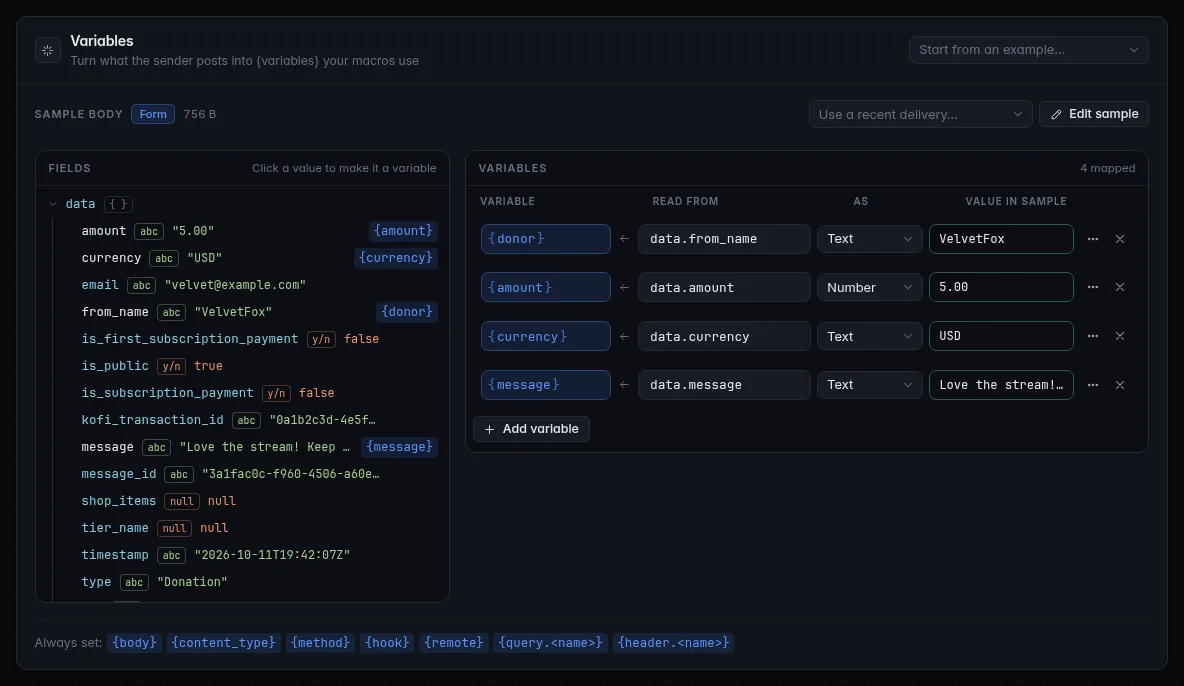
- Get a sample. Paste a body into Sample body (JSON, a form such as
name=Ann&amount=5, or text), or pick Use a recent delivery… after the sender has called once. Start from an example… at the top right loads a typical one: a Ko-fi donation, a Companion or Stream Deck button, or a merch order. The panel says how it was read (JSON, Form or Text) and shows the size. Edit sample changes it, and Tidy re-indents JSON. - Click a value in Fields. It becomes a variable: CroStream suggests a name from the field, and picks the type from the value. Values already mapped show their variable next to them.
- Adjust the rows under Variables. Each row is one variable:
| Column | Meaning |
|---|---|
| Variable | The name, in braces. Lowercase letters, digits and _, starting with a letter. A name can't be one the webhook always sets (see below) or used twice. |
| Read from | The path to the value in the body, such as data.amount or items[0].name. The JSON paths reference explains every form. A mistake is shown with its column. |
| As | Text, Number, Yes / no or JSON: how the value is written into the variable. See below. |
| Value in sample | What the variable would be for your sample, worked out by the same code that runs on every call. A problem shows here in words. |
| More options (the dots) | If missing: the value to use when the path isn't in the body. For a path with [*], also Many values: Join (with a separator), Count, First, Last or JSON list. |
Types in short:
- Text accepts any single value: numbers and yes/no values are written as they appear.
- Number accepts numbers and numeric text. Ko-fi's
"5.00"stays5.00; nothing is rounded. - Yes / no gives
trueorfalse, from a real boolean,0/1, or text such asyes,no,on,off. - JSON writes whatever is there (an object, a list, any value) as compact JSON text. It's the only way to read an object or a list whole.
A value that is missing, or null, gives the row's If missing value
(empty if you set none). A value of the wrong kind (text where a number was
expected) also gives it, and the row shows what went wrong. A row with a
default set doesn't complain about missing values: the default says it's
optional.
What happens on a real call is exactly what the panel shows: the preview and the delivery use the same code, so the Value in sample column is what your macro will get.
Always set. Every call also sets these variables, whatever the format or mapping:
| Variable | Holds |
|---|---|
{body} |
The request body as text, at most 64 KiB. |
{content_type} |
The sender's Content-Type. |
{method} |
POST, GET, … |
{hook} |
The webhook's name. |
{remote} |
The IP address the call came from. |
{query.<name>} |
A query parameter of the address: {query.scene} for ?scene=intro. The token parameter is left out. |
{header.<name>} |
A request header, name in lowercase: {header.user-agent}. Credentials (Authorization, Proxy-Authorization, Cookie) and the signature header are left out. |
Query and header variables hold at most 4 KiB each, and at most 64 of each are set. A text webhook maps nothing: its variables get their If missing values.
Names are yours
Pick names that read well in a message: {donor} rather than
{from_name}. You can use them in the macro's steps, and in the
reply.
6. Choose the reply
The Reply panel sets what the sender gets back once its call is accepted:
| Setting | Meaning |
|---|---|
| Status | 202 Accepted (the default), 200 OK, 201 Created or 204 No Content (no body). Some services only accept 200; pick what the sender wants. |
| Body | JSON (the default) or Text, with a box for the text. Leave it empty to answer {"ok":true} (JSON) or nothing (text). |
The body can use the webhook's {variables}: {"thanks": "{donor|json}"}.
For a JSON reply, put values inside quotes with the |json filter (see
Variables), so a quote or
line break in them can't break the JSON. If the reply still isn't valid JSON
once the variables are filled in, the call fails with 500 reply failed,
and the trigger does not fire.
The reply is sent at once; it does not wait for your macro to finish.
7. Run a macro when it's called
Nothing happens on a call until a trigger listens for it.
- On the webhook's page, click Use in a trigger. CroStream creates a trigger and a macro with a placeholder step, and opens the macro for you to replace the step with what should happen. (Once a webhook has triggers, the page lists them under Runs, with Another trigger.)
- Or build it yourself: on the Triggers page, click New trigger, pick the event A webhook is received under Webhooks, and choose the Webhook.
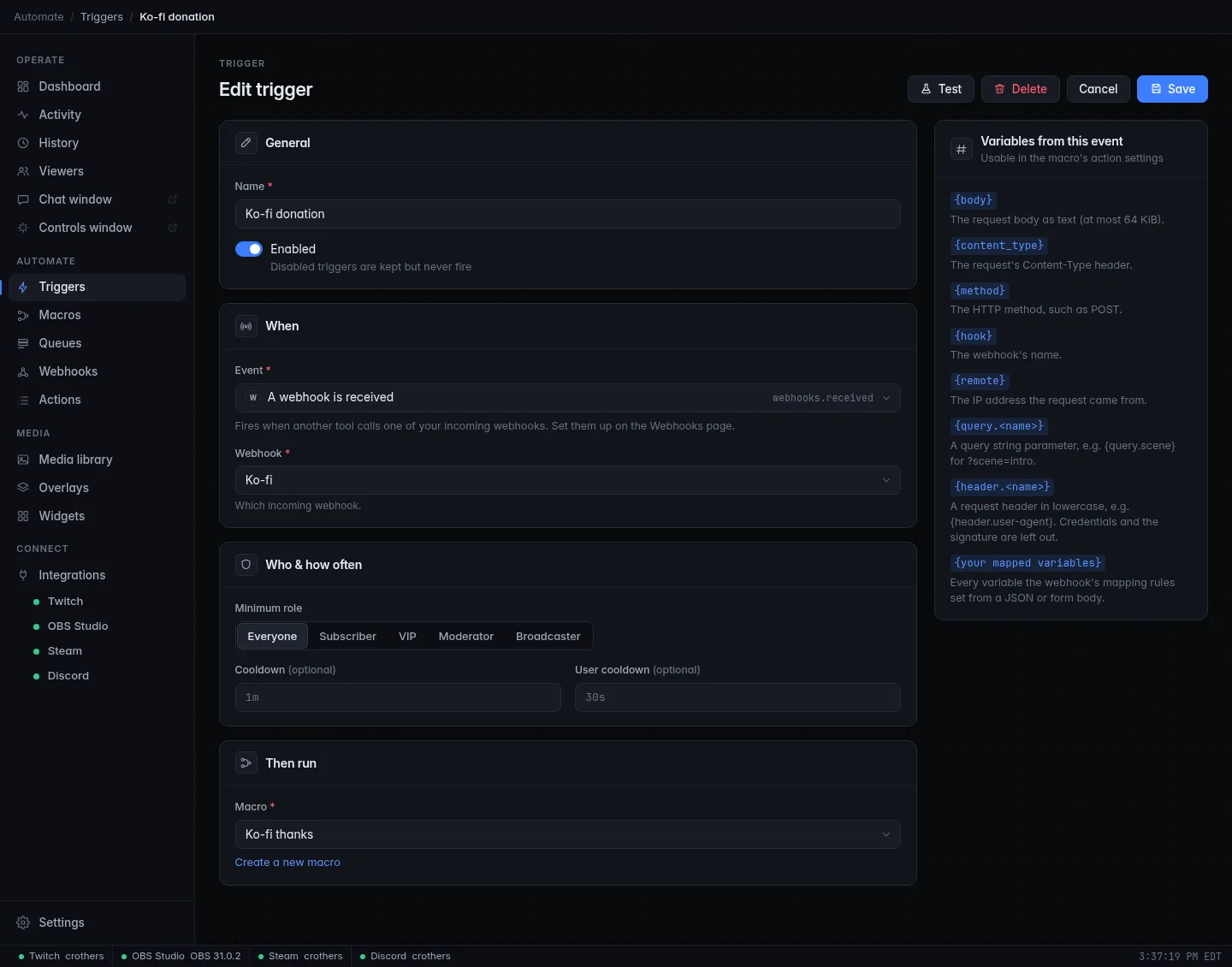
The macro gets every variable from the table above and every variable you
mapped; the trigger editor lists them. {detail} is a short summary, such as
Ko-fi received (748 bytes). A webhook is caused by no viewer, so the
trigger's Minimum role always passes, and {user} isn't set (map a
{user} yourself if the body names someone, or use another name like
{donor}). A Cooldown on the trigger works, and is a good way to
protect against a sender that calls too often. Test on the trigger runs
the macro with the webhook's saved sample, mapped by its rules.
Recent deliveries
Every call a webhook answers is logged under Recent deliveries, live, for the last 20 calls. The log is kept until CroStream restarts.
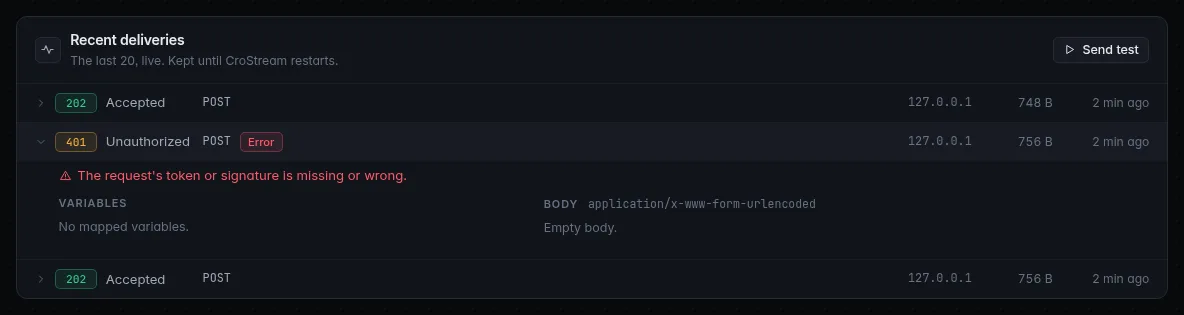
Each row shows the status code and its name, the method, a Test tag for calls from Send test, an orange count when some mapping had a problem, a red Error tag when the call failed, the sender's address, the body size and how long ago. Click a row to open it:
- Variables: what the macro got. Problems lists the rules that didn't work and why.
- Body: what was sent, with its content type, and Use as sample to map from it. At most 8 KB are kept. For a call refused for a wrong token or signature, the body is not kept.
- Answered: the reply that was sent.
- For a failed call, the reason, in words.
Only calls that got as far as the webhook are logged: ones refused before that (403, 404, 405 and 429, below) leave nothing here. A webhook that's off shows This webhook is off: calls get 404.
What the sender gets back
| Status | Meaning | What to check |
|---|---|---|
| 202, or the status you chose | Accepted. The trigger fired. | |
| 400 | The body couldn't be read as the format you set (JSON or form), or could not be read at all. | The delivery's error says why. Use Auto, or fix the sender. |
| 401 | The token or signature is missing or wrong. The answer says nothing more, on purpose. | Compare the token, or the signing key, signature header and exact body. |
| 403 | The caller's address is outside what Accept requests from allows. | The Listener panel. |
| 404 | No such webhook, or it's turned off. The answer is the same for both. | The address, and the On switch. |
| 405 | The method isn't one the webhook accepts. The Allow header lists the accepted ones. |
Methods. |
| 413 | The body is larger than 1 MiB. | |
| 429 | Too many calls; see below. Retry-After says how many seconds to wait. |
|
| 500 | The reply you configured isn't valid JSON after its variables were filled in. | Reply. |
CroStream checks in this order: who is calling (403), the address (404), the method (405), the rate limit (429), the body size (413), and then the token or signature (401). So a call with a wrong token still counts against the rate limit, which makes guessing slow.
Rate limits
Each webhook limits how often it answers, to protect your stream from a flood or a runaway script:
- Each sender (by IP address; for IPv6, all addresses of one
/64count as one sender) may make 10 calls at once, then one every 2 seconds (30 a minute). - Each webhook, from all senders together, may take 60 calls at once, then two a second (120 a minute).
Over the limit, the answer is 429 with a Retry-After header. A well-behaved
sender waits and tries again. Calls through a tunnel or proxy on this PC all
come from this PC, so they share one sender's limit.
Other limits: a body is read up to 1 MiB; at most 100 incoming webhooks and 100 destinations; at most 100 mapping rules per webhook; samples and replies up to 64 KiB.
Putting a webhook on the internet
Services like Ko-fi call you from the internet, so they need an address that reaches your PC. Two ways:
- Port forwarding. Set Accept requests from to Open to all, and
forward the port from your router to this PC. Give the service
http://<your public address>:<port>/hook/<name>. Your home address usually changes, and plainhttp://can be read by anyone on the path: the token travels in the clear. Many services refuse non-HTTPS addresses. - A tunnel (Cloudflare Tunnel, Tailscale Funnel, ngrok and similar),
or a reverse proxy with a certificate. The tunnel gives you an
https://address and forwards tohttp://localhost:62690. This is usually the better way: no router changes, and the secret is encrypted on the way.
Whichever you pick:
- Prefer HMAC signature if the service offers it.
- With a tunnel or proxy on this PC, the listener sees every call as coming from this PC, so even Localhost only lets tunnel traffic in. The exposure setting can't protect you then; the token or signature does. And never use None with a tunnel.
- Forward only this port, and only while you need it.
- If a token ever leaks, Regenerate it.
The Ko-fi tutorial walks through a complete example.
Outgoing webhooks
Destinations
A destination is a place CroStream sends to, saved once: its address, how to sign in, and any fixed headers. Macros then pick it by name, so a token lives in one place and not in every macro.
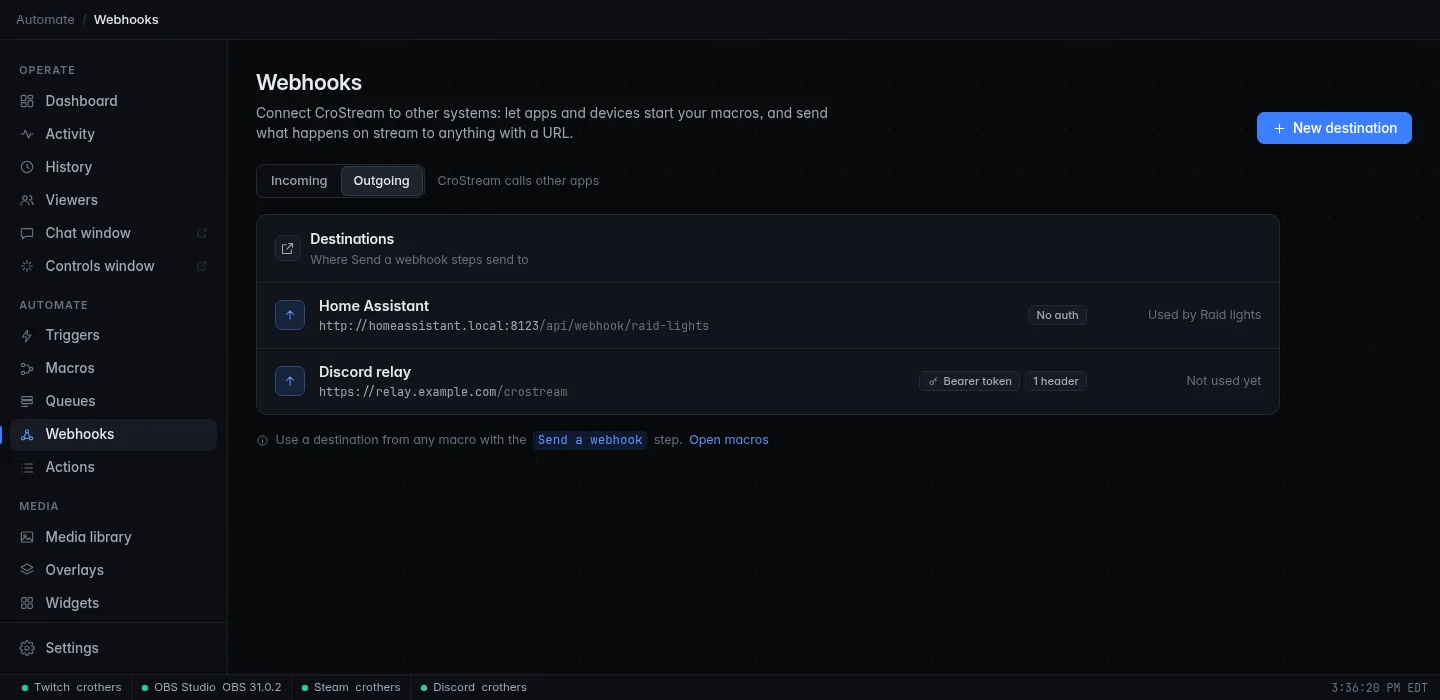
On the Outgoing tab, click New destination:
| Setting | Meaning |
|---|---|
| Name | Unique. What you pick in a step. |
| Base URL | The full address, starting with http:// or https://, with no user name or password in it. A step can add a path to it, such as /events/{event}. A plain http:// address to something on the internet shows a warning: it sends your sign-in unencrypted. |
| Authentication | How CroStream signs in, below. |
| Headers | Fixed headers sent with every request: a name and a value each (up to 32). Content-Type is set from the step's body type. |
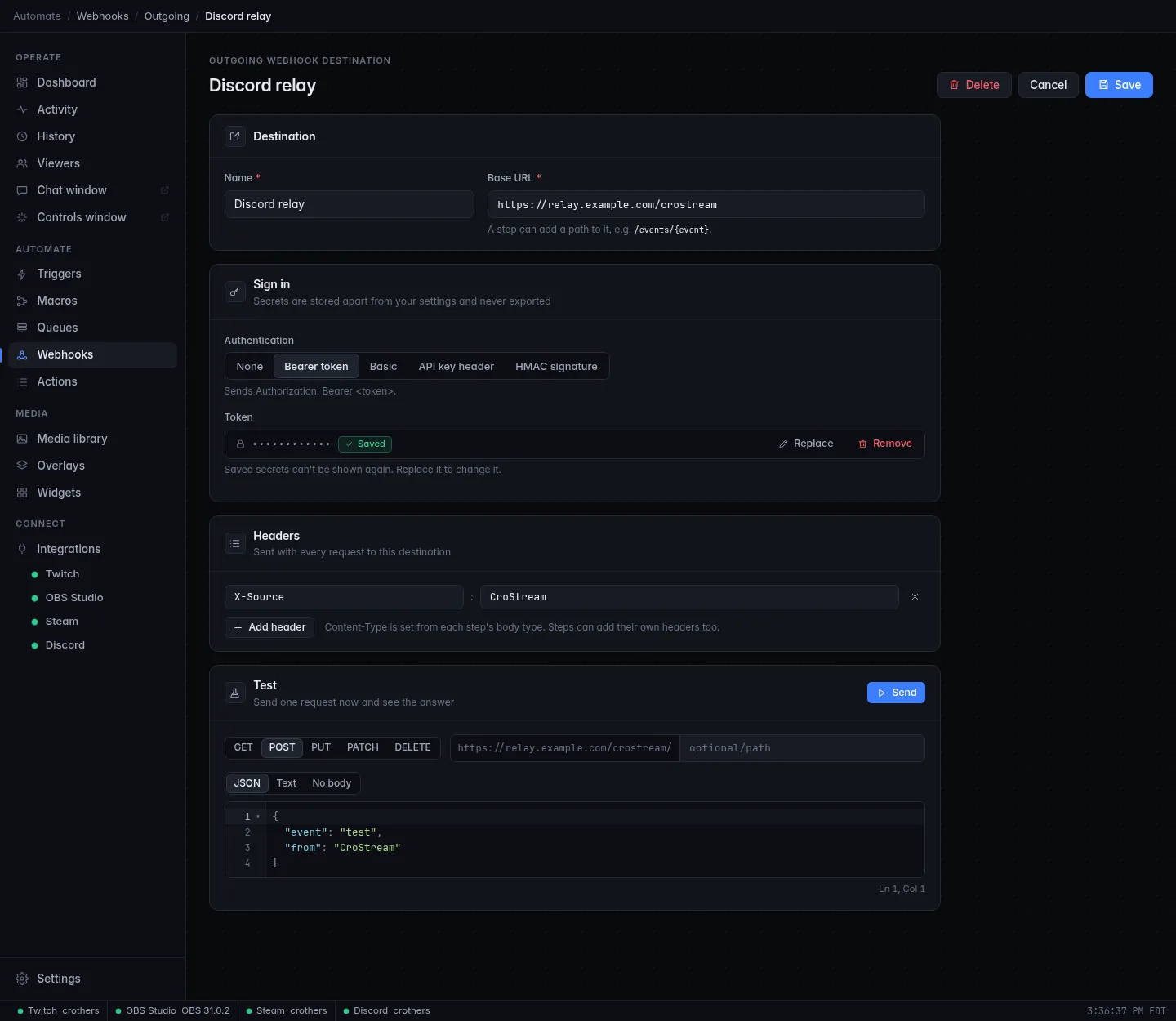
Authentication choices:
| Choice | What CroStream sends | The secret you enter |
|---|---|---|
| None | Nothing. Fine for services on your own network. | |
| Bearer token | Authorization: Bearer <token>. |
Token |
| Basic | Authorization: Basic …. |
Username and Password. The username can't contain a colon. |
| API key header | The key in a header you name, such as X-API-Key. |
Key, and the Header name. |
| HMAC signature | sha256=<hex>, the HMAC-SHA256 of the exact body, in a header (default X-Signature-256), so the receiver can check it came from you. |
Signing key, and optionally the Header name. |
Secrets are write-only. After you save, the editor shows dots and
Saved; you can Replace or Remove the secret but never read it
back. It lives in the secrets store, not in config.json, and isn't exported
or written to the log. A destination whose secret is missing fails at send
time with a message saying so.
Test sends one request right now, with the saved settings, and shows the answer: status, content type, body and how long it took (in milliseconds). Choose the method, an optional path added to the base URL, and a body (JSON, Text or No body). It is a real request; the answer to an error such as 404 is shown, not hidden. A test doesn't retry. Unsaved changes aren't used.
You can't delete a destination while a macro uses it: CroStream names the macros so you can change them first.
The Send a webhook step
In the macro editor, find Send a webhook in the palette under Webhooks.
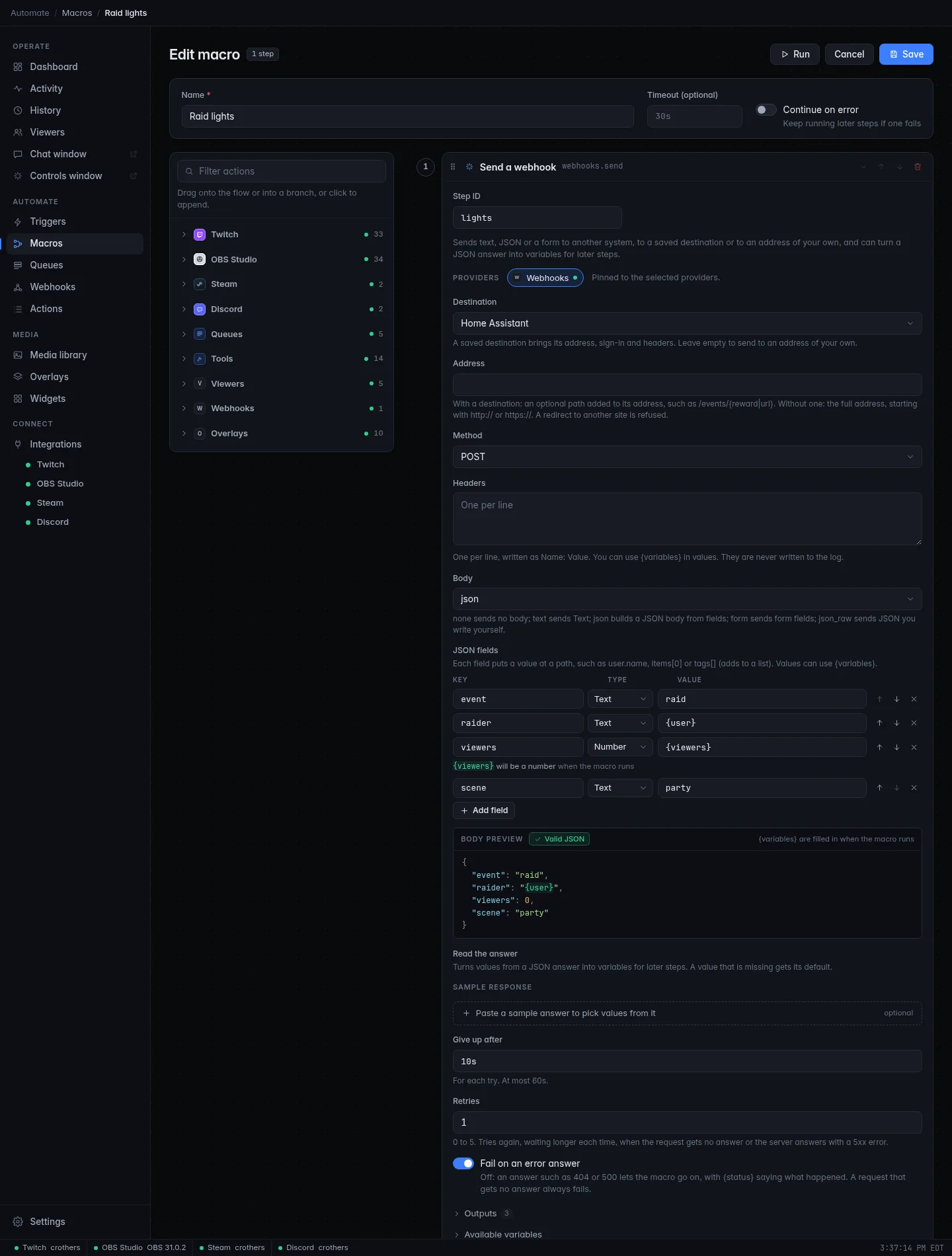
| Setting | What it does |
|---|---|
| Destination | A saved destination, which brings its address, sign-in and headers. Leave it empty to send to an address of your own. |
| Address | With a destination: an optional path added to its address, such as /events/{reward|url}. Without one: the full address. Takes {variables}. A path can't lead to another website, and a redirect to another site is refused (a redirect within the same site is followed). |
| Method | POST (the default), GET, PUT, PATCH or DELETE. |
| Headers | One per line, as Name: Value, with {variables} in values. Added to the destination's. Never written to the log. |
| Body | none, text, json, form or json_raw. See below. |
| Give up after | How long to wait for an answer, for each try: 10s by default, at most 60s. |
| Retries | 0 (the default) to 5. After a request that gets no answer, or a 5xx answer, CroStream waits half a second and tries again, doubling the wait each time up to 8 seconds. Other answers, such as 404, are not retried. |
| Fail on an error answer | On (the default): an answer that isn't 2xx fails the step, and the message includes the start of the answer. Off: the macro goes on, and {status} says what happened. A request that gets no answer always fails. |
Body choices:
| Choice | Sends |
|---|---|
none |
No body. Use it for GET. |
text |
The Text box, as text/plain. Takes {variables}. |
json |
A JSON body built from JSON fields, below. |
form |
Form fields (a name and a value each), as a web form. Values take {variables}. |
json_raw |
JSON you write out in full in the JSON box. |
JSON fields
The json body is a list of fields. Each has a Key (where the value goes), a
Type and a Value.
| Column | Meaning |
|---|---|
| Key | A path in the new document: user.name makes {"user":{"name":…}}; items[0] is a list position; tags[] adds a new element to the list tags. |
| Type | Text (a JSON string), Number (a JSON number: it must be one once the variables are filled in, so {amount} has to hold 12.50, not words), Yes / no (true/false, also 1/0, yes/no, on/off), Null (no value) or JSON (the value is JSON text, such as ["a","b"], placed as it is). |
| Value | What to put there. Takes {variables}. |
The Body preview under the fields shows the JSON the step will build,
and Valid JSON when it works. A problem, such as two fields that want the same key, is
shown on the field. Variables the macro fills in later show as written in
text fields; in number, yes/no and JSON fields the preview shows a stand-in
(0, false or null) with a note on the field. Text values are escaped
for you: a quote or a line break in {message} can't break the JSON.
Fields run in order, and the keys of an object come out in the order the
fields created them. The JSON paths reference
lists every key form.
Writing the JSON yourself
With json_raw you write the whole body. Variables inside it are put in as
they are, so put them inside quotes with the |json filter:
{message|json} escapes quotes, backslashes and line breaks, so a chat
message can't break your JSON. A number like {viewers} goes in bare. After
the variables are filled in, the result is checked, and the step fails with
the line and column of the problem if it isn't valid JSON.
Read the answer
Read the answer turns a JSON answer into variables for the steps after it. It works like the incoming webhook's Variables panel: rows of Variable, Read from (a path), As and If missing. Paste a Sample response to click values from, if you like. Every row sets its variable; a value that is missing, or an answer that isn't JSON, gives the row's default.
What the step reports back
| Output | Meaning |
|---|---|
{status} |
The answer's status code, such as 200. |
{body} |
The answer's body as text, at most 64 KiB. |
{content_type} |
The answer's content type. |
| your rows | One variable for each row of Read the answer. status, body, content_type and detail can't be used as names. |
In a macro started by a webhook, use the step's name
An event's variables always win over a step's outputs of the same name.
A macro started by an incoming webhook already has {body} and
{content_type} (the request's). To read the answer of a Send a
webhook step there, use the step's ID: {lights.body}, where lights
is the Step ID. {status} is free either way.
The Activity page shows each send as, for example, POST homeassistant.local:8123: 200.
Only the host is shown: headers, secrets and bodies are never logged.
Share and back up webhooks
Webhooks are part of your settings, so they are in backups and can be exported and imported with macros and triggers, with some care taken for secrets:
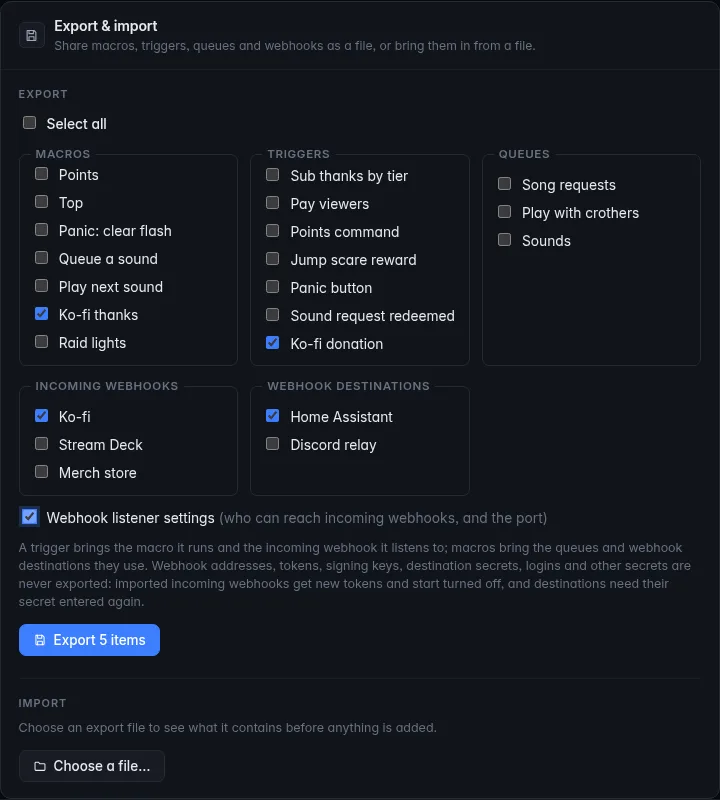
- Export (Settings → Export & import) lists Incoming webhooks and Webhook destinations, and has a Webhook listener settings box (who can reach them, and the port). A trigger brings its webhook, and a macro brings the destinations it uses.
- Never exported: tokens, signing keys, destination secrets, and the captured sample body (which can hold a sender's data).
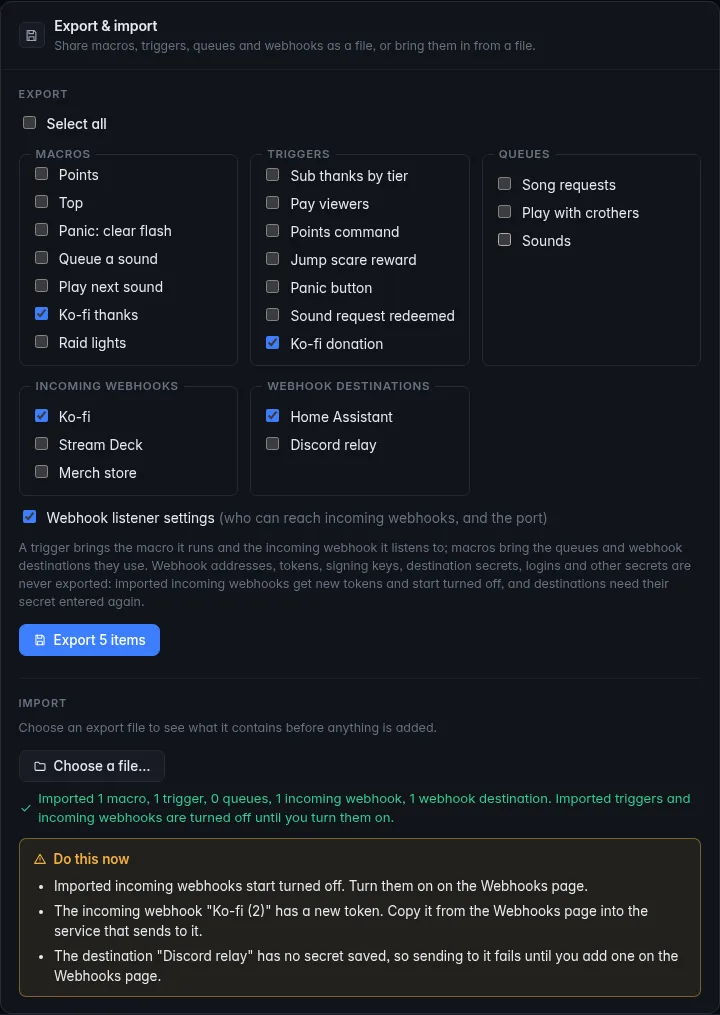
- On import, incoming webhooks arrive turned off, with new tokens. Destinations arrive without their secret. An import never makes the listener wider than it is now: if the file allows more than your current setting, yours stays and a note says so. A webhook that had None gets a token if the listener isn't local.
- After an import, a Do this now box lists what to redo: turn the webhooks on, copy new tokens into the sender, enter destination secrets.
Backups and restores keep the webhooks' settings. If a restore brings back a webhook whose token was deleted with it, CroStream makes a new token, so copy it into the sender again. Destination secrets aren't part of a backup either: they stay where they are.
Security
Webhooks open a door into your stream, so here is exactly what protects it and what doesn't.
- The listener only runs while a webhook is on, and it is a separate server from the one that does the Twitch login, with strict timeouts, a 1 MiB body cap and rate limits.
- Each webhook has its own secret. A wrong token or signature gets a bare
- Tokens are compared in constant time, and the signing key is never sent.
- Unknown and turned-off webhooks answer the same 404, so a scanner can't learn which addresses exist.
- Who may connect follows the exposure setting, judged by the connection itself and never by forwarding headers. A proxy or tunnel on the same PC makes everything look local.
- Secrets stay out of files and logs. Tokens, signing keys and
destination secrets are in the secrets store, and are not exported. The
request's
AuthorizationandCookieheaders and signature never become variables. - Plain HTTP is readable. The listener speaks HTTP, not HTTPS. On your own PC or network that is fine. Across the internet, put a tunnel or proxy with a certificate in front.
- A token in an address (
?token=) can end up in the logs of the sender and of anything in between. Use a header, or HMAC, if you can. - In browser mode the HTTP API has no login and can read a webhook's token, like everything else in your setup. Keep it on your own PC or network, as that page says.
A good setup for most streamers: Localhost only for tools on your PC; Local networks only for a Stream Deck or Home Assistant; Open to all (through a tunnel, with HMAC or a token) only for services that must call you from the internet.
Troubleshooting
My webhook isn't firing
Go down the list:
- Is the webhook On? An off webhook answers 404.
- Does Recent deliveries show the call? If it doesn't, the call never arrived, or was refused before the webhook (403, 404, 405 or 429). Check the address, the port, the method, and that the sender can reach this PC.
- A 401? The token or signature is wrong. Regenerate, copy again, or check the signing key and the signature header.
- A 202 but nothing happens? A webhook alone does nothing: there must be an enabled trigger with the event A webhook is received for this webhook, running a macro. Check the Activity page.
- Does the macro use the right variable names? A name that isn't set
is left as written, such as
{donor}.
The listener says the port can't be opened
Another program uses the port. Pick another under Port and click Apply, and update the senders. CroStream tries again every 30 seconds.
Another device can't reach it
The listener is on Localhost only by default. Choose Local
networks only, then check the PC's firewall allows the port, and use
the PC's network address from Addresses, not localhost.
A variable is empty or shows its default
Open the delivery and look under Problems: it says whether the path
wasn't found, was null, or had the wrong kind of value. The path is
case-sensitive. For a Ko-fi style form, the path starts with the form
field: data.amount.
Send a webhook fails
The step's message says why. Typical ones: answered 401 Unauthorized
(check the destination's secret: Replace it), request to host failed
(the host is down or unreachable, or the timeout is too short), redirected
to another site (use the final address), the JSON is not valid (see
|json), destination has no secret saved (open it and add one). More are
in Troubleshooting.
Related
- JSON paths and mapping: every path form, with examples.
- Events and Actions: the reference.
- Variables: the
|jsonand|urlfilters. - Triggers and Macros.
- Tutorials: Thank Ko-fi donors in chat and Flash your lights on a raid.
- Backups, export and import.