Updates
CroStream keeps itself up to date. It checks for new versions, tells you when one is ready, and installs it when you say so: it never installs anything without you. Every update is checked against CroStream's signature before it's installed, so only genuine CroStream releases get in. Everything about updates is in Settings → Updates.
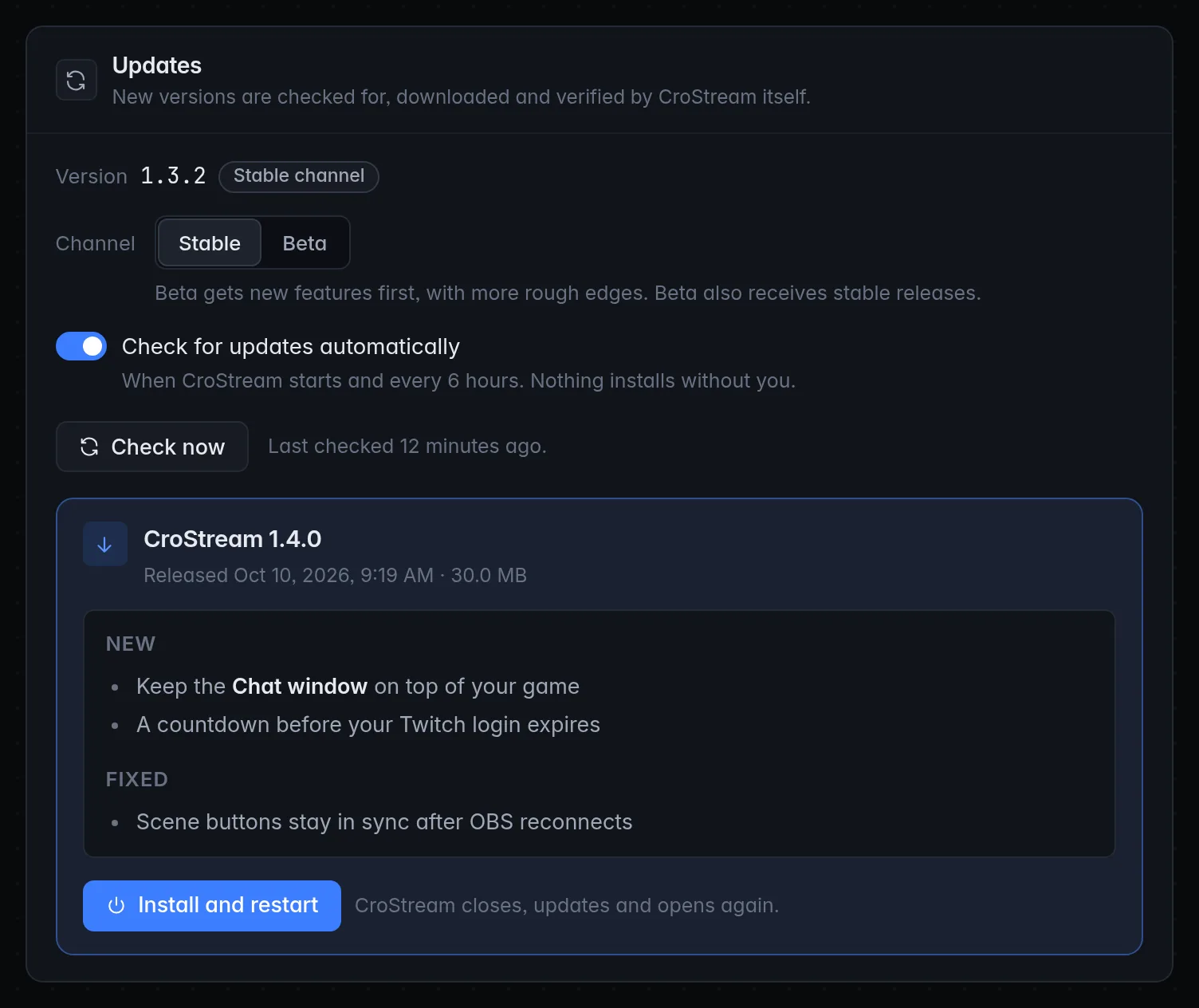
When an update is available
You'll notice it in three places:
- a highlighted Update available link at the bottom of the sidebar, just above Settings;
- a card in Settings → Updates with the new version, its release date and size, and the release notes;
- a system notification, CroStream version is available, if you turned on When an update is available in Desktop behaviour.
Install an update
- Click Update available in the sidebar, or open Settings → Updates.
- Read the release notes on the card if you like.
- Click Install and restart.
CroStream downloads the update (a progress bar shows how far along it is), checks it, then closes, updates and opens again by itself. If the download finishes but the restart doesn't happen, the button reads Restart now and the sidebar link Restart to update: click either.
Update between streams
Installing restarts CroStream, which takes a few seconds in which triggers don't fire. Do it before you go live or after you end, not mid-stream. Nothing forces you to update straight away.
Required updates
Rarely, a version is too old to keep receiving fixes. Then the card is red, marked Required, and says This version of CroStream is too old to keep receiving fixes. Install the update to stay supported. The sidebar link reads Update required. Install it at your next break.
Checking for updates
With Check for updates automatically on (the default), CroStream checks shortly after it starts and then every 6 hours while it runs. To check right now, click Check now. Next to it, CroStream says when it last checked, and You're up to date. when there's nothing new.
Turning automatic checks off means CroStream only checks when you click Check now.
Some new versions are offered to a share of computers first and to everyone a little later, so a friend may see an update before you do. A required update is offered to everyone straight away.
Channels: Stable and Beta
Under Channel, pick which releases you get:
| Channel | What you get |
|---|---|
| Stable | Finished releases. The right choice for most streamers. |
| Beta | New features first, with more rough edges. Beta also receives every stable release, so you're never behind. |
Changing the channel checks for updates again straight away.
Going back from Beta to Stable
CroStream only ever moves forward. If you switch from Beta back to Stable, you stay on your current beta version until a stable release newer than it comes out.
The version you're running
The top of the Updates panel shows Version and your exact version number, followed by your channel, for example Stable channel. Quote that version when you ask for help.
Development builds
A build marked Development build next to its version is a test build, not a release. It can check for updates, so you can see what's out, but it never checks by itself and it won't install them: the panel says This development build can check for updates but won't install them. A development build also always sends crash reports. To get onto the released versions, install a release build from the download page.
Some builds have updates turned off entirely, and the panel says Updates aren't set up in this build. In browser mode, the panel says Updates are installed by the CroStream desktop app.
Troubleshooting
| Problem | What to do |
|---|---|
| Check now shows an error | Usually no internet connection, or the update server can't be reached. Try again later; CroStream also retries on its own schedule. |
| Install and restart is greyed out | A check or download is already running, or this is a development build. |
| The update downloaded but nothing happened | Click Restart now. |
| There's no update to install. Check for updates first. | Click Check now, then install. |
| A friend has a version I don't | Some versions reach a share of computers first. Click Check now later, or wait for the automatic check. |