The settings file
Everything you build in CroStream's screens (macros, triggers, queues,
pinned Dashboard buttons, integration settings and your preferences) is
saved in one file, config.json, in the config folder (see
Where files are kept). You never need to
open it; the app writes it for you. This page is for when you want to:
edit many macros at once, fix something by hand, copy a setup between
machines, generate macros from a script, or understand what the app
saved.
Overlays, widgets, your media, viewers and history are not in this file; see Other files.
Editing it safely
- Close CroStream first, or be ready to reload. CroStream keeps the settings in memory and writes the whole file whenever you change something in the app, so an unsaved hand edit is overwritten by the next change you make in the UI.
- Edit the file in any text editor. It's ordinary JSON, written with two-space indents.
- Load it. Start CroStream, or, if it's running, click Reload on
the Triggers or Macros page (or call
ReloadConfig). Reload applies macros, triggers, queues, integration settings, history and viewer settings at once, without a restart.
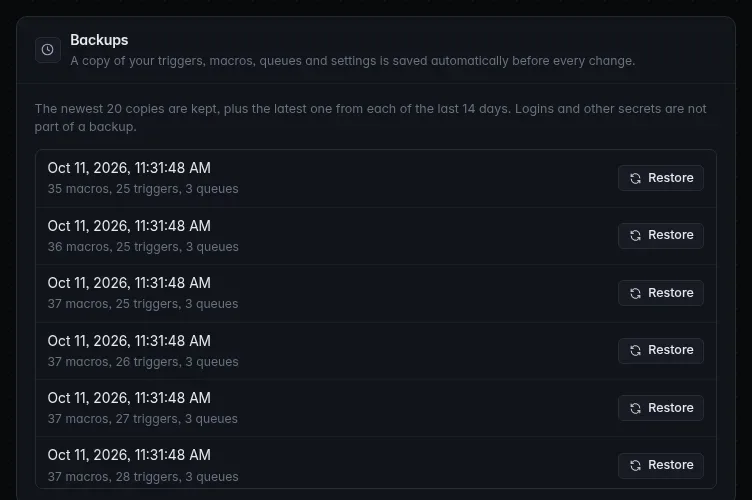
Before every change it makes, CroStream copies the current file into the
backups folder next to it (named like
config-20261011T151943.647Z.json). It keeps the newest 20 copies, plus
the newest copy of each of the last 14 days. Restore one from
Settings → Backups; see Backups.
A broken file stops saving, not streaming
If config.json isn't valid when CroStream starts, CroStream starts
anyway with the default setup in memory, shows the error, and refuses
to save anything, so it can't overwrite your file. Fix the file and
click Reload. If a reload finds the file invalid, the error is
shown and the running setup stays as it was.
Two kinds of problem are treated differently:
- Structural problems refuse the whole file: invalid JSON, an unknown
key anywhere outside
paramsandintegrations, a wrongversion, a malformed or duplicate ID, two macros (or triggers, or queues) with the same name, a trigger that names a macro that doesn't exist, a step breaking the step rules below. - Problems with one item only disable that item: an unknown action or
trigger type, an unknown provider, or
paramsthe action or trigger doesn't accept (including unknown parameter names). The rest of your setup loads, and the app shows the item's error on the Triggers or Macros page.
The whole file
{
  "version": 3,
  "integrations": { "twitch": {}, "obs": { "host": "localhost", "port": 4455, "auto_connect": false } },
  "sequences": [ … ],
  "bindings": [ … ],
  "queues": [ … ],
  "history": { "keep_days": 90 },
  "viewers": { "currency": "pixels" },
  "dashboard": { "macros": [ "seq-…" ] },
  "webhooks": { "exposure": "lan", "inbound": [ … ], "destinations": [ … ] },
  "desktop": { "close_to_tray": true },
  "updates": { "channel": "stable" },
  "diagnostics": { "reports": true }
}
| Key | Holds | Section |
|---|---|---|
version |
Always 3 |
|
integrations |
Each integration's settings | Integrations |
sequences |
Your macros | Macros |
bindings |
Your triggers | Triggers |
queues |
Your queues (left out when there are none) | Queues |
history |
History settings | History |
viewers |
Viewer database settings | Viewers |
dashboard |
Pinned Dashboard macros | Dashboard |
webhooks |
The webhook listener, incoming webhooks and destinations (left out when there are none) | Webhooks |
desktop |
Tray, start-up and notification preferences | Desktop |
updates |
How the app updates | Updates |
diagnostics |
Crash reporting opt-ins (left out until you turn something on) | Diagnostics |
Sections at their defaults are left out of the file. A file from an older
version (1 or 2, or from before the app was called CroStream) is upgraded
when CroStream starts, after it saves a copy as config.v1.json.bak or
config.v2.json.bak. See Upgrading.
What the file calls things
The file uses CroStream's internal names:
| In the app | In the file |
|---|---|
| Macro | sequence (sequences) |
| Trigger | binding (bindings) |
| A trigger's event | its source |
| Action | action step |
Durations are text in Go's format: "500ms", "30s", "5m",
"1h30m". The app writes them in full ("1m0s"). IDs are a
lowercase prefix and a 26-character ULID: seq-01m4nr3cqyykwt94nac1zkhpm6.
New items need a fresh, unique ID; the easiest way to get one is to
create the item in the app. IDs never change, so references between items
(a trigger's macro, a step's queue) survive renames.
Integrations
integrations holds each integration's settings by its ID. Secrets (the
OBS password and login tokens) are never in this file; they're kept in the
secrets folder of the config folder.
| ID | Keys |
|---|---|
obs |
host (default "localhost"), port (default 4455), auto_connect (Connect automatically) |
twitch |
none (the login is a secret) |
steam |
path: the Steam folder, when it isn't found by itself |
discord |
client_id: your own Discord application ID, if you use one |
Settings of integrations this version doesn't know are kept as they are.
Macros
Each entry of sequences is a macro:
{
  "id": "seq-01m4nr3cmax6btz4tr8jgjfffx",
  "name": "Sub thanks",
  "timeout": "1m0s",
  "continue_on_error": true,
  "steps": [
    { "id": "alert", "kind": "action", "action": "overlay.alert", "providers": ["overlay"],
      "params": { "target": "overlay-01m4nr1t2xz2zw461bq7erpa90/element-gp8bzatyemrn4653e31n7khfx9", "hold": "8s" } },
    { "id": "wait", "kind": "delay", "delay": "2s" },
    { "id": "thanks", "kind": "action", "action": "chat.send", "providers": ["twitch"],
      "params": { "message": "Thanks for the sub, {user}!" } }
  ]
}
| Key | Meaning |
|---|---|
id |
seq-<ulid> |
name |
Unique among macros |
timeout |
How long one run may take: default 30s, at most 10m (longer values are cut to 10 minutes) |
continue_on_error |
Keep running later steps after a step fails. The run still counts as failed, so a redemption is refunded. |
steps |
The steps, in order |
Steps
Every step has an id (a lowercase letter, then lowercase letters,
digits and _) that's unique within the macro, branches included: it
names the step's outputs, as in {thanks.message_id}. Its kind is one
of:
kind |
Keys | Does |
|---|---|---|
action |
action, providers, params |
Runs an action |
delay |
delay (more than 0, at most 10m) |
Waits |
if |
branches, else |
Runs the first branch whose condition holds, else the else steps |
switch |
value, cases, else |
Runs the first case whose values include value |
stop |
fail, message |
Ends the run here; with "fail": true it counts as failed |
{
  "id": "tier", "kind": "switch", "value": "{tier}",
  "cases": [
    { "values": ["3"], "steps": [ { "id": "t3", "kind": "action", "action": "chat.send", "params": { "message": "TIER 3?!" } } ] },
    { "values": ["2", "prime"], "steps": [ { "id": "t2", "kind": "action", "action": "chat.send", "params": { "message": "Thank you!" } } ] }
  ],
  "else": [ { "id": "done", "kind": "stop", "message": "tier 1" } ]
}
switch compares value (after filling in variables) with each case's
values as text, ignoring case and surrounding spaces. Only if and
switch steps may hold other steps. A macro has at most 500 steps in
all, nested at most 8 levels deep.
Conditions
An if step's branches are { "when": <condition>, "steps": [...] }.
A condition is:
{
  "match": "all",
  "rules": [
    { "left": "{bits}", "op": "gte", "right": "100" },
    { "fact": "obs.scene", "op": "eq", "right": "Gameplay" },
    { "not": true, "left": "{user_role}", "op": "role_gte", "right": "moderator" },
    { "group": { "match": "any", "rules": [ … ] } }
  ]
}
match is all or any. A rule compares left (a template such as
{bits}) or a fact (a live value: obs.scene, or
<name>:<argument> such as tools.counter:deaths) with right; not
inverts it, and group nests a condition. An empty condition holds.
op |
True when |
|---|---|
eq, ne |
Equal, not equal (as numbers when both sides are numbers, else as text ignoring case) |
contains, starts, ends |
The left side contains, starts with, ends with the right |
gt, gte, lt, lte |
A number above, at least, below, at most the right |
empty |
The left side is empty (right unused) |
in |
The left side equals one of the right side's values (comma- or line-separated) |
matches |
The left side matches the regular expression on the right, ignoring case |
role_gte |
The left side, a role, is at least the right one |
The facts you can check are listed in Conditions.
Actions, steps and providers
An action step names the action by its ID. Shared actions have no
prefix and run on every integration that provides them: clip (OBS
replay and Twitch clip), marker, chat.send, scene.set.
Provider actions belong to one integration: twitch.timeout,
obs.audio_mute, tools.counter, overlay.alert, viewers.points.
providers limits a step to the listed integrations (["obs"]). Empty or
left out, the step runs on every connected integration that provides the
action. The full list of actions, with their IDs, parameters and
outputs, is in Actions; the
HTTP API's GetCatalog lists them
too.
Action params
params holds the action's parameters by their file names, which are
shown in Actions. Most parameters are text
and take {variables}, even ones that hold a number ("amount": "500"
or "amount": "{bits}"); a few are plain numbers or true/false. When
unsure, build the step in the app and copy what it saved. A parameter the
action doesn't know, or a value of the wrong type, disables the macro.
{ "id": "points", "kind": "action", "action": "viewers.points", "providers": ["viewers"],
  "params": { "viewer": "{user_login}", "change": "add", "amount": "500", "reason": "Subscribed" } }
Variable naming and JSON params
Every step's outputs become variables for the steps after it, under three names:
{step.provider.key}, always:{twitch_clip.twitch.clip_url};{step.key}, from the first provider that succeeded, in manifest order (Twitch, OBS Studio, Steam, Discord, Queues, Tools, Viewers, Overlays), so it's set whenever any provider succeeded:{twitch_clip.clip_url};{key}alone, likewise, unless the trigger already set a variable of that name: the trigger's variables are never overwritten.
Parameters that hold JSON (OBS filter settings, OBS plugin requests) fill variables into string values only, so text from viewers can't add keys. See Variables.
Triggers
Each entry of bindings is a trigger:
{
  "id": "bind-01m4nqwwap6z14j4pdpt7tkjkm",
  "name": "clip",
  "source": {
    "type": "twitch.chat_command",
    "params": { "command": "!clip", "aliases": ["!c"] },
    "min_role": "everyone",
    "cooldown": "1m0s",
    "user_cooldown": "30s"
  },
  "sequence": "seq-01m4nqwwap513e991pfg4hfsdx"
}
| Key | Meaning |
|---|---|
id |
bind-<ulid>; cooldowns are kept by it |
name |
Unique among triggers |
disabled |
true turns the trigger off |
source.type |
The event, below |
source.params |
The event's options |
source.min_role |
Who may fire it: everyone, subscriber, vip, moderator or broadcaster |
source.cooldown |
Time before it fires again for anyone |
source.user_cooldown |
Time before the same viewer can fire it again |
sequence |
The ID of the macro it runs |
The broadcaster isn't held back by cooldowns.
source.type |
params (* required) |
|---|---|
twitch.chat_command |
command* (no spaces), aliases |
twitch.redemption |
reward_id (empty: any reward), input_contains |
twitch.follow |
none |
twitch.sub |
tier (any, 1, 2, 3, prime), min_months, gifted (exclude default, include, only) |
twitch.gift |
tier (any, 1, 2, 3), min_count, max_count |
twitch.cheer |
kind (any, cheer, power_up), min_bits, max_bits |
twitch.raid |
min_viewers, max_viewers |
twitch.stream |
state* (online, offline) |
twitch.channel_update |
none |
twitch.ad_break |
none |
twitch.hype_train |
phase* (begin, level_up, progress, end) |
twitch.poll_end |
none |
twitch.prediction_end |
status (any, resolved, canceled) |
twitch.auto_reward |
reward (any, send_highlighted_message, single_message_bypass_sub_mode, random_sub_emote_unlock, chosen_sub_emote_unlock, chosen_modified_sub_emote_unlock) |
steam.game_started, steam.game_stopped, steam.screenshot |
game |
hotkey.press |
keys* (such as Ctrl+Shift+F9) |
webhooks.received |
hook* (an incoming webhook's ID) |
queue.release |
queue* (a queue ID) |
tools.interval |
every* (1m to 24h, default 10m), only_live (default true), min_chat (0 to 1000; 0 is off) |
viewers.first_chat |
none |
viewers.returning |
min_days_away (0 to 365) |
Older files may have reward_title on redemptions; it still works, but
new triggers pick the reward by reward_id. What each event's options do
and the variables it sets are in Events.
Queues
Each entry of queues is a queue:
{
  "id": "queue-01m4nr38z22pjm7w7rdynxvqsd",
  "name": "Song requests",
  "interval": "3m0s",
  "per_release": 1,
  "max_items": 25,
  "when_full": "refuse",
  "fields": [ { "key": "song", "label": "Song", "default": "{args}" } ],
  "keep_waiting": true,
  "keep_for": "2h0m0s"
}
| Key | Meaning |
|---|---|
id, name |
queue-<ulid>; a unique name |
interval |
Time between releases: 1s to 24h |
per_release |
Items released each time: 0 to 100 (0 means 1) |
max_items |
Most waiting items: 0 to 1000 (0 means 50) |
when_full |
refuse (default: the Add to queue step fails) or drop_oldest |
fields |
Up to 20 values each item carries: key (named like a step ID), label, and default (a template used when the Add to queue step leaves it empty) |
keep_waiting |
Keep waiting items through a restart (After a restart); otherwise they're cleared |
keep_for |
With keep_waiting, drop restored items older than this: 1m to 7 days (168h), or empty for no limit |
Webhooks
Webhooks: who may reach the listener, the incoming webhooks and the outgoing destinations. Tokens, signing keys and destination secrets are not here; they are in the secrets store.
"webhooks": {
  "exposure": "lan",
  "port": 62690,
  "inbound": [
    {
      "id": "hook-01m4p7bnmvwx8wn3q65kdztznk",
      "name": "Ko-fi",
      "slug": "ko-fi",
      "enabled": true,
      "format": "form",
      "rules": [
        { "var": "donor", "path": "data.from_name" },
        { "var": "amount", "path": "data.amount", "type": "number" },
        { "var": "message", "path": "data.message", "default": "" }
      ],
      "reply": { "status": 202 }
    }
  ],
  "destinations": [
    {
      "id": "dest-01m4p7bnpdsagyspgnm362t8r2",
      "name": "Discord relay",
      "url": "https://relay.example.com/crostream",
      "auth": "bearer",
      "headers": ["X-Source: CroStream"]
    }
  ]
}
| Key | Meaning |
|---|---|
exposure |
local (the default, left out), lan (local networks) or open (anyone) |
port |
The listener's port, 1024 to 65535; left out for 62690 |
inbound |
The incoming webhooks, at most 100 |
destinations |
The outgoing destinations, at most 100 |
An entry of inbound:
| Key | Meaning |
|---|---|
id, name |
hook-<ulid>; a unique name of at most 80 characters |
slug |
The address, /hook/<slug>: 1 to 64 of a-z, 0-9 and -, starting with a letter or digit; unique |
enabled |
false makes it answer 404 |
methods |
Accepted methods: GET, POST, PUT, PATCH or DELETE; left out for POST only |
format |
auto (the default), text, json or form |
auth |
token (the default), hmac, token+hmac or none. none is refused unless exposure is local |
hmac_header |
The signature header; left out for X-Signature-256 |
rules |
The mapping rules, at most 100: var (^[a-z][a-z0-9_]*$, and not body, content_type, method, hook, remote or detail), path (a path), type (string, number, bool or json), many (join, count, first, last or json), sep and default |
sample |
The sample body the editor maps from, up to 64 KiB |
reply |
status (200 to 299, left out for 202), type (json or text) and body (a template, up to 64 KiB) |
An entry of destinations:
| Key | Meaning |
|---|---|
id, name |
dest-<ulid>; a unique name |
url |
The base address, http:// or https://, with no user name or password |
auth |
none (the default), bearer, basic, hmac or header |
auth_header |
The header for header (required there) and hmac (default X-Signature-256) |
headers |
Up to 32 fixed headers, each "Name: Value" |
A webhook you add by hand has no token yet, and refuses every call until it gets one: open it in the app and save it, which makes the missing secrets.
The Send a webhook step ("action": "webhooks.send", "providers":
["webhooks"]) takes these params: destination (a destination ID), url,
method, headers (a list of "Name: Value" lines), body_type (none,
text, json, form or json_raw), text, json (a list of {"path",
"type", "value"} fields; type is string, number, bool, null or
json), json_raw, form (an object of names and values), response (a
list of rules like the above), timeout, retries and fail_on_error.
History
off: true stops recording and reading history,
leaving the database as it is. keep_days is 1 to 3650; 0 or left out
means 90.
Viewers
"viewers": { "off": false, "currency": "pixels", "chat_keep_days": 0, "ignore": ["nightbot", "streamelements"] }
| Key | Meaning |
|---|---|
off |
true stops recording viewers and turns the points actions off; the database is left as it is |
currency |
What points are called, up to 32 characters (empty: points) |
chat_keep_days |
How long viewers' chat messages are kept: 0 (forever) to 3650. Message counts are kept either way |
ignore |
Up to 500 lowercase Twitch logins (bots, your alt accounts) left out of "give to everyone watching" and the leaderboards; their records are kept |
See Viewers.
Dashboard
The macros pinned as buttons on the Dashboard, in order; at most 50.
Desktop
The desktop app's own preferences, from Settings. Browser mode ignores them.
"desktop": {
  "close_to_tray": true,
  "launch_at_login": true,
  "start_minimized": false,
  "notify": { "live": true, "failures": true, "disconnects": true, "updates": false, "login_warnings_off": false }
}
| Key | Meaning |
|---|---|
close_to_tray |
Closing the window hides it to the tray instead of quitting |
launch_at_login |
Start CroStream when you log in to the computer (the system keeps the actual registration) |
start_minimized |
Start in the tray with the window hidden |
notify.live |
Notify when the stream goes live |
notify.failures |
Notify when a macro action fails |
notify.disconnects |
Notify when Twitch or OBS loses its connection |
notify.updates |
Notify when a new version is available |
notify.login_warnings_off |
true turns off the warnings about a login expiring or lost (they're on by default) |
See The desktop app. Hand edits apply after
a reload, except launch_at_login: the operating system keeps that
registration, so change it in Settings.
Updates
channel is stable or beta (which also gets stable releases); left
out, it's the channel your copy was released on. auto_check: false
turns off the automatic checks; left out, they're on. See
Updates.
Diagnostics
The crash reporting choices. reports
turns on sending errors, crashes and logs; tracing and replay turn on
performance tracing and session replay, and only count while reports is
on. All default to off and are left out of the file while they are. A
development build always reports whatever reports says. Hand edits
apply after a reload. The environment variables that override this are in
Command line.
Export files
Settings → Export & import writes the macros, triggers, queues and
webhooks you pick to a JSON file, with what they depend on: a trigger brings
its macro and incoming webhook, and macros and triggers bring the queues
and webhook destinations they use. Integration settings and secrets are
never exported. Webhooks are in a webhooks key shaped like the section
above (with exposure and port only when Webhook listener settings
was ticked), without tokens, signing keys, destination secrets or sample. Parameters that work like a
password (the Discord webhook address) are emptied and listed in
blanked, so you know to enter them again after importing.
{
  "format": "crostream.bundle",
  "version": 1,
  "exported_at": "2026-10-09T18:00:00Z",
  "sequences": [],
  "bindings": [],
  "queues": [],
  "blanked": ["macro \"Discord ping\", step \"post\": Webhook address"]
}
Files exported by older versions ("format": "streamlink.bundle") still
import. On import:
- Add as copies (the default) gives everything new IDs and re-links the references between the items. Names already in use get " (2)", " (3)" and so on.
- Replace matching items overwrites items that have the same ID.
Imported triggers and incoming webhooks always start turned off, and
imported webhooks get new tokens. An import never widens exposure. The whole import is checked and
saved at once, after one backup. Files over 5 MB, or with more than 500
items of a kind, are refused.
Other files
The config folder holds config.json, backups/, secrets/,
overlays/ (one JSON file per overlay) and widgets/ (one per custom
widget, with history/ and trash/). The state folder holds what
CroStream records:
| File | What |
|---|---|
history.db |
Events, the activity log and the chat log. Safe to lose: deleting it while CroStream is closed starts history from scratch. Not part of config backups. |
viewers.db |
Viewer records and points. A copy goes to backups/viewers-YYYYMMDD.db in the state folder once a day; the newest 7 are kept. |
library/ |
The media library: library.db (folders, items, tags), files/ (your media, named by item ID) and thumbs/ |
state/ |
Live state: counters, timers, waiting queue items, overlay overrides |
Back up viewers.db and library/ along with the config folder; they
aren't part of the settings backups. The
folders' locations on each system are in
Where files are kept.
Related
- Triggers, Macros and Queues: the same things in the app.
- Events, Actions, Conditions and Variables: the full reference.
- HTTP API: read and change all of this from scripts.
- Command line: try a copy of your config safely.