Triggers
A trigger says when something should happen: "when someone types
!clip", "when a viewer redeems Hydrate", "when a raid of 50 or more
arrives". It points at a macro, which says what happens:
clip, post in chat, switch scene. Keeping the two apart means one macro can be
started by several triggers (a chat command and a hotkey, say), and you can
change what a macro does without touching what starts it. (Unsure of a
word? The glossary explains them all.)
Every trigger has three parts:
- an event, the thing that starts it, with options such as which command or which reward (all events);
- who and how often: the lowest role allowed to fire it, and cooldowns;
- the macro it runs.
The Triggers page
Open Triggers in the sidebar, under Automate. Each row shows the trigger's name, a one-line summary of its event, role and cooldowns, and the macro it runs (click the macro to open it).
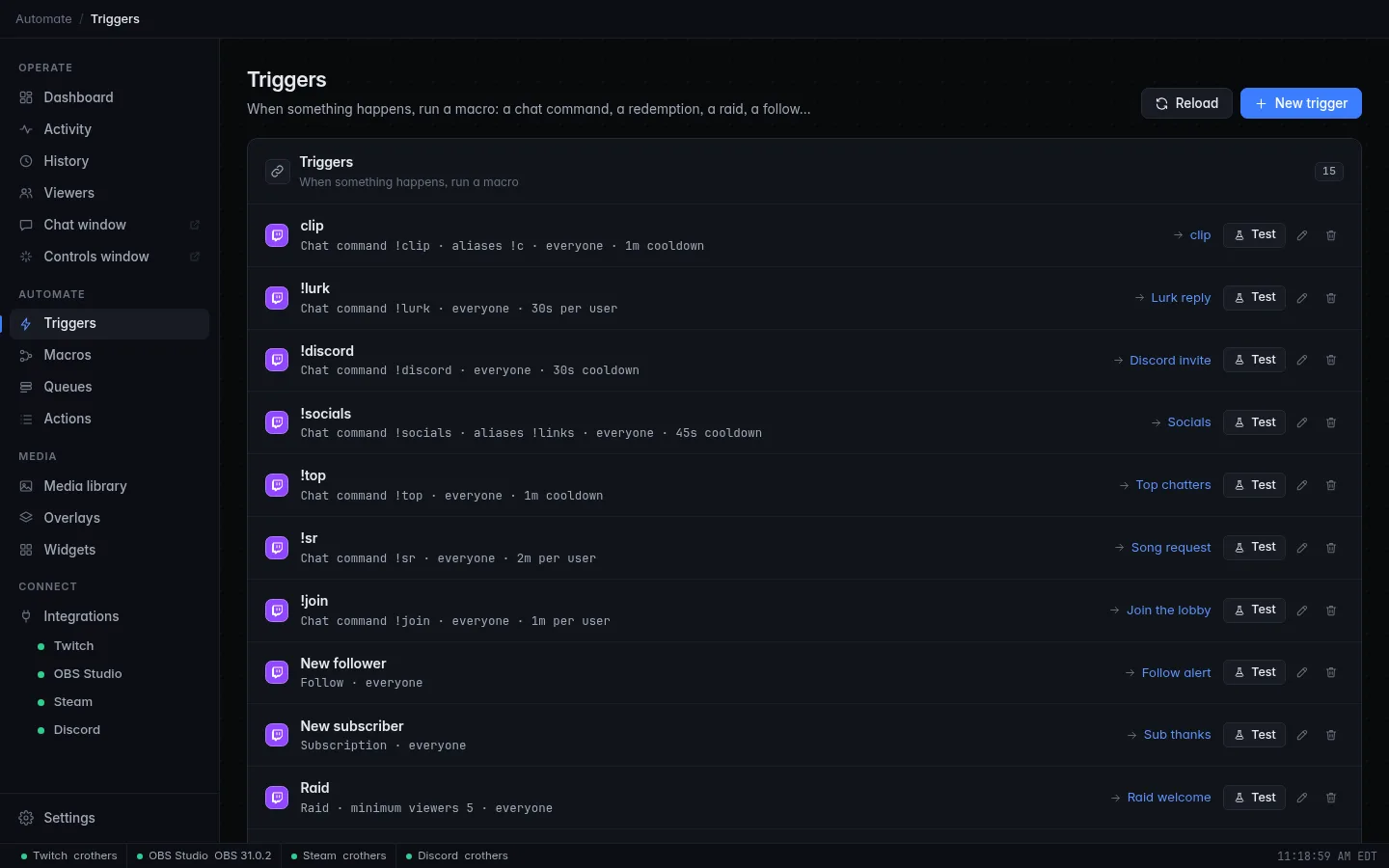
- Test runs the trigger once right now (see Test and Run).
- The pencil opens the trigger editor. The bin deletes the trigger after you click Confirm delete. Deleting a trigger never deletes its macro.
- A grey disabled tag marks a trigger that is switched off.
- A red line under a trigger says why it cannot run (for example, its macro was deleted). A yellow line is a warning: the trigger is fine but may not fire for now, such as a Twitch permission you need to log in again for, or a hotkey another program already uses.
- Reload re-reads your settings file, for when you edited it by hand. Open config folder (desktop app only) shows where it lives.
Create a trigger
- On the Triggers page, click New trigger.
- Under General, give it a Name you'll recognise in the activity feed, such as Raid shoutout. Names must be unique.
- Under When, pick the Event. The list is grouped by integration (Twitch, Steam, Hotkeys, Queues, Tools, Webhooks, Viewers). Its options appear below it: the command for a chat command, the reward for a redemption, a minimum and maximum for raids and cheers, and so on.
- Under Who & how often, choose the Minimum role and, if you like, a Cooldown and a User cooldown (see below).
- Under Then run, pick the Macro. No macro yet? Click Create a new macro, build it, then come back.
- Click Save.
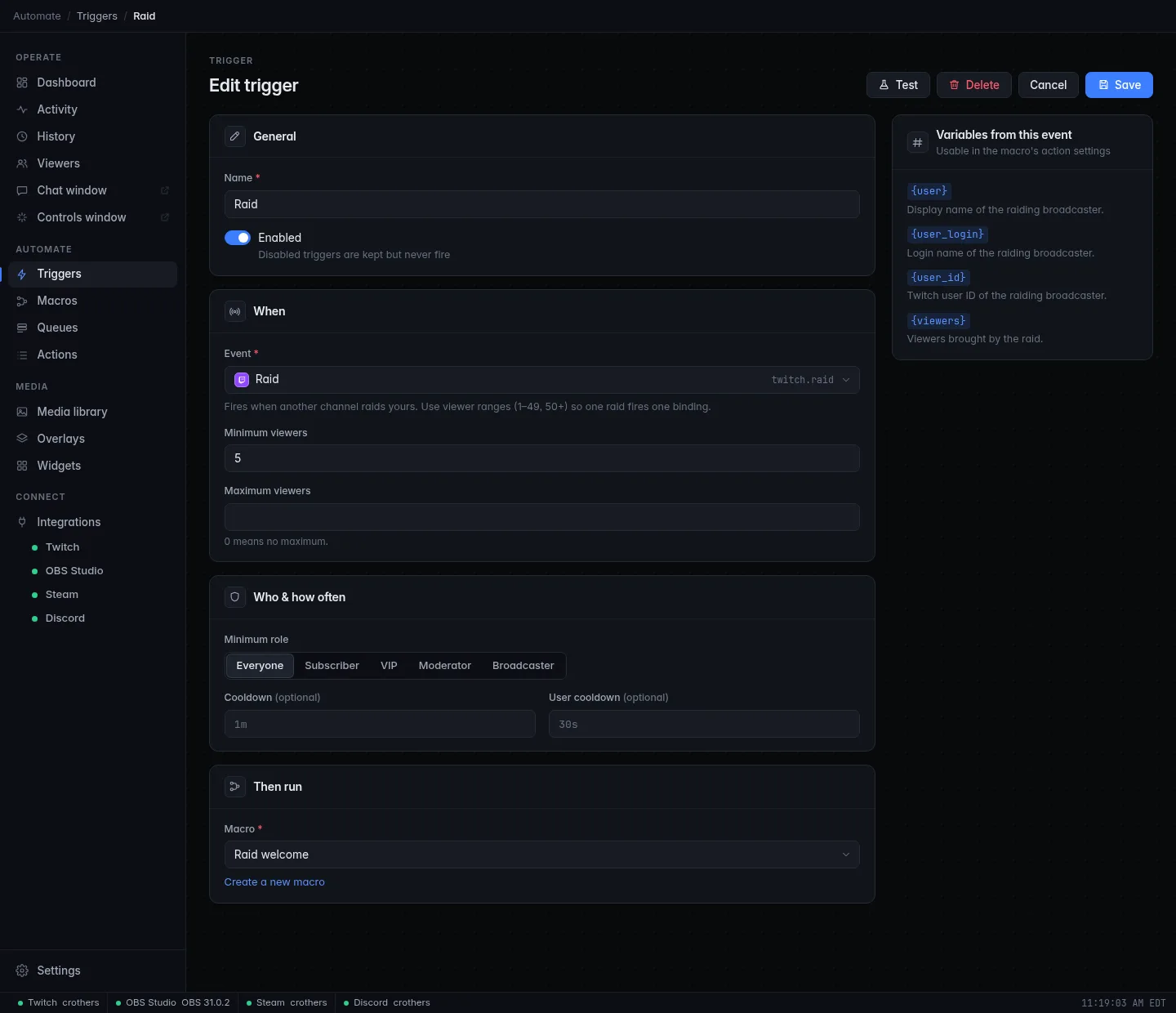
The panel on the right, Variables from this event, lists the
variables the event hands to the macro, such
as {user} and {args} for a chat command. Use them in the macro's
messages and settings.
Saved straight away
Triggers and macros take effect the moment you save. There's nothing to restart. If you leave the editor with unsaved changes, CroStream asks whether to discard them.
The default !clip
CroStream comes with one trigger and one macro already set up. The clip
trigger fires when anyone types !clip (or !c) in chat, with a one-minute
cooldown. Its macro saves the OBS replay buffer, creates a Twitch clip and
tells chat:
viewer !clip
CroStream @viewer clipped it! https://clips.twitch.tv/…
In the message, {user} becomes the name of the viewer who typed the
command and {clip_url} becomes the link to the new clip. Change it, or
delete it, like any other trigger.
Who can fire it
Minimum role is the lowest role allowed to fire the trigger. The roles go up in this order:
Everyone → Subscriber → VIP → Moderator → Broadcaster
A role includes everything above it: Subscriber lets subscribers, VIPs, moderators and you fire it. When someone below the minimum tries, the macro doesn't run and the activity feed notes that they were denied.
Events no viewer causes, such as On a timer, Stream online/offline or A Steam game starts, always pass the role check.
Finer control inside the macro
The minimum role is all-or-nothing. To do something different for
moderators, check {user_role} with an If step in the macro
instead (see Macros).
Cooldowns
A cooldown stops a trigger from firing again too soon. Write it as a
duration: 30s, 2m, 1h30m. Leave it empty for no cooldown.
| Setting | What it limits | Example |
|---|---|---|
| Cooldown | The whole trigger, for everyone. | 1m: !clip works at most once a minute, whoever types it. |
| User cooldown | Each person separately. | 30s: each viewer can use !hug every 30 seconds, but different viewers don't block each other. |
Use both together if you like: the trigger then waits for whichever has longer left.
- The cooldown starts when the macro starts, whether it then succeeds or fails.
- An attempt during a cooldown doesn't run, and the activity feed shows how long was left.
- You, the broadcaster, skip cooldowns, and your own uses don't start them, so you can always fire your own commands.
- Events no viewer causes have no user cooldown, only the trigger's Cooldown.
- Saving a trigger keeps its running cooldown.
Cooldowns on Twitch rewards
Channel point rewards have their own cooldown, set on Twitch (or with CroStream's Create reward and Update reward actions). Twitch's cooldown stops viewers from redeeming at all. A trigger's cooldown only stops the macro: the redemption itself goes through and waits in your Twitch request queue (see Channel point refunds).
Enabled and disabled
Switch Enabled off in the trigger editor to keep a trigger but stop it from firing, for example a raid trigger you only want on special streams. It stays in the list with a disabled tag. A disabled hotkey trigger also releases its key combination.
Test and Run
You can try a trigger or a macro without waiting for the real thing.
| Button | Where | What happens |
|---|---|---|
| Test | A trigger (the list or the editor) | Runs the trigger's macro with a sample event made from the trigger's options, as you. It ignores the minimum role and cooldowns and never completes or refunds a redemption. |
| Run | A macro (the list or the editor) | Runs the macro on its own, with no event. Only {user} (your Twitch login, or test before you log in), {rule} and {user_role} are set. |
Both run the macro for real: chat messages are sent, scenes switch, clips are made. Both use the saved version, so save first.
A test uses sample values: a chat command test has nothing after the
command (so {args} is empty), a redemption test uses test input as the
viewer's text, and so on. The run shows up in the activity feed like any
other.
Several triggers, one event
Every trigger whose event matches fires, independently and at the same
time. Two triggers on !clip both run. That's handy (a sound and a chat
message from separate macros), but for tiered reactions give each trigger
its own range, so one event fires one trigger:
| Trigger | Event options |
|---|---|
| Small raid | Raid, Minimum viewers 1, Maximum viewers 49 |
| Big raid | Raid, Minimum viewers 50, Maximum viewers 0 (no maximum) |
Two triggers with only minimums (1 and 50) would both fire for a raid of 60.
Events at a glance
The Events reference lists every event with all its options and variables. In short:
| Integration | Events |
|---|---|
| Twitch | Chat command, Channel point redemption, Follow, Subscription, Gifted subs, Cheer or power-up, Raid, Stream online/offline, Title or category change, Ad break, Hype train, Poll ended, Prediction ended, Built-in channel point reward |
| Steam | A Steam game starts, A Steam game stops, A screenshot is taken |
| Hotkeys | Hotkey (guide) |
| Queues | Queue release (guide) |
| Tools | On a timer |
| Webhooks | A webhook is received (guide) |
| Viewers | First-time chatter, Returning chatter |
A few things worth knowing:
- Chat command matches the first word of a message, ignoring capital
letters, so
!Clip nowfires!clip.{args}is everything after it and{arg1}to{arg9}are its first nine words. Messages CroStream sends itself never fire a command. - Gifted subs fires once per gift, however many subs it holds. The
recipients fire Subscription too, but only if that trigger's
Gifted subs option is set to
includeoronly. - On a timer first fires one interval after the app starts or the trigger is saved. With Only while live on (the default) it skips while you're offline.
- First-time chatter and Returning chatter need the viewer database.
- Every follow, sub, gift, cheer and raid also appears in Activity, whether or not a trigger reacts to it.
Hotkeys
A trigger with the Hotkey event fires when you press a key combination anywhere on your computer, even in a game. Setting one up, and what works on Windows, macOS and Linux, is explained in Hotkeys.
Channel point refunds
When a channel point redemption fires your triggers, CroStream waits until every macro it started has finished, then tells Twitch:
- Fulfilled if every run succeeded;
- Canceled if any run failed, which refunds the viewer's points.
A run fails when a step fails (even if the macro is set to continue on error), when it times out, or when it reaches a Stop step set to Fail and refund.
A redemption that starts no macro at all (no trigger matches, the viewer's role is too low, or the trigger is cooling down) is left alone: it waits in your Twitch request queue for you to handle.
This only works for redemptions that wait in Twitch's request queue, and only for rewards CroStream created: Twitch doesn't let an app complete or refund other apps' rewards. Create rewards you want refunds for with the Create reward action. For other rewards the activity feed shows a notice instead. Test and Run never complete or refund anything.
Refund on purpose
Use a Stop step set to Fail and refund to give the points back when a redemption can't be honoured, for example a "change the scene" reward while you're on your Be right back scene. See Macros.
Troubleshooting
The trigger doesn't fire
- Is it Enabled? Disabled triggers show a disabled tag.
- Is there a red or yellow line under it on the Triggers page? It says what's wrong.
- Check Activity: a denied line means the person's role is below the Minimum role; a cooldown line means it fired too soon.
- Is the integration connected? Twitch events need you logged in; Steam events need Steam running.
- Chat commands match the first word exactly:
!clipdoesn't fire on!clipsorplease !clip.
It fires twice
Two triggers match the same event. Give tiered triggers ranges that don't overlap (see Several triggers, one event).
Test works, but the real event doesn't
Test ignores the role and cooldowns, so check those first. Then check the event's options, such as the reward picked or the minimum bits: the real event has to match them.
The redemption wasn't refunded when the macro failed
Only rewards CroStream created can be refunded, and only while the redemption waits in Twitch's request queue. Rewards set to skip the queue are completed by Twitch at once.
Related
- Macros: build what a trigger runs.
- Events reference: every event, option and variable.
- Hotkeys and Queues: two special kinds of trigger.
- Your first chat command: a step-by-step tutorial.