Overlay data reference
Live data is the shared, constantly updated information CroStream sends to every overlay page: recent chat, recent events, the latest event of each kind, your counters and timers, the stream's state, leaderboards, the end-of-stream credits, the hype train, polls and predictions. The built-in data elements (Chat, Recent events, Latest, Counter, Timer, Leaderboard, Credits, Hype train, Poll and so on) draw from it, and so can your own custom widgets. This page lists every key, its exact JSON shape, and when it changes.
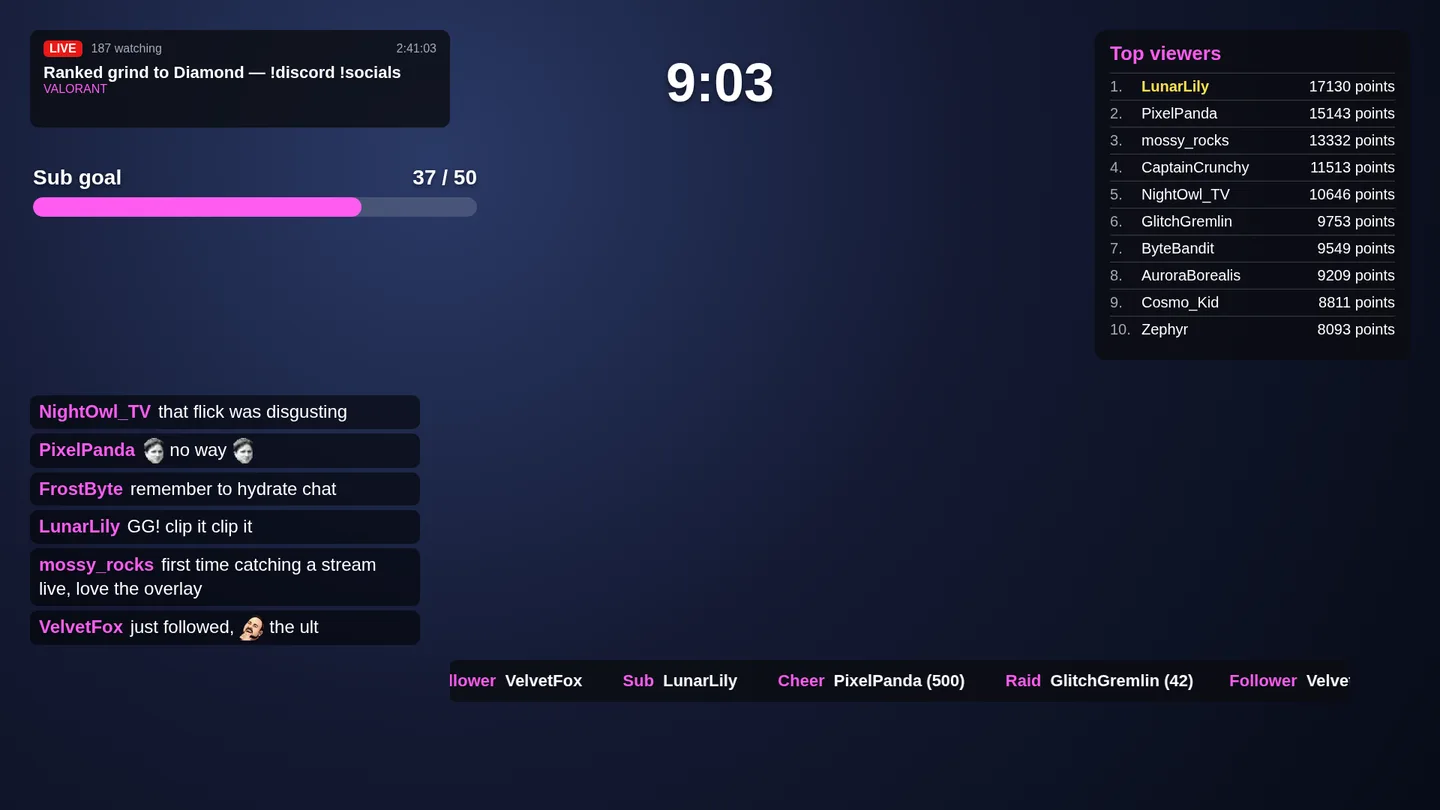
How live data works
- One shared set. Every overlay page gets the same data, keyed by
name (
chat,counter.deaths,leaders.bits.stream). A custom widget receives only the keys it declares; a built-in element reads the keys it needs. - Pushed on change. When a value changes, the new value of that key is sent to every open page at once. A page that falls behind gets the newest value of each key, never a stale one. Nothing is sent when a recomputed value is identical to the last one.
- Whole values. A key's value is always sent whole: when one chat line
arrives, the
chatkey is sent again with all its lines. - Some keys survive restarts.
latest.*andtimer.*are saved and restored when CroStream starts. Counters are re-sent at start from their saved values.eventsis refilled from the history. Everything else is recomputed after start. - Tests don't count. Events from a trigger's Test button and integration notices never reach live data, so testing a macro can't put a fake follower in your "latest follower" box. Use real events, or actions that change data (Change a counter, Control a timer).
- Missing until known. A key that hasn't been produced yet is simply
absent (and
eventscan benullon a fresh install). Always handle the empty case. - Dotted keys read the same everywhere. Most keys contain dots. In a
custom widget you can read a key whole or walk into it by dots, and
templates and scripts agree:
{{data.counter.subs}},sl.get('data.counter.subs'),sl.data.counter.subsandsl.data['counter.subs']are the same value, and so are{{data.latest.twitch.follow.vars.user}}andsl.data.latest.twitch.follow.vars.user. A family reads as one object: withcounter.*declared,{{data.counter}}(orsl.data.counter) holds every counter by name.
Times are RFC 3339 strings in UTC, such as "2026-10-11T19:04:05.123Z".
Each value is at most 1 MB.
All keys
| Key | Value | Updates | Survives restart |
|---|---|---|---|
chat |
The last 50 chat lines, oldest first | Every chat message | No |
events |
The last 30 events, newest first | Every event | Refilled from history |
latest.<event type> |
The newest event of a type | Every event of that type | Yes |
counter.<name> |
A number | Every change; all counters at start | Yes (from the counters) |
timer.<name> |
A timer's state | Every Control a timer action | Yes |
stream |
Live, title, category, viewers, start time | Every minute, and at once on stream or channel changes | No |
leaders.<metric>.<period> |
Top 10 supporters | 5 s after a relevant event, and every 3 minutes | No |
credits |
Everyone who took part this stream | With the leaderboards | No |
hypetrain |
The current or last hype train | Every hype train update | No |
poll |
The current or last poll | Every poll update | No |
prediction |
The current or last prediction | Every prediction update | No |
folders.<field>, folder.<id> |
A media folder's files | Custom widgets only, every 3 minutes | n/a |
chat
The last 50 chat messages, oldest first.
[
  {
    "id": "c0a1d6f3-2f8e-4c55-9d2e-6c1f0b7a9e11",
    "user": "LunarLily",
    "text": "Kappa that was clean Kappa",
    "time": "2026-10-11T19:04:05.123Z",
    "emotes": [
      { "id": "25", "name": "Kappa" },
      { "id": "25", "name": "Kappa" }
    ]
  }
]
| Field | Type | Meaning |
|---|---|---|
id |
string | Twitch's message ID: stable and unique, good for sl-key |
user |
string | The chatter's display name |
text |
string | The message as typed |
time |
string | When it arrived |
emotes |
array | The message's Twitch emotes in order, repeats included: {id, name}. Left out when there are none. name is the word the emote replaces; the image is at /emote/<id> (sl.emote(id) in a widget) |
Updates with every chat message. Starts empty when CroStream starts.
events
The last 30 events (follows, subs, gifts, cheers, raids, redemptions, stream online and offline, channel updates, ad breaks, hype trains, poll and prediction results, Steam games, hotkeys, queue releases, timer ticks), newest first. Filled from the history at start, so it isn't empty after a restart.
[
  {
    "type": "twitch.cheer",
    "user": "PixelPanda",
    "amount": 500,
    "summary": "cheered 500 bits",
    "time": "2026-10-11T19:02:11Z"
  },
  {
    "type": "twitch.follow",
    "user": "VelvetFox",
    "summary": "followed",
    "time": "2026-10-11T19:01:40Z"
  }
]
| Field | Type | Meaning |
|---|---|---|
type |
string | The event type, as in the table under latest |
user |
string | Who did it (display name), or "" |
amount |
number | Bits, gifted subs, raid viewers and the like. Left out when 0 |
summary |
string | A short description, as in the activity feed |
time |
string | When it happened |
Can be null until the first event.
latest
latest.<event type> is the newest event of one type, with its
variables: the same values a trigger for that event gets, so
latest.twitch.cheer carries user, bits and message. All values are
strings.
{
  "vars": {
    "user": "PixelPanda",
    "user_login": "pixelpanda",
    "user_id": "123456789",
    "bits": "500",
    "kind": "cheer",
    "message": "Cheer500 lets go",
    "power_up": "",
    "amount": "500",
    "summary": "cheered 500 bits"
  },
  "time": "2026-10-11T19:02:11Z"
}
Every event also has user, summary and, when it has an amount,
amount. The other variables:
| Key | Variables |
|---|---|
latest.twitch.follow |
user, user_login, user_id |
latest.twitch.sub |
user, user_login, user_id, tier, months, streak, message, gifter |
latest.twitch.gift |
user, user_login, user_id, count, tier, total |
latest.twitch.cheer |
user, user_login, user_id, bits, kind, message, power_up |
latest.twitch.raid |
user, user_login, user_id, viewers |
latest.twitch.redemption |
user, user_login, user_id, input, reward, reward_id, cost |
latest.twitch.auto_reward |
user, user_login, user_id, reward, cost, message, emote |
latest.twitch.channel.update |
user, summary |
latest.twitch.ad_break |
duration, automatic |
latest.twitch.stream.online, latest.twitch.stream.offline |
user, summary |
latest.twitch.hype_train |
user, summary |
latest.twitch.poll.end, latest.twitch.prediction.end |
user, summary |
latest.steam.game_started |
game, appid, playtime_hours |
latest.steam.game_stopped |
game, appid, playtime_hours, session_minutes |
latest.steam.screenshot |
game, appid, screenshot_path |
latest.hotkey.press |
user, summary |
latest.queue.release |
user, summary |
latest.tools.interval |
user, summary |
Every gifted sub also arrives as a twitch.sub (for the recipient, with
gifter set), so latest.twitch.sub can be a gifted sub. Chat messages
don't produce a latest key; read chat. What each variable
means is in Variables.
In a template: {{data.latest.twitch.follow.vars.user}}. In a widget,
declare latest.* for all of them, or the exact keys you use.
Counters
counter.<name> is the value of a counter kept by the
Change a counter action: a whole number.
- Counter names are lowercase (the action lowercases them), so the key of
a counter you call
Deathsiscounter.deaths. - Updates every time the counter changes, and every counter is sent again when CroStream starts.
- A counter that was never changed doesn't exist yet: the key is missing.
- A name with spaces (
death count) makes a key with a space. Templates can't spell it; read it in a script assl.data['counter.death count'], and declarecounter.*.
Timers
timer.<name> is the state of a countdown or stopwatch run by the
Control a timer action (and shown by Timer elements of that name).
The server sends only state changes, never ticks: the page works out the
time shown from this state.
{
  "mode": "countdown",
  "running": true,
  "endsAt": "2026-10-11T19:30:00Z",
  "remainingMs": 300000,
  "elapsedMs": 0,
  "capMs": 0
}
| Field | Meaning |
|---|---|
mode |
"countdown" or "stopwatch" |
running |
Whether it's counting now |
endsAt |
A running countdown: when it reaches zero. Left out otherwise |
remainingMs |
A paused or stopped countdown: the time left, in ms |
startedAt |
A running stopwatch: when it last started. Left out otherwise |
elapsedMs |
A stopwatch: the time counted before startedAt, in ms |
capMs |
A countdown's longest allowed time left (for subathons), in ms; 0 is none |
To show it:
- countdown, running:
endsAt − now(not below 0); - countdown, paused:
remainingMs; - stopwatch, running:
elapsedMs + (now − startedAt); - stopwatch, paused:
elapsedMs.
Timer names are 1 to 64 letters, digits, spaces, dots, dashes or
underscores, and keep their capitals. A widget can only declare lowercase
keys, so declare timer.* and pick the timer in your script. Timers are
saved and survive restarts; a running countdown keeps running while
CroStream is closed.
stream
Your stream's state on Twitch.
{
  "live": true,
  "title": "Ranked grind to Diamond — !discord !socials",
  "category": "VALORANT",
  "viewers": 187,
  "startedAt": "2026-10-11T16:24:00Z"
}
| Field | Meaning |
|---|---|
live |
Whether you're live |
title |
The stream title |
category |
The category (game) name |
viewers |
Current viewers while live; 0 when offline |
startedAt |
When the stream went live. Left out when offline |
Checked every minute, and at once when you go live or offline, change your title or category, or Twitch connects. A failed check keeps the last value.
Leaderboards
leaders.<metric>.<period> is a top-10 list, best first:
| Metric | value is |
From |
|---|---|---|
bits |
Bits cheered | History |
gifts |
Subs gifted (anonymous gifts left out) | History |
chat |
Chat messages sent | History |
points |
Points balance | Viewer database |
watch |
Minutes watched | Viewer database |
| Period | Covers |
|---|---|
stream |
This stream: since you went live, or since CroStream started when you're offline |
week |
The last 7 days |
all |
Everything stored |
That makes 15 keys, such as leaders.bits.stream, leaders.gifts.week and
leaders.points.all. Points are balances, so all three points periods
show the same board. The points and watch boards leave out viewers
the viewer database ignores (bots, your alt accounts).
Boards are recomputed 5 seconds after the last follow, sub, gift, cheer,
raid or chat message (a burst of chat is one recompute), when the stream
goes live or offline, and every 3 minutes regardless. The bits, gifts
and chat boards stop updating while history is off; points and
watch while the viewer database is off.
credits
Everyone who took part in this stream, for end-of-stream credits.
{
  "since": "2026-10-11T16:24:00Z",
  "followers": ["VelvetFox", "NightOwl_TV"],
  "subs": ["LunarLily"],
  "gifters": [{ "user": "Generous", "count": 5 }],
  "cheerers": [{ "user": "PixelPanda", "bits": 500 }],
  "raiders": [{ "user": "BigStreamer", "viewers": 42 }],
  "chatters": ["LunarLily", "PixelPanda", "FrostByte"]
}
| Field | Holds |
|---|---|
since |
Where "this stream" starts (as the stream period above) |
followers |
Up to 500 new followers |
subs |
Up to 500 subscribers (gift recipients included) |
gifters |
Up to 100 gifters, most subs first |
cheerers |
Up to 100 cheerers, most bits first |
raiders |
Up to 100 raiders, biggest raid first |
chatters |
Up to 50 chatters, most active first |
Recomputed with the leaderboards, from the history (so it's not updated while history is off).
Hype train
{
  "active": true,
  "level": 2,
  "progress": 350,
  "goal": 1000,
  "total": 1350,
  "endsAt": "2026-10-11T19:08:00Z"
}
| Field | Meaning |
|---|---|
active |
Whether a hype train is running |
level |
Its level |
progress |
Points toward the next level |
goal |
Points the level needs |
total |
Points in all |
endsAt |
When it ends unless it gets more. Left out after it ended |
Updates on every hype train event. When it ends, active turns false,
progress and goal go to 0, and level and total keep their last
values.
Polls and predictions
poll is the current or last poll, prediction the current or last
prediction. Both have the same shape.
{
  "active": true,
  "status": "active",
  "title": "Will I beat the boss?",
  "choices": [
    { "title": "Yes", "votes": 12000, "color": "blue" },
    { "title": "No", "votes": 8000, "color": "pink" }
  ],
  "endsAt": "2026-10-11T19:10:00Z"
}
| Field | Poll | Prediction |
|---|---|---|
active |
true while voting is open |
true while open or locked |
status |
active, then completed, terminated or archived |
active, locked, then resolved or canceled |
title |
The question | The question |
choices[].title |
The choice | The outcome |
choices[].votes |
Votes | Channel points on the outcome |
choices[].color |
(none) | blue or pink |
choices[].winner |
true on the choice(s) with most votes once completed (ties mark every one) |
true on the winning outcome once resolved |
endsAt |
When voting closes. Left out after it ended | When it locks. Left out once locked or ended |
Updates as votes come in. Polls and predictions are Twitch Affiliate and Partner features.
Media folders
These two keys exist only inside custom widgets, which can't list a media
library folder themselves. For a Media folder field, with folder.*
declared, the page lists the chosen folder and sends its files as
folders.<field key> and folder.<folder id>: a list of items with at
least id, kind (image, video or audio), width and height.
The page lists the folder again every 3 minutes. See
Media folders.
What isn't live data
Steam's library, OBS scenes, queue contents and Discord status are not
sent to overlays. Show the latest Steam game with
latest.steam.game_started; for anything else, use the
HTTP API (GetIntegrationState) from your own tools.
Reading live data outside an overlay
The same data is available without a widget, for scripts and tools:
| How | What you get |
|---|---|
POST /api/OverlayData with [] |
Every key and its current value, as one JSON object. See HTTP API. |
GET /overlay/<overlay id>/state |
{"state": …, "data": {…}}: an overlay's live state plus every data key |
GET /overlay/<overlay id>/events |
A Server-Sent Events stream: overlay (the overlay's design), state (its live overrides), then data events with the changed keys, as they happen; deleted if the overlay is deleted |
curl -s http://127.0.0.1:8080/overlay/overlay-01m4nr1fbqrd8vhqt7dkh68kwc/state | jq '.data["leaders.bits.stream"]'
The overlay URLs work on both the desktop app's overlay server
(http://127.0.0.1:62689) and in browser mode (the
address you serve on).