Sentry
CroStream's crash reporting is built on Sentry. This page is the complete reference: what Sentry is, which of its features CroStream uses and when, where your data goes, and exactly what is removed on the way. For turning reporting on and off, use the Crash reporting guide; this page explains what happens behind that switch.
The short version
- In a released version, nothing goes to Sentry unless you turn crash reporting on (Settings → Crash reporting). A development build always reports.
- Everything passes through CroStream first, which removes secrets, chat, viewer names and your folder paths before anything leaves your computer.
- The only destination is Sentry's US servers, at
o4512239177236480.ingest.us.sentry.ioon port 443. Blocking it stops reports and nothing else.
Where to find it
Open Settings and scroll to Crash reporting, below Updates.
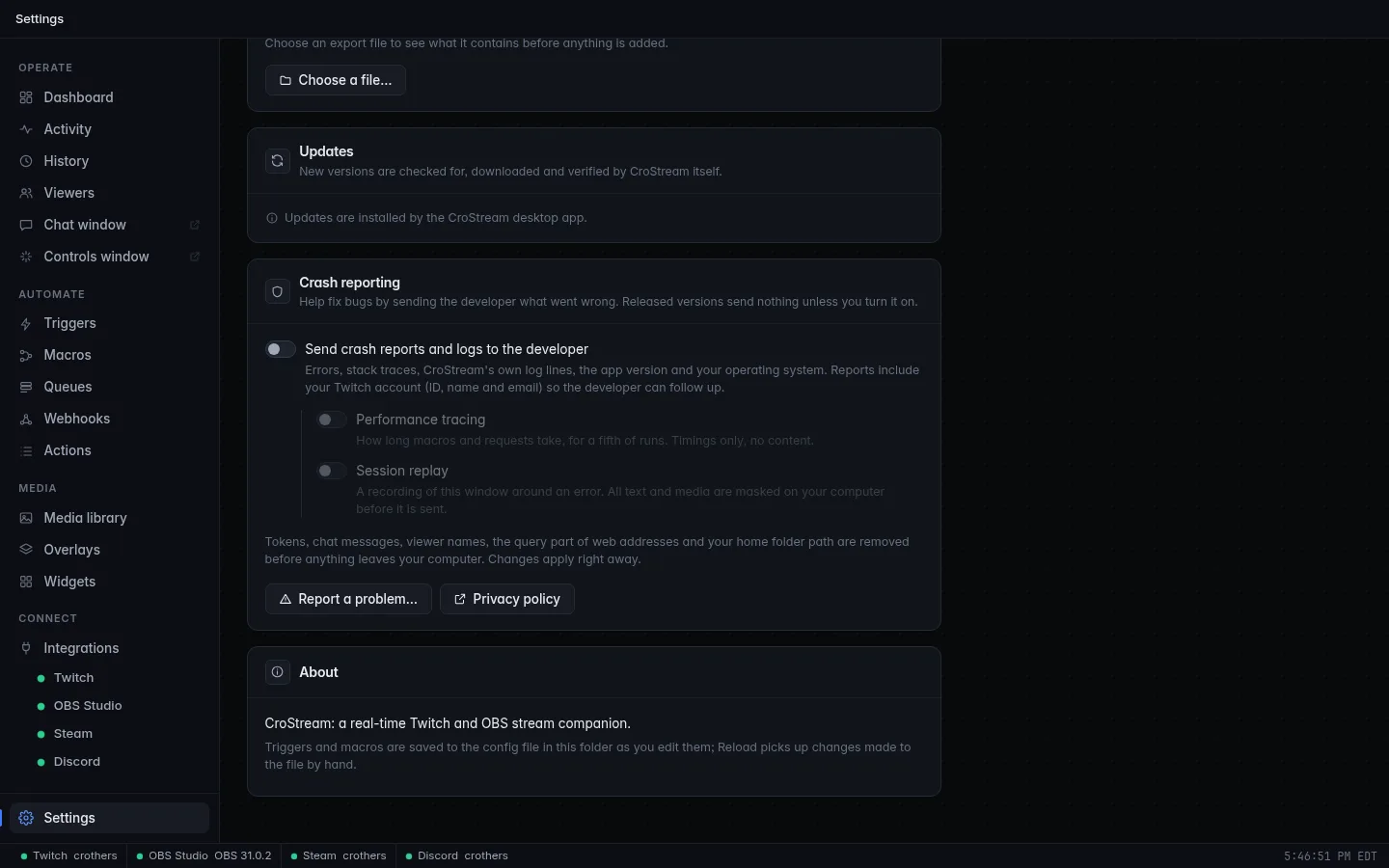
Report a problem… is also in the tray icon's menu on every system, and under Help in the macOS menu bar. Those menus belong to your operating system and can't be shown in a screenshot here; see Desktop behaviour.
What Sentry is
Sentry is an error-monitoring service run by Functional Software, Inc. A program includes Sentry's code (its SDK); when something goes wrong the SDK packages up what happened and sends it to Sentry, where the developer sees it grouped with the same error from other people, with the version, the system it ran on and the steps leading up to it. Without that, the developer learns about a bug only when someone notices and writes it up, if they do.
CroStream uses it to find and fix bugs, in test builds especially, and to help you with a problem you report. Reports aren't sold or used for advertising; see the privacy policy.
Two Sentry projects
Sentry sorts what it receives into projects. CroStream has two, both under the developer's one Sentry organization:
| Project | Gets reports from | Examples |
|---|---|---|
| The app's core (written in Go) | The part of CroStream that does the work: Twitch, OBS, macros, triggers, the viewer database, overlays. | A macro step that crashes; a failing connection; a log line at error level. |
| The window (written in Svelte) | The pages you click through, in the desktop window or in a browser. | A page that fails to draw; a button that throws an error; a Report a problem message. |
The window never contacts Sentry itself. See How data travels.
What CroStream uses from Sentry
Sentry has many features. These are the ones CroStream uses, in Sentry's own words with a plain explanation.
| Sentry feature | In plain words | Sent when | Setting |
|---|---|---|---|
| Issues and events | An error or crash, with its stack trace: the chain of code that led to it. Includes failures CroStream contained and restarted. | An error is logged, or a part of the app fails. | Main switch |
| Logs | CroStream's own log lines, as Sentry's searchable log stream. | A log line at information level or above. | Main switch |
| Breadcrumbs | The trail before an error: the last 100 log lines (information and warning) and the types of recent events, such as "follow" or "raid". | Attached to an error, not sent alone. | Main switch |
| User | Who the report is from: your Twitch ID, login, display name and email. | With errors, transactions and reports. | Main switch |
| Tracing (performance, transactions) | How long something took. CroStream times macro runs, the browser-mode API's requests, and the window's page loads. | About one run in five (0.2). |
Performance tracing |
| Session Replay | A recording of the window around an error. | Only when an error happens, never otherwise. | Session replay |
| User Feedback | The message you type in Report a problem…. | When you click Send. | Main switch |
Every feature needs the main switch. Performance tracing and Session replay are additional opt-ins and do nothing while it is off.
Issues and events
An event is one error report. Sentry groups similar events into an issue, so a bug hitting fifty people is one issue with fifty events. CroStream's events come from:
- a part of the app that fails (a panic, in Go's terms), with the name of
the part that failed,
goroutine, as a tag; - anything CroStream logs at error level;
- an error in the window.
Events carry the stack trace (function and package names are kept so the developer can find the code), the version, your operating system and your Twitch account.
Logs
Besides errors, CroStream sends its ordinary log lines (information and above) while reporting is on. These are the same lines CroStream writes to its own log: what connected, what ran, what failed. Sentry shows them together with the errors around them. Attributes that name a person (such as a login or chat text) are dropped; see What is removed.
Breadcrumbs
An error alone often isn't enough to understand a bug, so each carries a
trail. In the app's core it is the last 100 log lines at information
and warning level, and the type of each recent event (for example
follow), never what it contained: no chat text, no names, no payload. The
window adds its own trail the SDK collects by default, such as navigation
and requests (method, address and status, never a body). All of it is
scrubbed the same way.
User
The report's user is the Twitch broadcaster you're logged in as: ID,
login, display name and, once your Twitch login has the optional
user:read:email permission, email. CroStream's core owns this: it sets
it itself, replaces anything the window says about the user, and never sends
an IP address. Logging out of Twitch clears it, and reports are then sent
without a name. See Your Twitch
account.
The panel always shows who reports are sent as, here crothers (crothers@example.com) (see the last panel in Settings and what they control). Until your Twitch login has the email permission, only the name is shown.
Tracing
With Performance tracing on, CroStream sends transactions: a name and how long it took.
| Timed | Name | Detail kept |
|---|---|---|
| A macro run | macro (operation macro.run) |
The number of steps, and whether it failed. Never the macro's name, its variables or its content. |
| A browser-mode API request | /api/<Method> (operation http.server) |
The method name and the status. Applies to browser mode only. |
| The window's page loads and navigation | As the Sentry browser SDK names them | Timings. Addresses are reduced to their path, with no query. |
One transaction in five is kept (a rate of 0.2). The window's requests to
the browser-mode API carry a trace header so the two sides connect;
the desktop app makes no HTTP calls of its own.
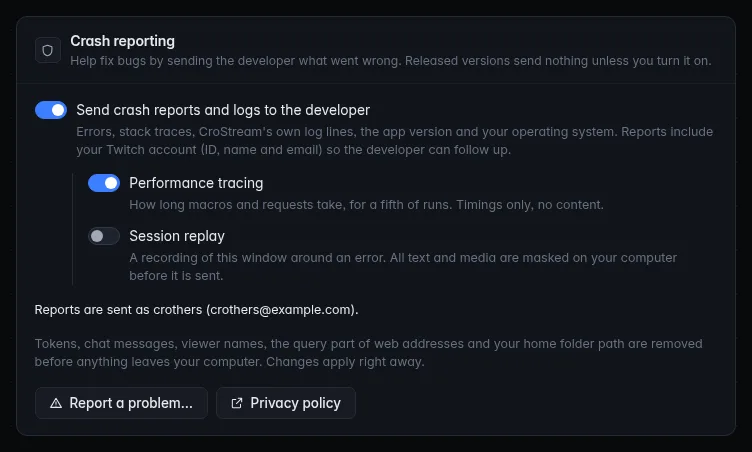
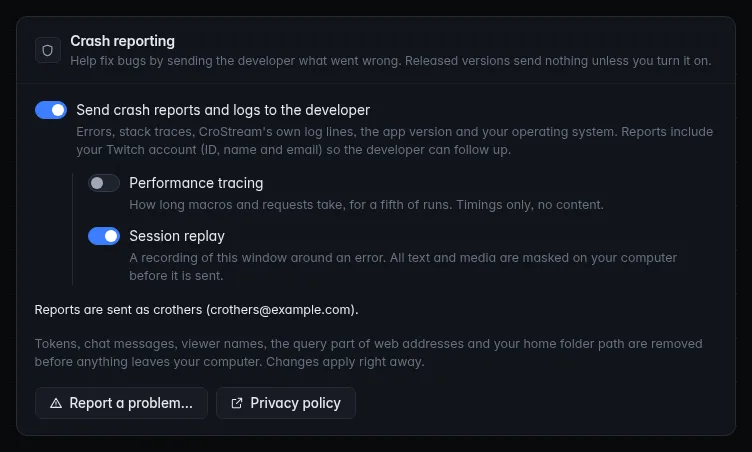
Session Replay
With Session replay on, the window records what it shows, like a
screen video built from the page rather than pixels, and keeps only the
moments around an error. No whole-session recordings are made (the
session sample rate is 0; the on-error rate is 1: every error that
happens while it is on).
- All text is masked, all inputs are masked and all media (images, video) are blocked, in the window, before the recording is sent.
- No console lines, no clicks list and no request or response detail (no headers or bodies) are included.
- The recording's code is a separate download (about 127 KB, as built) fetched only if you turn replay on.
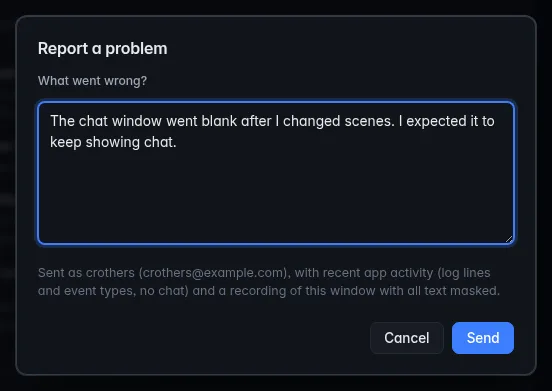
With replay on, Report a problem… says so before you send:
User Feedback
Report a problem… sends a Sentry user feedback item: your message, who it is from, and the same breadcrumbs as an error. It goes with the replay if Session replay is on. Your wording is kept, apart from the removal of tokens and web address queries. See Report a problem.
When it goes through, the box says so:
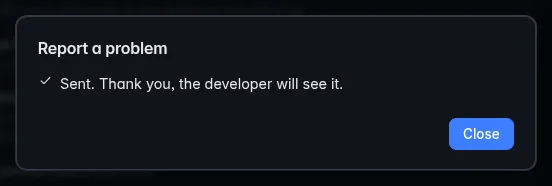
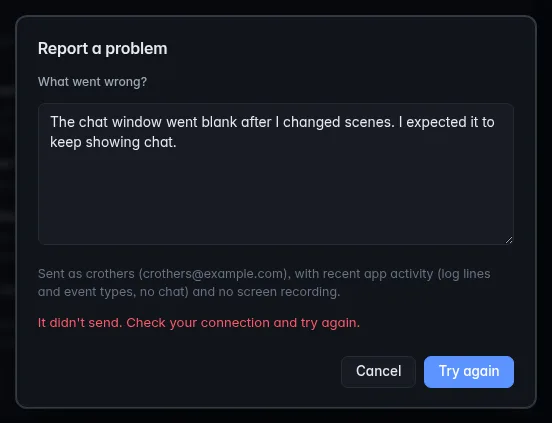
If the report can't get out in about five seconds, it says that instead, keeps your text, and offers Try again:
Not used
CroStream doesn't use these Sentry features, and the relay drops their data if anything tried to send it:
- Profiling (code-level CPU profiles)
- Attachments (files sent with an error, such as your config)
- Cron monitors and check-ins
- Metrics
- Debug files and source uploads from your computer. The developer uploads the app's source maps from the release machine, which makes window errors readable; nothing of that is on your computer.
- Crash dumps of the native process.
- Hostname and module lists: both are turned off.
Settings and what they control
| In CroStream | config.json key |
Sentry features |
|---|---|---|
| Send crash reports and logs to the developer | diagnostics.reports |
Issues and events, logs, breadcrumbs, user, user feedback |
| Performance tracing | diagnostics.tracing |
Transactions |
| Session replay | diagnostics.replay |
Session Replay |
| (development build) | Main switch forced on; tracing and replay still need their own switch | |
CROSTREAM_SENTRY=off (environment) |
Everything off, even in a development build |
The panel shows each combination. The main switch alone sends errors, logs, breadcrumbs and your identity; the two options under it are separate:
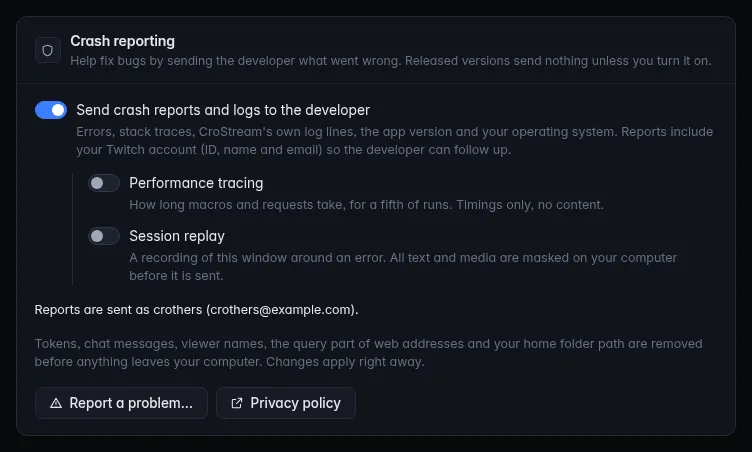
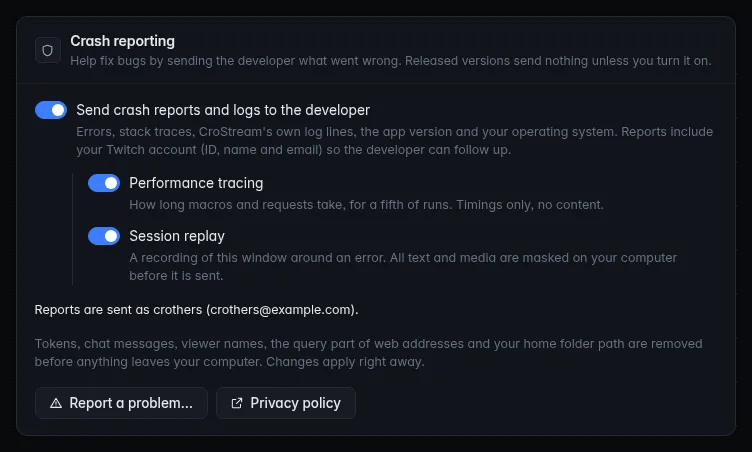
Development builds, builds without crash reporting and runs switched off by the environment look different. Those states are shown in Troubleshooting.
All three keys default to off and are left out of the file while they are.
See the settings file and
Environment variables
for the developer details, including CROSTREAM_SENTRY_DSN and
CROSTREAM_SENTRY_UI_DSN, which point a test run at another Sentry project.
Changes apply immediately. Turning reporting off first sends what is already queued (for up to two seconds), then stops. The Crash reporting guide explains each switch for users.
Release and environment
Every report is tagged with where it came from, so the developer can tell a bug in a test build from one in the release you run.
| Tag | Value | Used for |
|---|---|---|
| Release | crostream@ plus the version, for example crostream@1.4.0 |
Seeing which version has a bug, whether a new release fixed it, and which version brought it. |
| Environment | development for a development build, otherwise your channel: stable or beta |
Keeping test-build noise apart from real releases, and weighing a Beta bug differently from a Stable one. |
How data travels
flowchart LR
    W[The window] -- "its reports" --> R["CroStream's relay<br/>/sentry/envelope"]
    A[The app's core] --> S[CroStream's scrubber]
    R --> S
    S -- "HTTPS, port 443" --> Y[Sentry, US region]
The local relay
The window's reports never go to Sentry directly. The window posts them to
a path on CroStream itself, /sentry/envelope (in the desktop app, inside
the window's own server; in browser mode, on the same server as the web
UI). The relay is a one-way gate:
- Refuses everything while reporting is off (answers "nothing to send"), so a window can't send while you've turned it off.
- Checks the destination. A report must name the window's own Sentry project; anything addressed elsewhere is refused, so it isn't a general proxy.
- Limits size and rate: at most 2 MB per report, and 60 at once then one a second.
- Keeps only what your settings allow. Performance items are dropped unless tracing is on, replay items unless replay is on, and every item type CroStream doesn't use (profiles, attachments, cron check-ins, metrics) is dropped always.
- Scrubs every text value with the same rules as the core, replaces the user with your Twitch identity, removes the computer's name and module lists, and tells Sentry never to infer an IP address.
- Forwards over HTTPS with a 10-second limit.
Where it goes
Everything is sent over HTTPS (port 443) to Sentry's US region, host
o4512239177236480.ingest.us.sentry.io. There is no other server and no
CroStream server in between.
Firewalls and Pi-hole
If you block that host, crash reports simply don't arrive. CroStream keeps working as normal and nothing in the app breaks or shows an error (the Report a problem box says It didn't send if you try it). Blocking it is a fine alternative to the switch on a computer you manage centrally. Note that Twitch, OBS and updates use other addresses, not this one.
Offline, slow and busy
- Offline or unreachable: the report isn't sent, and CroStream does not save it to retry later. It is lost; the next error is tried afresh. CroStream configures no offline queue, and the Sentry SDKs it uses do not keep one on disk by default. Nothing waits or blocks while this happens.
- Sentry asks for slower sending (a rate limit): the SDK obeys it and holds back. The relay passes Sentry's rate-limit headers on to the window so its SDK obeys too.
- Too many errors: CroStream spaces them itself.
| Limit | What it does |
|---|---|
| Error events from the core | Up to 20 at once, then one every 10 seconds. |
| The same error | Sent once a minute at most. |
| Reports from the window | Up to 60 at once, then one a second. |
| One report from the window | Up to 2 MB. |
A crash loop, then, can't use up the developer's quota or your network.
What is removed
All text CroStream sends passes through one scrubber in the app's core: the core's own events, logs and breadcrumbs, and everything the window sends through the relay. It runs on your computer. The rules, in order:
| Rule | Before | After |
|---|---|---|
| Authorization headers | Authorization: Bearer abc123 |
Authorization: [redacted] |
Bearer, OAuth and Basic credentials |
Bearer abc123 |
Bearer [redacted] |
| Twitch IRC passwords | oauth:abc123 |
oauth:[redacted] |
| Values named token, secret, password, passwd or api key | access_token=abc123, "client_secret":"abc123" |
access_token=[redacted], "client_secret":"[redacted]" |
| Passwords inside web addresses | https://name:pass@host/x |
https://host/x |
| Discord webhook secrets | /api/webhooks/123/abc |
/api/webhooks/[redacted] |
| The query part of web addresses | https://host/path?code=abc&x=1 |
https://host/path?[redacted] |
| Email addresses | name@example.com |
[redacted] |
| IP addresses | 203.0.113.7 |
[ip] |
| Your home folder | /home/name/crostream/x.go |
~/crostream/x.go |
| Your user name as a path part | C:\Users\name\x |
C:\Users\[user]\x |
Long random-looking strings: 24 or more letters, digits, _ or - with at least three digits (hashes, IDs, keys) |
a1b2c3d4e5f6a7b8c9d0e1f2a3 |
[redacted] |
Besides text, whole fields are dropped, by name (any case), from log
attributes, tags, extra data and contexts: login, user, username,
display_name, viewer, chatter, chat, text, message_text,
body, email, ip, remote, peer, host, cookie, authorization,
and anything whose name contains token, secret, password,
api_key or cookie. This is how chat text and viewer names stay out
of logs: the value is not just masked but never included.
Also removed from every report:
- your computer's name (replaced with
crostream) and the list of program modules; - the values of variables in stack frames;
- cookies, request headers (but the browser name, from the user agent, stays for window errors), request bodies and the query of the page's address;
- for the window, the SDK's own idea of who you are, replaced by your Twitch identity.
What is deliberately kept
To be useful the report keeps: Go function and package names in stack
traces (they contain no digits that would trip the token rule),
loopback and "any" addresses such as 127.0.0.1, which only name your
own computer, Sentry's own IDs (event, trace, replay), timestamps,
the version, your operating system, and the Twitch identity
described above. The scrubber prefers to remove when unsure, so an
unusually long name with digits in it may be turned into [redacted].
Scrubbing twice changes nothing, so a value that has already been cleaned stays as it is.
Where it is stored, and for how long
Reports are stored by Sentry in its US region. How long Sentry keeps them, and on what terms, is Sentry's to say: see the Sentry privacy policy and its documentation on data retention. CroStream sets no retention of its own here and this page doesn't promise a figure. The CroStream side of this, including who can read reports, is in the privacy policy.
To have a report deleted, email contact@crostream.io.
Questions
Can I see what was sent?
Not from the app. Nothing is shown or saved locally: the reports are on Sentry's side, where the developer reads them, and CroStream keeps no copy on your computer. What you can see is what goes in a report from the Report a problem box, which says who it is sent as and what comes with it, and the log lines CroStream writes to its normal log output (the same text that becomes the report's logs). The lists on this page are the full description.
Does turning it off delete past reports?
No. Turning it off stops anything new from being sent, immediately. Reports already sent stay with Sentry; to have them removed, email contact@crostream.io.
Is my chat sent?
No. Chat messages and viewer names are removed from everything, including log lines and the trail of recent events (only the event's type is kept). Session replay masks all text and media. The one exception is a message you write yourself in Report a problem….
Why does a development build insist on reporting?
A development build is a test build: it exists so the developer finds problems before a release, and without reports there would be no point in handing it out. A released version never forces it. See Development builds.
Does it slow CroStream down?
No noticeable amount. With reporting off, the window doesn't even load the Sentry code. With it on, the window loads about 160 KB of it (as built), plus about 127 KB for replay only if you turn that on. Sending happens in the background, never blocks what you're doing, and is rate-limited.
Does blocking Sentry break CroStream?
No. See Firewalls and Pi-hole above: reports just don't arrive.
Can I point it at my own Sentry?
Yes, in a test setup: CROSTREAM_SENTRY_DSN and CROSTREAM_SENTRY_UI_DSN
replace the two destinations. See Environment
variables.