Logging in to Twitch
CroStream works on your channel as you, the broadcaster: it reads your chat, sees channel point redemptions and follows, creates clips and posts messages. To do that it needs your permission, which you give once on Twitch's own login page. You never type your Twitch password into CroStream.
How login works
- In CroStream's sidebar, under Connect, click Twitch. (Or click Twitch in the status bar at the bottom of the window.)
- Click Login. Your web browser opens a Twitch page, and CroStream shows Waiting for authorization in your browser….
- On the Twitch page, check that you're logged in to Twitch as your streaming account, then click Authorize.
- The browser tab says Logged in as your name . You can close this tab. Close it and go back to CroStream.
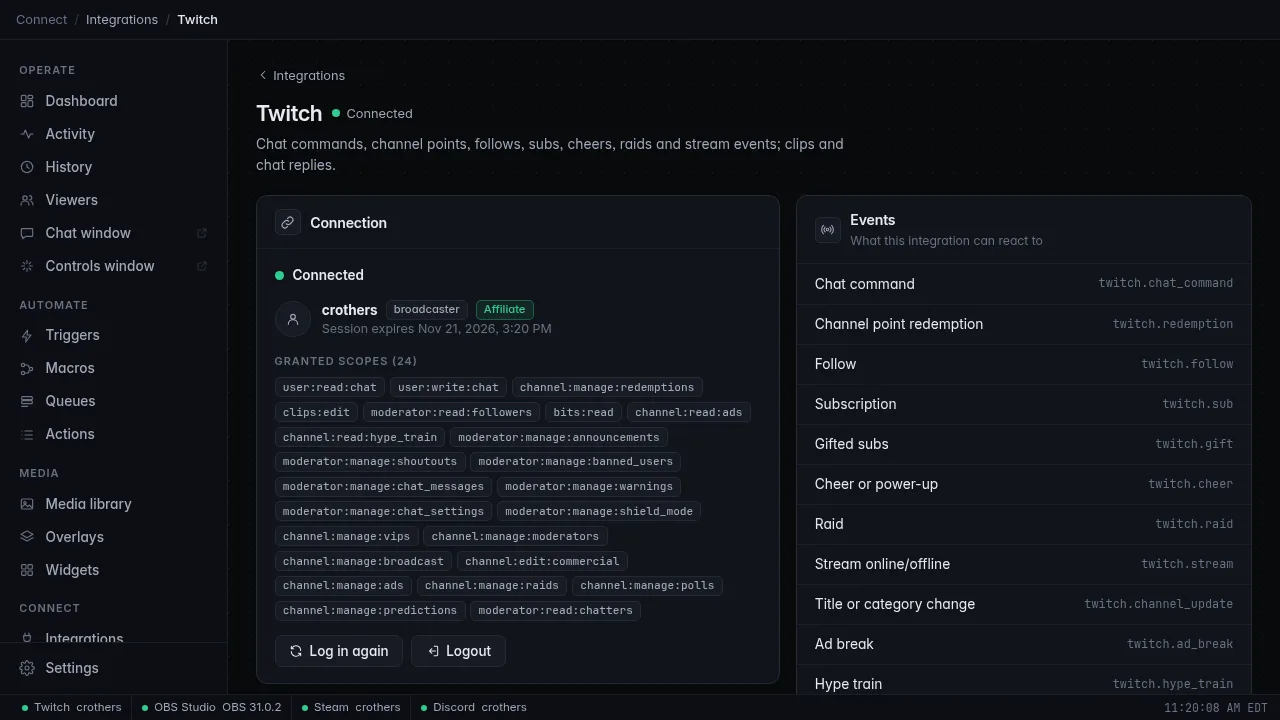
The Twitch page in CroStream now shows your channel name, your role (broadcaster) and when the login expires. The status bar at the bottom of the window shows Twitch followed by your channel name, with a green dot.
The browser didn't open?
Click Open login page next to Waiting for authorization in your browser…. It opens the same page again. Changed your mind? Click Cancel.
Log in on the streaming computer
Twitch sends you back to a small page that CroStream serves on your own
computer, at localhost port 62689. That only works in a browser on
the same computer CroStream runs on. If you run CroStream on a
different machine with no screen, see Browser
mode.
What CroStream asks for
Twitch shows a list of permissions on the authorize page. CroStream asks for what its features need, and nothing for your account settings, password or payments:
- Chat: read and send chat messages.
- Channel points: see redemptions, and complete or refund them.
- Clips: create clips.
- Activity your triggers react to: follows, bits, ads, hype trains, and poll and prediction results.
- Who's in chat: the list of chatters, which the viewer database uses to count watch time.
-
What actions do: announcements, shoutouts, moderation (timeouts, bans, warnings, deleting messages, shield mode), chat settings, VIPs and moderators, your stream title and category, ads, raids, polls and predictions.
-
Your email address: read-only. Twitch's login page shows it among the permissions. CroStream uses it only to tell the developer who sent a crash report, and only if you turn crash reporting on (it's off in released versions until you do). Without it everything works the same.
The Twitch page in CroStream lists exactly what your current login allows, under Granted scopes.
No channel points?
Channel points exist only for Twitch Affiliates and Partners. On a channel that isn't one yet, the Twitch page says so, and triggers on redemptions and the reward actions are turned off. Everything else works.
Your login is private
Your login is stored on this computer only, in a private folder only your user account can read (see Where CroStream keeps its files). It's never part of a backup or an export file, so sharing your macros never shares your login.
Why logins expire
Twitch logins from CroStream last a limited time, which Twitch decides. The Twitch page shows the exact date under your name: Session expires date and time.
CroStream logs in straight from your computer, with no CroStream server in the middle that would have to keep your login for you. The kind of Twitch login that works that way can't be renewed in the background, so every so often you log in again. It takes one click and you stay connected while you do it.
CroStream warns you well ahead of time:
- From 14 days before, a banner across the top of the window counts down.
- From 7 days before, a pop-up you have to click through appears each day and each time CroStream starts, until you log in again.
Login warnings explains every warning and what to do about it.
Logging in again
- Open the Twitch page (sidebar Connect → Twitch), or click Log in again on the warning banner.
- Click Log in again and approve the Twitch page as before.
Your current login keeps working while you do this. Chat commands and redemptions don't stop for a moment, and if you cancel halfway, nothing changes. Logging in again before a stream, rather than during one, is still the calm option.
You also need to log in again when:
- A new CroStream version needs a new permission. Until you do, your existing login keeps working minus the new parts: the Activity feed says which events are off ("log in to Twitch again to enable: follows, …"), the Triggers page flags the affected triggers, and the affected actions say "re-login". The Twitch page lists the missing permissions under Log in again to grant: and the Log in again button turns into the main button.
- Twitch rejected your login. Changing your Twitch password, or removing CroStream under Connections in your Twitch settings, ends the login straight away. CroStream shows a red warning saying Twitch logged you out.
Log out
On the Twitch page, click Logout. CroStream stops listening to your channel, forgets the login and tells Twitch to cancel it. Your triggers, macros and other settings stay.
Troubleshooting
| Problem | What to do |
|---|---|
| The browser tab says You declined the authorization on Twitch. | You clicked Cancel on Twitch. Click Login in CroStream and try again. |
| The browser tab says the login failed, or shows an error from Twitch | Start again from CroStream with Login. A login link works only once, so reloading the old tab doesn't help. |
The browser can't reach localhost:62689 |
The browser isn't on the computer CroStream runs on, or CroStream was closed. Log in on the streaming computer with CroStream running. |
| You logged in as the wrong Twitch account | Log out on twitch.tv in your browser, log in there as your streaming account, then click Log in again in CroStream. |
| Twitch shows Off in the status bar | You're not logged in, or Twitch ended the login. Open the Twitch page and click Login. |
| Twitch says Error in the status bar | Hover over it to read the error, or open the Twitch page. CroStream keeps retrying a dropped connection by itself. |
Related
- Connect OBS, the next step
- Login warnings
- Twitch integration: everything Twitch can trigger and do
- Where CroStream keeps its files