Thank and shout out raiders
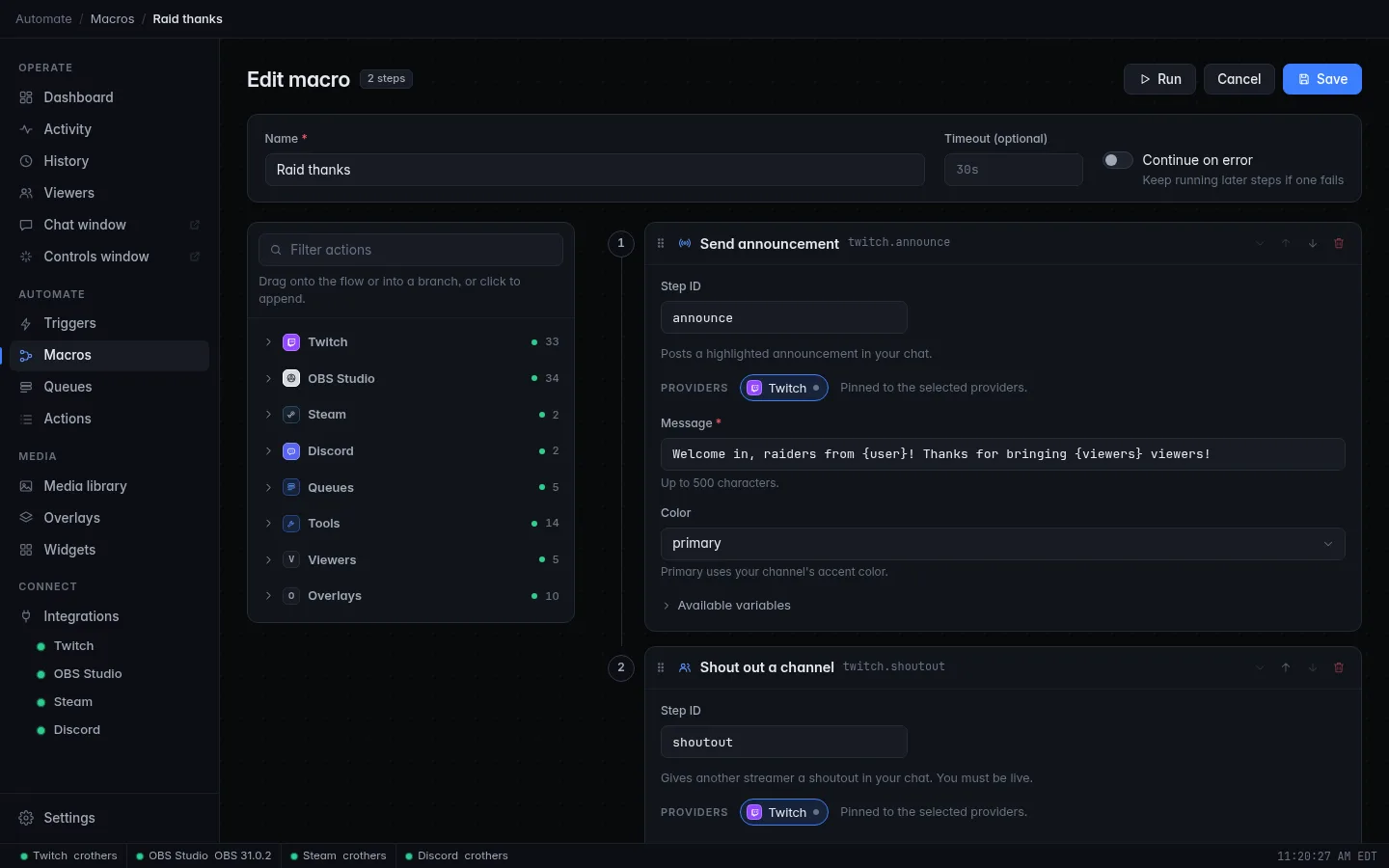
A raid is the best moment to make a new crowd feel welcome, and the worst moment to be typing. In this tutorial CroStream does it for you: every incoming raid gets a highlighted thank-you in chat and an official Twitch shoutout for the raiding channel.
What you'll build
A trigger that fires on every raid and runs a macro that:
- posts a highlighted announcement in chat, with the raider's name and the size of the raid;
- gives the raiding channel a Twitch shoutout, so your viewers can follow them with one click.
CroStream Welcome in, raiders from PixelPanda! Thanks for bringing 42 viewers!
Time: about 5 minutes. Level: beginner.
Before you start
- CroStream is logged in to Twitch. See Logging in to Twitch.
- You know the basics of triggers and macros, from Your first chat command.
- For the real test, you need to be live: Twitch only accepts shoutouts from a live channel.
Step 1: Build the macro
- In the sidebar, click Macros, then New macro. Set Name to
Raid thanks. -
Filter the palette for
announceand click Send announcement. Set Message to:{user}becomes the raiding channel's name and{viewers}the number of viewers they brought. The Raid event provides both; see Events. -
Pick a Color if you like. primary uses your channel's accent color.
- Filter for
shoutand click Shout out a channel. Set Channel to{user_login}. That is the raider's login name, the form Twitch needs. - Click Save.
The announcement comes first on purpose: if Twitch refuses the shoutout, the thank-you has already gone out.
Step 2: Add the trigger
- Click Triggers, then New trigger. Set Name to
Raid thanks. - Under When, pick Raid as the Event.
- Leave Minimum viewers and Maximum viewers empty, so every raid counts.
- Under Then run, pick the Raid thanks macro.
- Click Save.
Check it works
- Click Test. CroStream runs the macro with a sample raid of 10 viewers.
- Your chat shows the announcement.
- Open History. The announcement step succeeded, and the shoutout step
failed with "Twitch refused it: you must be live, and you cannot shout
out your own channel". That failure is expected: Test runs as you,
so
{user_login}is your own channel. A real raid supplies the raider's. - For the real test, ask a friend to raid you while you are live.
Troubleshooting
| What you see | What to do |
|---|---|
| The shoutout fails with "wait a little" | Twitch allows one shoutout every 2 minutes, and the same channel only once an hour. A second raid soon after the first hits that limit. |
| The shoutout fails with "you must be live" | Shoutouts only work while you are live. |
| A step asks you to log in again | Your Twitch login is missing the permission for announcements or shoutouts. Log in again; see Logging in to Twitch. |
| Nothing happens on a real raid | Check that the trigger is Enabled and Twitch is connected (green dot in the status bar). |
Next steps
- Treat big raids differently with two triggers whose ranges do not
overlap: one with Minimum viewers
1and Maximum viewers49, one with Minimum viewers50. Each raid then fires exactly one. - Or branch inside one macro with an If step on
{viewers}: Add logic to a macro. - Show the raid on stream with a big alert: Add an alerts overlay to OBS.
- See every Twitch action, from polls to moderation, on Actions.