Run a points system
A points system rewards the people who hang out on your stream and gives them something to spend on fun extras. CroStream keeps every viewer's points in a database on your computer. It has no built-in earning rules, so you decide exactly how points are earned and spent, using triggers and macros. This tutorial sets up the classic version.
What you'll build
- Viewers earn 5 points every 10 minutes while you are live, lurkers included.
!pointstells a viewer their balance and watch time.!topposts the five richest viewers in chat.- A leaderboard on stream shows the top five.
NightOwl_TV !points
CroStream @NightOwl_TV, you have 1,250 coins and have watched 14h 20m.
Time: about 20 minutes. Level: intermediate.
Before you start
- CroStream is logged in to Twitch.
- The viewer database is on: open Viewers in the sidebar, click
More → Settings, and check that Keep a viewer database is on. Set
Name of your points if you want something other than "points", such
as
coins. See Viewers. - You know triggers and macros, from Your first chat command.
Step 1: Pay viewers for watching
- Click Macros, then New macro. Set Name to
Pay viewers. - Filter for
points, click Give points to everyone watching, and set Amount each to5. Leave Who on watching, which counts everyone in the chat list, lurkers too. Set Reason towatching; it shows in each viewer's history. - Click Save.
- Click Triggers, then New trigger. Set Name to
Pay viewers. - Pick On a timer as the Event. Set Every to
10mand leave Only while live on. - Pick the Pay viewers macro and click Save.
Bots and the logins on your ignore list never get points. See Viewers.
Step 2: A !points command
- Make a macro called
Points. - Filter for
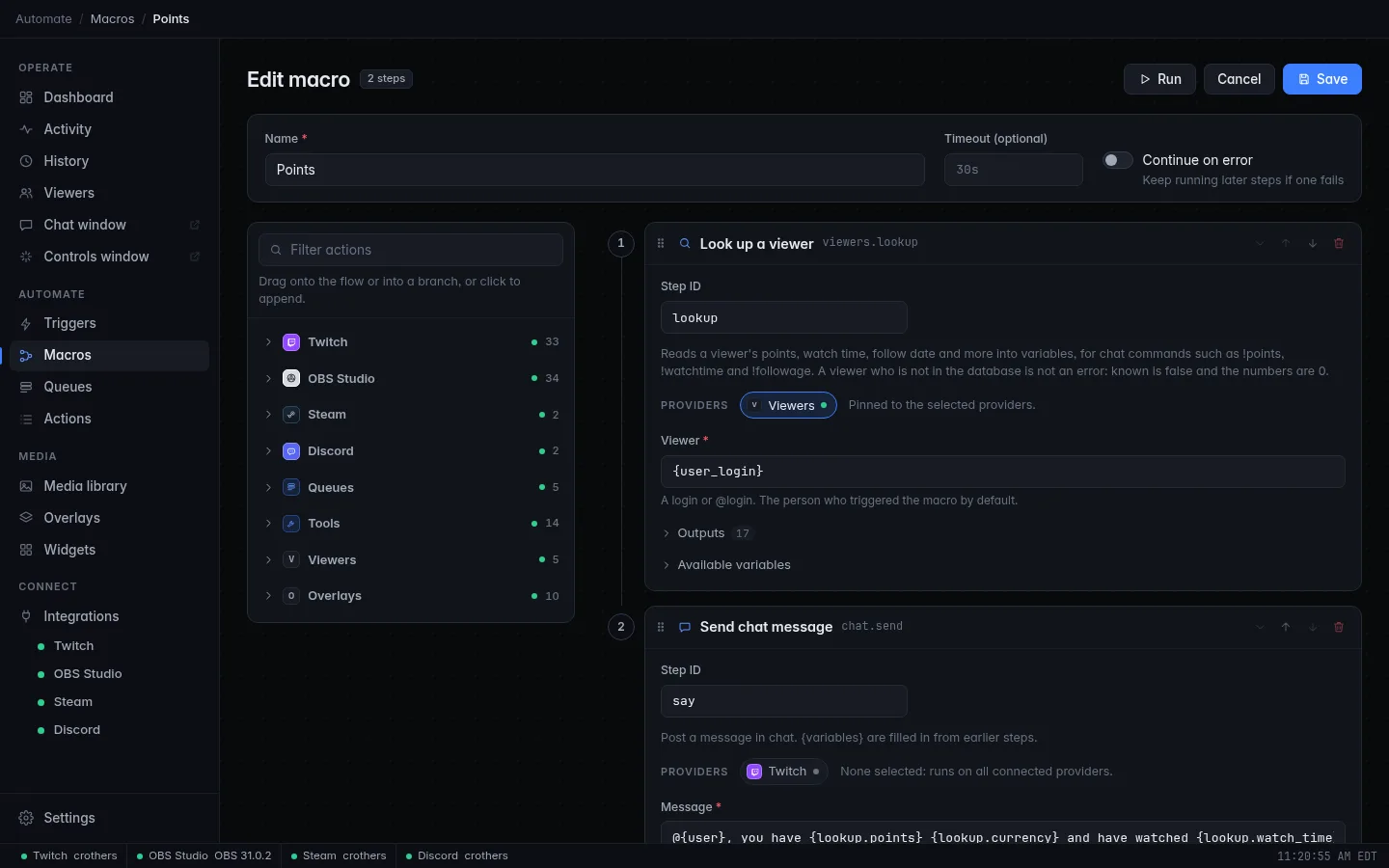
look up, click Look up a viewer, and set its Step ID tolookup. Viewer already says{user_login}: the person who typed the command. -
Add a Send chat message step:
The
{lookup.…}variables come from the Look up a viewer step: the balance, your name for points, and the watch time. -
Make a trigger called
Points commandon Chat command!points, with a User cooldown of10s, running Points.
Step 3: A !top command
- Make a macro called
Top. - Add a Top viewers step with the Step ID
top. Leave Ranked by on points and How many on5. -
Add a Send chat message step:
{top.list}is the ranking on one line, such as1. NightOwl_TV (1250) · 2. PixelPanda (980). Change the look with Row format and Between rows. -
Make a trigger called
Top commandon Chat command!top, with a Cooldown of30s, running Top.
Step 4: A leaderboard on stream
- Open Overlays and pick an overlay you already have in OBS, or make one and add it as in Add an alerts overlay to OBS.
- Click Add and pick Leaderboard under Alerts & data.
- In the inspector, set Ranked by to Points, Period to All
time, How many to
5and Title toTop coins. Leave Show the numbers on. - Drag it where you want it on the canvas.
Check it works
- Chat once from your own account so CroStream has a record of you. Then
open Viewers, click your name, and in the Adjust coins box (it is
named after your points) choose Add, type
100and click Add. - Click Test on the
Points commandtrigger. Chat shows your balance. - Click Test on
Top command. You lead the list, and the leaderboard on your overlay shows you too. - To check the timer without waiting, set Every to
1mwhile you are live, then put it back. Each viewer's Ledger tab lists every change with its reason.
Testing never changes balances
Testing a macro does not change anyone's points, so a Test of
Pay viewers pays nobody. Add points by hand, or wait for the real
timer, to see numbers move.
Troubleshooting
| What you see | What to do |
|---|---|
!points says 0 for everyone |
Nobody has earned yet. The timer only pays while you are live, every 10 minutes. |
| Watch time stays at zero | CroStream needs Twitch's permission to see who is in your chat. If the Twitch page or a login warning asks you to log in again, do it. |
| A viewer isn't paid | Bots and ignored logins are skipped. Check More → Settings → Ignored viewers on the Viewers page. |
!top is empty |
Nobody has points yet, or every viewer is ignored. |
Next steps
- Let viewers spend points: check the balance with an If on the Look up a viewer result, then use Change points set to subtract. Add logic to a macro shows the If step; Viewers has ready-made recipes.
- Move points over from StreamElements or Streamlabs with More → Import… on the Viewers page.
- Points can't be rebuilt if lost. Back them up: Back up and move your setup.