Hotkeys
A hotkey is a key combination, such as Ctrl+Shift+F9, that runs a macro when you press it, anywhere on the computer CroStream runs on: in a game, in OBS, with CroStream minimised. Use hotkeys for things you want under your hand while live: clip the last moment, switch to your Be right back scene, mute your mic, fire a sound, or clear a screen flash in a hurry.
A hotkey is simply a trigger whose event is Hotkey, so everything about triggers (macros, cooldowns, Test) applies.
Set up a hotkey
- On the Triggers page, click New trigger and give it a Name, such as Clip hotkey.
- Under When, set Event to Hotkey (under Hotkeys).
- Click the Keys box. It says Press the combination….
- Press the combination, for example Ctrl+Shift+F9. The box shows it as keys.
- Under Then run, pick the Macro, and click Save.
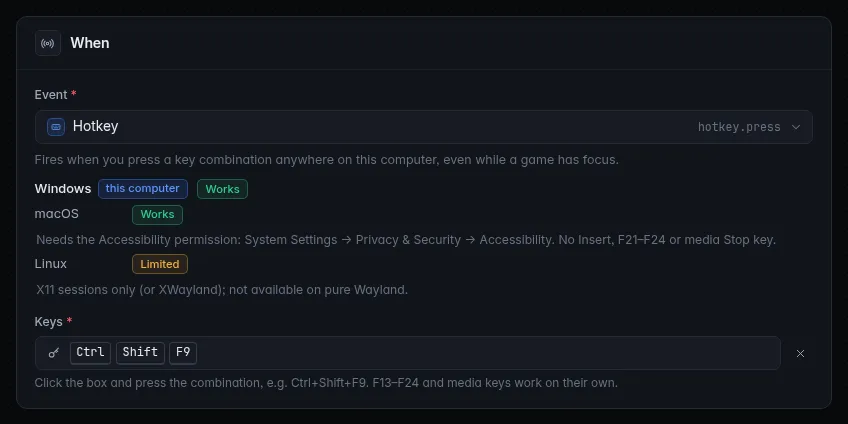
While the box is listening, Esc cancels and Backspace clears it. The × next to a combination clears it too. Press it once you've saved: the macro runs, wherever your focus is.
The macro gets one variable, {keys}: the combination pressed, such as
Ctrl+Shift+F9.
Which combinations work
- A combination is up to four modifiers, Ctrl, Alt, Shift and Super (the Windows key; Cmd on a Mac), plus one key: a letter, a digit, F1 to F24, the number pad digits, the arrows, Space, Enter, Tab, Esc, Backspace, Ins, Del, Home, End, Page Up, Page Down, or a media key.
- Every combination needs a modifier, except F13 to F24 and the media keys (play/pause, next, previous, stop). That way a hotkey can't steal a key you type or play with.
- Holding the keys fires once. Your keyboard's key repeat is ignored; release and press again to fire again.
- On a Mac, CroStream shows Alt as Option and Super as Cmd.
Keys nothing else uses
F13 to F24 exist on many macro keypads and stream controllers, and nothing else listens to them, which makes them perfect hotkeys. Set the device's button to send, say, F15, then press that button while the Keys box is listening.
Your operating system
Hotkeys work everywhere, with no setup.
macOS needs your permission before an app can see keys pressed in other apps:
- Open System Settings → Privacy & Security → Accessibility.
- Turn on CroStream (click + and add it if it isn't listed).
- Back in CroStream, save any trigger, or restart CroStream, so it registers your hotkeys again.
Until you do, hotkey triggers show a warning that the combination couldn't be registered. Macs have no Ins key, no F21 to F24 and no media Stop key, so combinations using them can't be registered.
Hotkeys work on desktops that use X11, and through XWayland. On a pure Wayland session, or a computer with no desktop (such as a browser mode setup), there are no global hotkeys: the Hotkey event is marked unavailable and its triggers show why.
The trigger editor shows these differences under the Event list, with your own system first.
When a hotkey can't be registered
CroStream registers exactly the combinations your enabled triggers use, and updates them as you save. If one can't be registered (usually because another program, such as OBS or Discord, already owns it):
- the trigger shows a yellow warning on the Triggers page and in its editor, saying it may be in use by another program;
- Integrations → Hotkeys shows could not register followed by the combination. When all is well it shows how many hotkeys are registered.
Pick a different combination, or remove it from the other program. Saving any trigger tries again.
Two of your own triggers can share a combination: both fire, each running its own macro. Disabling or deleting a hotkey trigger releases its combination for other programs.
Ideas
| Hotkey | Macro |
|---|---|
| Ctrl+Shift+F9 | Clip and post the link in chat. |
| F13 | Switch scene to Be right back and Mute or unmute an OBS audio source (your mic). |
| F14 | Pause queue for your sound alerts, while you talk to chat. |
| Ctrl+Alt+X | Clear the screen flash, as a panic button. |
| F15 | Marker with the description Highlight, to find it in the VOD later. |
Troubleshooting
Nothing happens when I press it
- Is the trigger Enabled, and is there a warning under it?
- On a Mac, check the Accessibility permission (above) and restart CroStream.
- Check Activity: if the trigger fired but the macro failed, it says why.
- Try it with Test on the trigger: if the macro works from there, the problem is the key combination, not the macro.
The Keys box won't accept my combination
It needs a modifier, unless it's F13 to F24 or a media key. The box says so under it.
The hotkey works, but now another program's shortcut doesn't
CroStream took the combination first. Pick another one for either program.
Related
- Triggers: cooldowns, Test, and more.
- Hotkey macros: a step-by-step tutorial.
- Screen flash: a jump-scare effect with a panic button.