Run redemptions one at a time
When ten viewers redeem the same reward in the same second, ten sounds play on top of each other and nobody enjoys any of them. A queue fixes that: it holds redemptions in a line and lets them out one at a time, at a pace you choose. This tutorial builds a "Sounds" queue that releases one song request a minute and announces each in chat as it comes up.
What you'll build
flowchart LR
    R[Redemption] --> M1[Macro: Add to queue]
    M1 --> Q[(Sounds queue)]
    Q -- one a minute --> T[Trigger: Queue release]
T --> M2[Macro: handle one item]- A Sounds queue that holds up to 50 items and releases one a minute.
- A trigger and macro that put each redemption into the queue.
- A trigger and macro that handle each item as it comes out, here by posting it in chat.
CroStream Up next: lofi rain from @NightOwl_TV (waited 1m 20s).
Time: about 15 minutes. Level: intermediate.
Before you start
- A channel point reward that asks the viewer for text, such as a "Sound request" reward. Your channel must be Affiliate or Partner. To make one in CroStream, see step 1 of Switch scenes with a channel point reward and switch on Viewer must type a message.
- You know triggers and macros, from Your first chat command.
Step 1: Create the queue
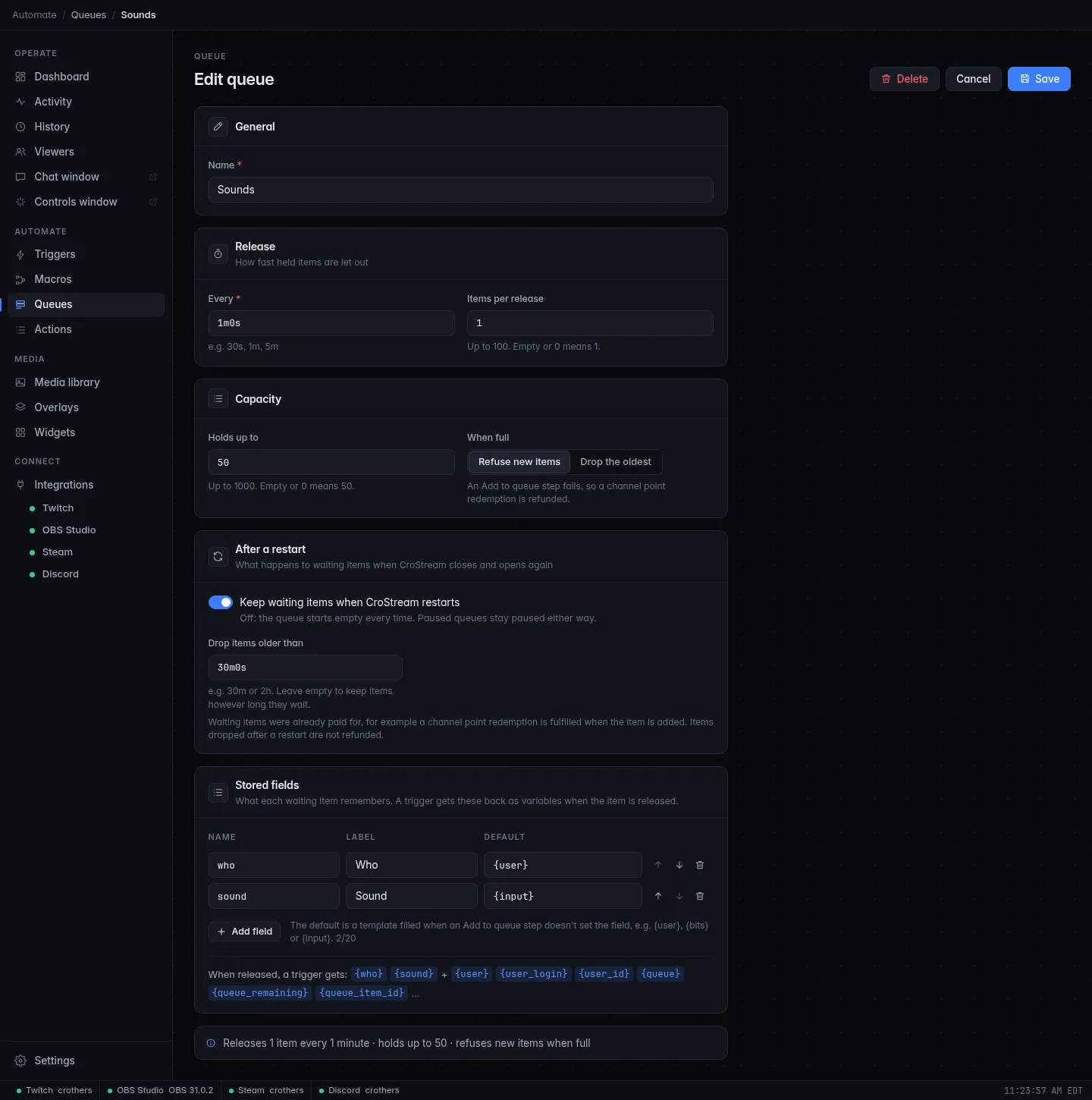
- In the sidebar, under Automate, click Queues, then New queue.
- Under General, set Name to
Sounds. - Under Release, set Every to
1mand Items per release to1. - Under Capacity, set Holds up to to
50and When full to Refuse new items. A full queue then makes the Add to queue step fail, so the viewer's points are refunded. - Under Stored fields, click Sound alert example. It fills in what
each waiting item remembers: who =
{user}, amount ={bits}and sound ={input}. Remove the amount row with its bin button, because redemptions have no bits. - Leave After a restart as it is: waiting items survive a restart of CroStream, and ones older than 30 minutes are dropped.
- Click Save.
Step 2: Put redemptions into the queue
- Click Macros, then New macro. Set Name to
Queue a sound. - Filter for
queue, click Add to queue, and pick Sounds as the Queue. It shows one box per stored field. Leave them empty to use each field's default ({user}and{input}). - Click Save.
- Click Triggers, then New trigger. Set Name to
Sound request redeemed. - Pick Channel point redemption as the Event, choose your reward in Reward, pick the Queue a sound macro, and click Save.
Points are paid when the item joins the queue
The redemption is fulfilled as soon as the item is added. If the queue later drops it, for example because it waited too long across a restart, the viewer is not refunded.
Step 3: Handle each released item
-
Make a macro called
Play next soundwith one Send chat message step:{who}and{sound}are the values you stored for that item, and{waited}is how long it sat in the queue. The trigger editor's Variables from this event panel lists them all. -
Make a trigger called
Sounds released. Pick Queue release as the Event, choose Sounds as the Queue, and run Play next sound.
Swap the chat message for whatever the reward should really do: play a sound, switch a scene, show an alert. The queue only spaces the work out.
Check it works
- Open the
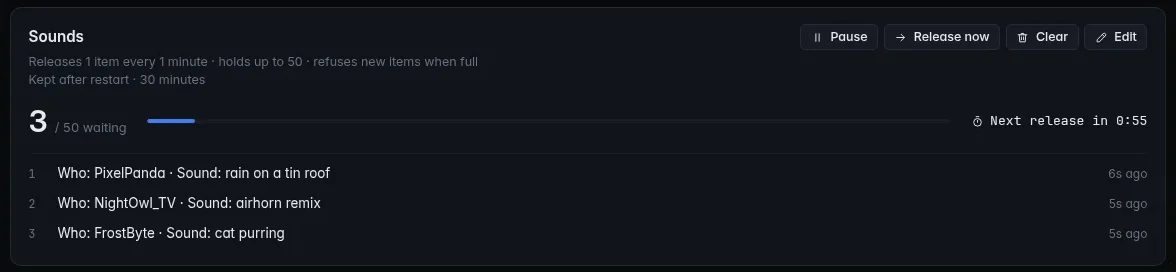
Sound request redeemedtrigger and click Test three times in a row. - Open Queues. The Sounds card shows the waiting items, the values they stored, and when the next release is due.
- The first item comes out at once, and chat shows "Up next: test input from …". The others follow a minute apart.
- Try the buttons on the card: Release now lets the next item out without waiting, Pause holds the queue, Resume carries on, and Clear throws away everything waiting (after you confirm).
Troubleshooting
| What you see | What to do |
|---|---|
| Nothing comes out of the queue | Check it isn't Paused on the Queues page, and that the Sounds released trigger is Enabled and set to the Sounds queue. |
Chat shows {sound} as written |
The stored field is not called sound, or the release trigger is on a different queue. |
| Redemptions are refunded | The queue is full and set to Refuse new items. Raise Holds up to, or choose Drop the oldest. |
| Items vanished after a restart | They waited longer than Drop items older than. Raise it or leave it empty. |
Next steps
- How queues behave in every situation: Queues.
- Queue sub and cheer alerts too. Alerts on one overlay already wait for each other; see Add an alerts overlay to OBS.
- Branch on how many items are waiting with the queue's live values in an If step: Add logic to a macro.