Run a macro from a hotkey
Stepping away mid-stream usually means three things at once: switch to your BRB scene, mute the mic, tell chat. In this tutorial you put all three on one key combination. The hotkey is global: it works anywhere on the computer, even while a game has the focus, so you never have to alt-tab.
What you'll build
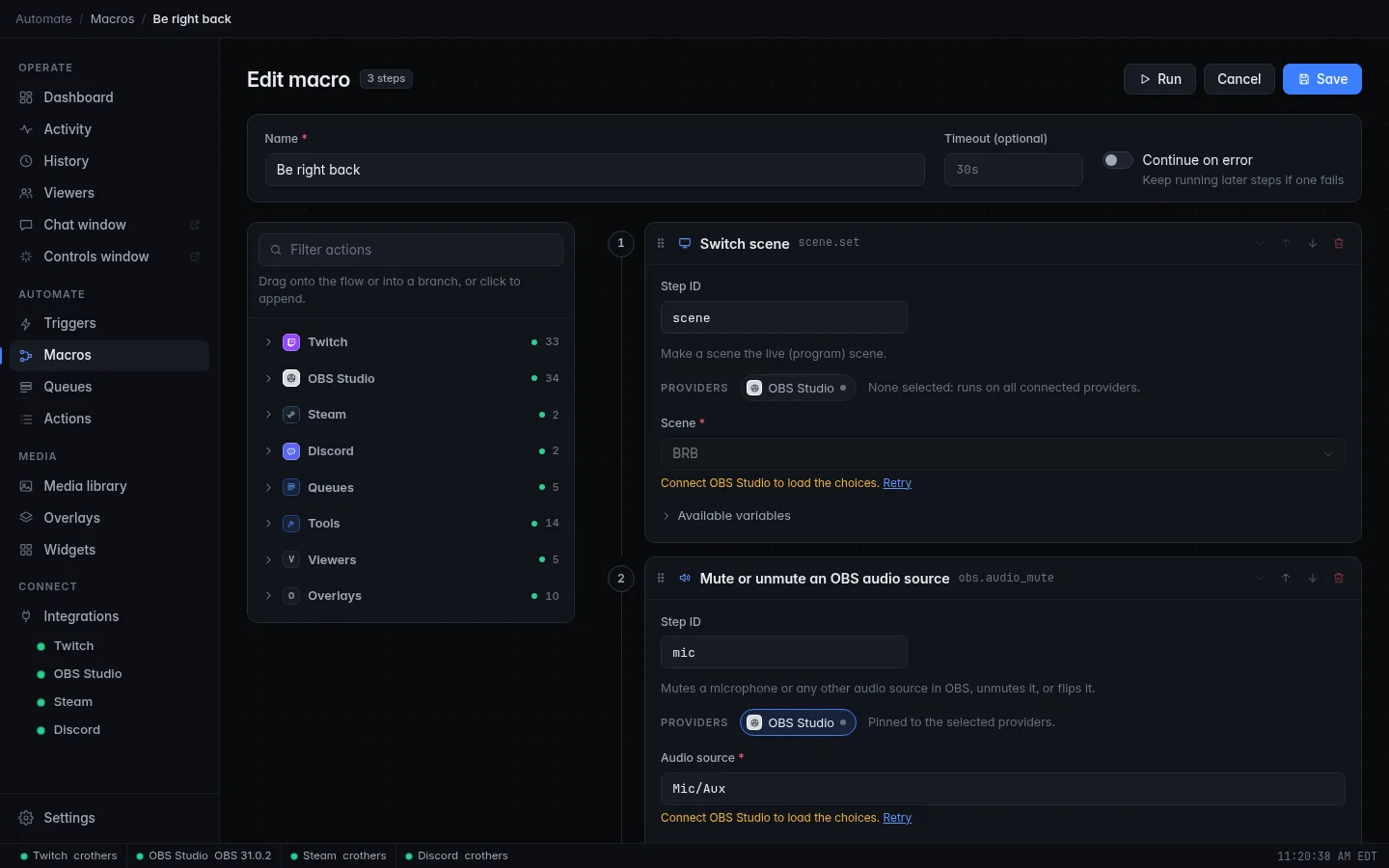
- A Be right back macro that switches OBS to your BRB scene, mutes your microphone and posts a message in chat.
- A Welcome back macro that does the reverse.
- Two hotkey triggers: Ctrl+Shift+F7 to go, Ctrl+Shift+F8 to come back.
CroStream Be right back, chat! Grab a drink.
Time: about 10 minutes. Level: beginner.
Before you start
- CroStream runs on the computer where you press the keys, and is connected to OBS. See Connect OBS.
- OBS has a scene called BRB (or use your own name), and you know the name of your microphone source in OBS.
-
Your system supports global hotkeys:
Works out of the box.
CroStream needs the Accessibility permission: System Settings → Privacy & Security → Accessibility, then switch on CroStream. Insert, F21 to F24 and the media Stop key can't be used.
Works in X11 sessions (and apps under XWayland). Not available on a pure Wayland session.
See Hotkeys for the details.
Step 1: Build the "be right back" macro
- In the sidebar, click Macros, then New macro. Set Name to
Be right back. - Filter the palette for
scene, click Switch scene, and set Scene toBRB. - Filter for
muteand click Mute or unmute an OBS audio source. Pick your microphone in Audio source and set Audio to mute. - Filter for
chat, click Send chat message, and set Message toBe right back, chat! Grab a drink. - Click Save.
Step 2: Add the hotkey trigger
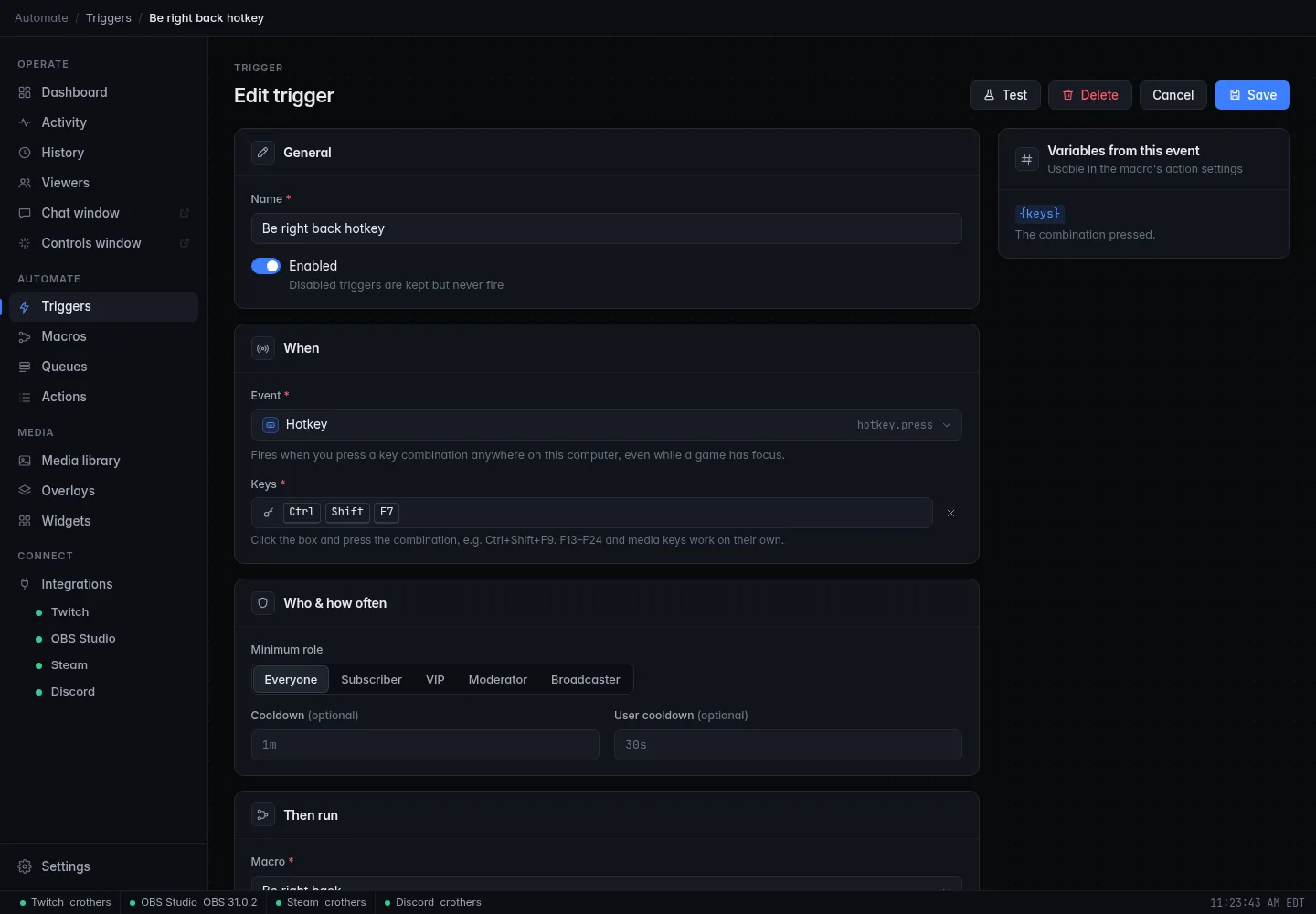
- Click Triggers, then New trigger. Set Name to
Be right back hotkey. - Under When, pick Hotkey as the Event.
- Click the Keys box and press Ctrl+Shift+F7. CroStream records the combination as you press it; there is nothing to type.
- Under Then run, pick Be right back, then click Save.
Choosing a combination
Every combination needs a modifier (Ctrl, Alt, Shift or Super) plus one key. The exceptions are F13 to F24 and media keys, which work on their own. That rule stops a trigger from eating a key you type with. If you own a Stream Deck or a macro keypad, map its buttons to F13 to F24 and give each one a trigger.
Step 3: Make the way back
A hotkey runs one macro, so build the return trip as a second pair:
- Make a macro called
Welcome backwith Switch scene set to your normal scene and Mute or unmute an OBS audio source set to unmute. Add a chat message such asI'm back!if you like. - Make a trigger called
Welcome back hotkeyon Hotkey Ctrl+Shift+F8 that runs Welcome back.
One key for both?
Audio also has a toggle choice that flips the mute each time. It is handy for a plain mute key, but for BRB two separate keys are safer: you always know which way you are going.
Check it works
- On the
Be right back hotkeytrigger, click Test. OBS switches to BRB, the mic mutes, and chat gets the message. - Click into another window, such as a game or a text editor, and press Ctrl+Shift+F7. The same happens. Holding the keys down fires the trigger only once.
- Press Ctrl+Shift+F8 to come back.
- Open History to see each run and every step it took.
Troubleshooting
| What you see | What to do |
|---|---|
| The trigger shows a warning that the combination "could not be registered" | Another program already owns that combination. Pick a different one. |
| Hotkey is greyed out and marked Unavailable in the Event list | Your system can't do global hotkeys, for example a Linux desktop on pure Wayland. Log in to an X11 session instead. |
| On a Mac, the trigger shows a warning about the Accessibility permission | Grant it in System Settings → Privacy & Security → Accessibility. |
| Test works but the keys do nothing | Make sure the trigger is Enabled and look for a warning on the trigger. Try a different combination. |
| The mic doesn't mute | Pick the microphone from the Audio source list so the name matches OBS exactly. |
Next steps
- Put Clear the screen flash on a hotkey as a panic button for screen flashes: A channel point jump scare.
- Pin the Be right back macro to the Dashboard and the Controls window, for a one-click button too: Chat and controls on a second screen.
- Make the macro smarter, such as only posting when you are live: Add logic to a macro.
- Everything about hotkeys: Hotkeys.