Crash reporting
When something goes wrong inside CroStream, the developer can only fix it if they know about it. Crash reporting sends them the error, so a bug you hit gets found without you writing it up. It is off in released versions until you turn it on, you decide how much to share, and anything private is removed on your computer before it leaves. Everything about it is in Settings → Crash reporting.
Is it on for me?
| You run | Crash reporting |
|---|---|
| A released version (installed from the download page) | Off. Nothing is sent until you turn on Send crash reports and logs to the developer. |
| A development build (a test build, or one you built yourself) | Always on, and it can't be turned off from the app. See Development builds. |
Not sure which you have? Open Settings → Updates: a development build has a Development build tag next to its version.
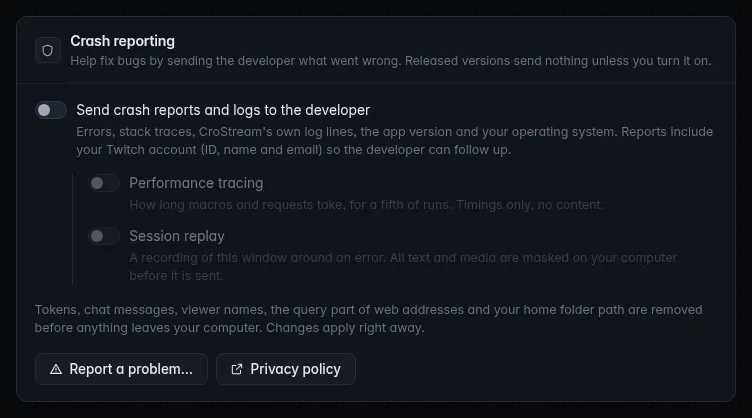
Turn it on
- Open Settings and scroll to Crash reporting, below Updates.
- Switch on Send crash reports and logs to the developer.
That's all. It applies at once, with no restart, and the panel then says who reports are sent as, for example Reports are sent as crothers (crothers@example.com).
To stop, switch it off again. Nothing more is sent from that moment.
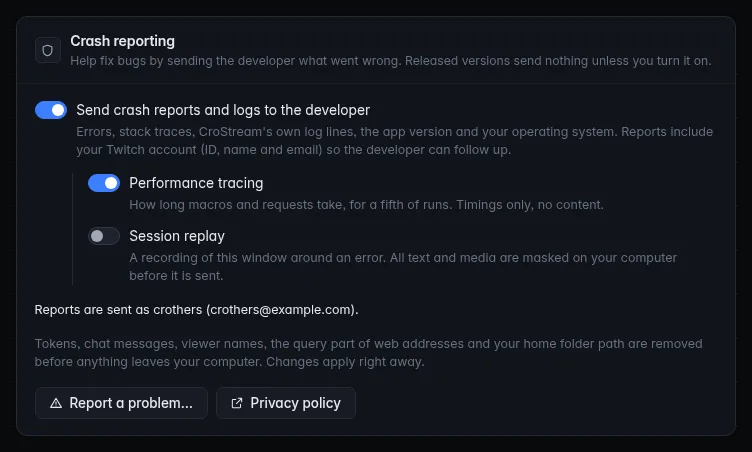
The options
| Option | What it does | Default |
|---|---|---|
| Send crash reports and logs to the developer | The main switch. Sends errors and crashes with their stack traces, CroStream's own log lines, the app version and your operating system, plus your Twitch account. | Off in a released version; always on in a development build. |
| Performance tracing | Timings: how long macros and requests take, for about one run in five. Timings only, no content. | Off |
| Session replay | A recording of the CroStream window around an error, with all text, inputs and media masked on your computer before it is sent. No console messages and no network detail are recorded. | Off |
| Report a problem… | Opens a box to describe a problem yourself. See Report a problem. | |
| Privacy policy | Opens the privacy policy. |
Performance tracing and Session replay only work while the main switch is on. With it off they are greyed out, and turning the main switch off stops them too. Both are off by default, in development builds as well.
The service behind all this is Sentry. The reference page lists each of its features CroStream uses and every removal rule in detail.
What is sent
| Sent | Details |
|---|---|
| Errors and crashes | The error, and the stack trace: where in CroStream's own code it happened. |
| CroStream's log lines | The messages CroStream writes about what it is doing. Errors go as reports; ordinary progress messages as logs. |
| Recent activity | The last 100 log lines and the types of recent events (for example "follow" or "raid"), as a trail leading up to the error. Never what the events said. |
| The app and your computer | The CroStream version, its channel (Stable or Beta), and your operating system. |
| Your Twitch account | The account you are logged in as, so the developer can follow up with you. |
| Timings | Only with Performance tracing: how long some macro runs and requests take. |
| A recording | Only with Session replay, and only around an error. |
To avoid flooding, CroStream sends the same error once a minute at most, and holds back bursts of errors.
What is never sent
Before anything leaves your computer, CroStream removes:
| Removed | How it looks |
|---|---|
| Logins, tokens and passwords: Twitch and OBS logins, bearer and OAuth tokens, keys, secrets and passwords, and long random-looking codes | [redacted] |
| Chat messages and viewer names: nothing from your chat or your viewer database | dropped |
Email addresses and IP addresses found inside error text (your own address on your own computer, such as 127.0.0.1, is left) |
[redacted], [ip] |
The query part of web addresses: everything after the ?. Discord webhook addresses lose their secret part |
?[redacted] |
| Your home folder and user name in file paths | ~, [user] |
| Your computer's name | replaced by crostream |
The only personal details that are sent are the Twitch account described next, on purpose. The same removal applies to the CroStream window's reports and to its recordings (which are masked, see above).
Everything goes through CroStream
The CroStream window never talks to the reporting service itself. It hands its reports to the CroStream app, which cleans and sends them. That is why one switch controls everything, and why turning reporting off stops all of it at once.
Your Twitch account
Reports are sent as the Twitch account you are logged in as: its ID, login, display name and email. This is so the developer can tell reports apart and get back to you about a bug you hit. If you aren't logged in to Twitch, reports are sent without a name.
The email is new. To read it CroStream asks Twitch for one more permission, user:read:email, so Twitch's login page now also asks to read your account's email address. CroStream treats it as optional:
- Until your next Twitch login, reports carry your ID, login and name without the email. You are not asked to log in again, and nothing in CroStream stops working.
- If you already opted in, the email starts being included after the next time you log in, whenever that is.
- It is used for crash reports only. See Twitch permissions.
The panel always shows what is being used: Reports are sent as name (email).
Report a problem
Report a problem… lets you tell the developer what happened, in your own words, with the technical detail attached.
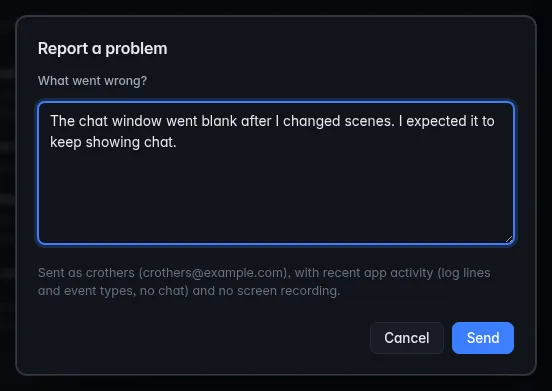
Where to find it:
- Settings → Crash reporting → Report a problem…, in the desktop app and in browser mode.
- Report a problem… in the tray icon's menu, on every system (the menu bar icon on macOS).
- Help → Report a problem… in the menu bar on macOS.
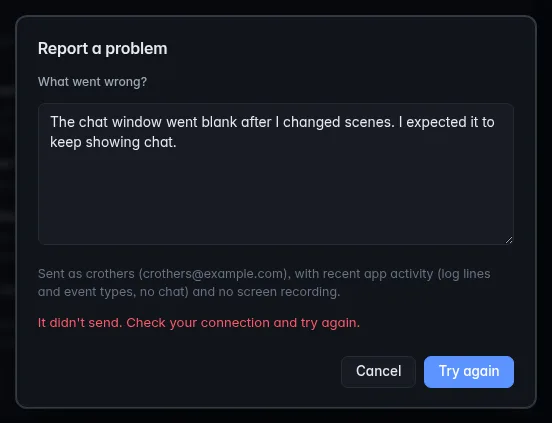
Describe what you were doing, what you expected and what happened instead, then click Send. The box only says Sent. Thank you, the developer will see it. once the report has really arrived. Otherwise it tells you why, and Send becomes Try again:
| The box says | Meaning |
|---|---|
| It didn't send. Check your connection and try again. | The report couldn't reach the service, or got no answer within 15 seconds. |
| Too many reports right now. Try again later. | Too many reports were sent in a short time. Wait a minute, then try again. |
| Crash reporting is off, so nothing was sent. Turn it on in Settings. | Reporting was switched off while the box was open. |
The text is required: Send stays greyed out until you write something.
The box tells you exactly what goes with your text: who it is sent as, the recent activity (log lines and event types, no chat), and either a recording of this window with all text masked (if Session replay is on) or no screen recording. The wording of your message is kept as you wrote it, apart from the removal of tokens and web address queries.
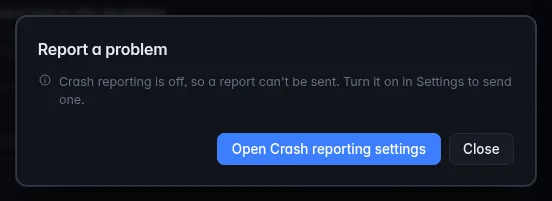
It needs crash reporting on
A report can't be sent while crash reporting is off. The box says Crash reporting is off, so a report can't be sent. Turn it on in Settings to send one. and has an Open Crash reporting settings button that takes you to the switch. Switch it on, then send.
Development builds
A development build is any build that isn't a published release: a
test build the developer hands out, or one you made yourself from the
source. Its version looks like 1.5.0-dev.3, and Settings → Updates
marks it with a Development build tag.
Development builds always report. In the panel the main switch shows on and greyed out, with Development build: crash reporting is always on. above it. This is deliberate: test builds exist to find problems before a release, and reports are how the developer finds them. A released version never does this; only you can turn reporting on there.
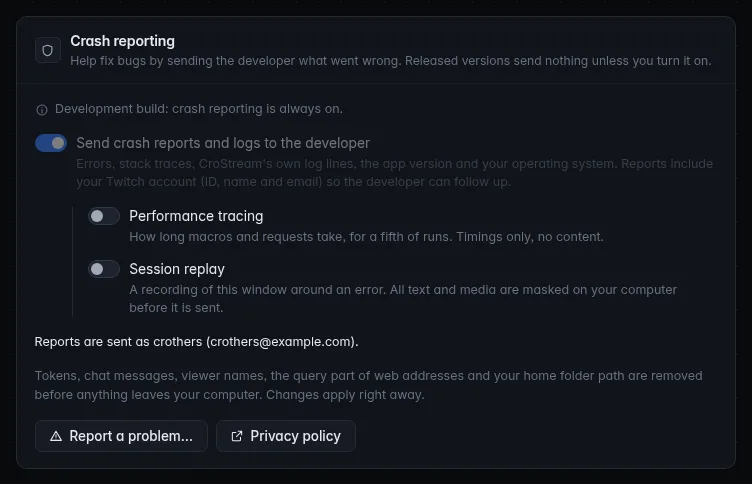
Performance tracing and Session replay stay off in a development build until you switch them on. Updates work differently too: see Development builds in Updates. To leave reporting behind, install a released version.
People who run CroStream in automated tests can turn reporting off for such runs with an environment variable. See Command line.
If CroStream hits an error
CroStream is built so one failing part doesn't take the rest down. If a part of the app fails, it is written to the log, reported (when reporting is on), and that part starts again by itself, instead of the whole app closing. You may see nothing, or a feature that briefly stops and comes back.
This isn't absolute. A failure deep inside the audio, hotkey or window libraries that CroStream relies on, or in the app's very core, can still close it. If CroStream closes unexpectedly, start it again and, with reporting on, consider using Report a problem to say what you were doing.
Troubleshooting
| Problem | What to do |
|---|---|
| The main switch is locked on and I can't turn it off | This is a development build. Reporting is always on there. Install a released version to get the choice back. |
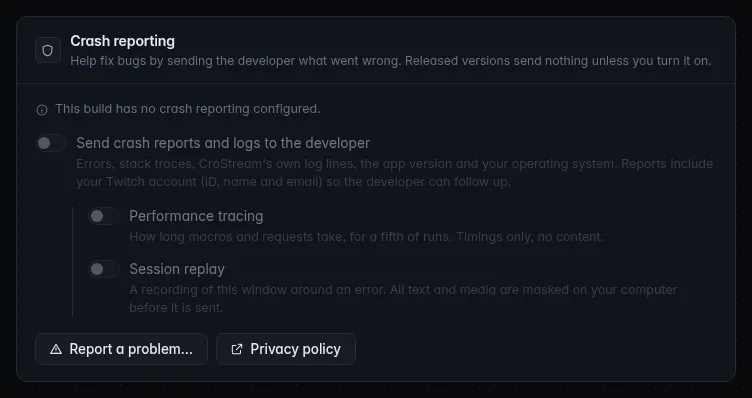
| The panel says This build has no crash reporting configured. | This build can't send reports at all, so there is nothing to turn on. Reports and the Report a problem box are unavailable. |
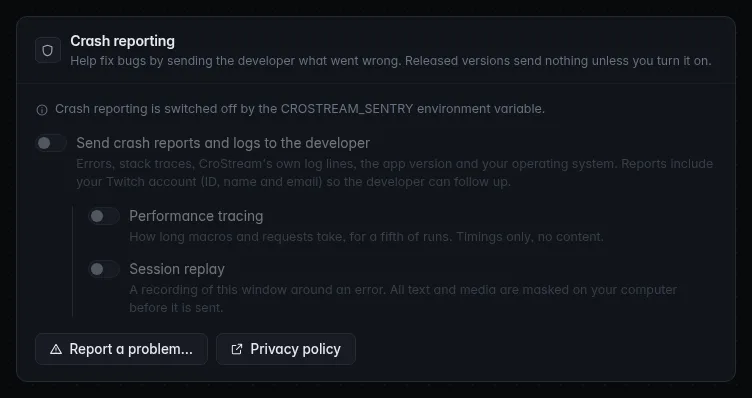
| It says Crash reporting is switched off by the CROSTREAM_SENTRY environment variable. | Whoever started CroStream set CROSTREAM_SENTRY=off. Remove it from the environment and restart CroStream. Until then the switches do nothing. |
| The panel says Crash reporting isn't available here. | CroStream couldn't read its crash reporting state, for example when the app is an older version without crash reporting. Update CroStream. |
| Performance tracing and Session replay are greyed out | They need the main switch on. Switch Send crash reports and logs to the developer on first. |
| Reports are sent as doesn't show my email | The email arrives after your next Twitch login. Use Log in again whenever it suits you. |
| It didn't send. Check your connection and try again. | The report couldn't reach the service. Check your internet connection and click Try again. |
| Too many reports right now. Try again later. | CroStream limits how many reports go out in a short time. Wait a minute and click Try again. |
| I turned it off but see a report was sent earlier | Reports already sent stay with the developer. To have one removed, email contact@crostream.io. See the privacy policy. |
What the three unusual states look like. In a development build the main switch is locked on, as shown above. In a build with no crash reporting, and when the environment variable is set, everything is greyed out and the panel says why:
If Report a problem… can't reach the service, the box keeps your text and shows Try again:
Related
- Settings
- Updates
- Sentry reference: the service behind it, every feature used, and every scrubbing rule
- Privacy policy
- Twitch permissions
- Troubleshooting